Technology in a collaborative environment
| Site: | Loomen za stručna usavršavanja |
| Course: | Pedagogy in a Digital Environment |
| Book: | Technology in a collaborative environment |
| Printed by: | Gost (anonimni korisnik) |
| Date: | Saturday, 24 October 2026, 10:43 PM |
Description
In this activity, topics related to digital technologies that can be used in a collaborative environment will be explained.
1. Introduction
Digital technology in ensuring collaborative learning
The introduction of digital technologies in higher education has opened up a wide range of opportunities for the development of collaborative and interactive learning, especially in the context of e-learning, blended, and hybrid teaching models. Such models combine the best elements of synchronous and asynchronous activities, allowing students flexibility in participation, while maintaining a sense of community and direct exchange of ideas. In synchronous forms of work, such as videoconference discussions or virtual classrooms, the emphasis is on direct dialogue and joint problem-solving. Asynchronous activities, such as forums, collaborative documents, or digital whiteboards, provide space for more thoughtful contributions and more even involvement of students who might not otherwise participate in real time.
Online collaboration platforms play a key role in enabling such a collaborative process, enabling easy sharing of resources and progress tracking while fostering the building of shared knowledge. These platforms integrate communication channels, tools for collaborative content editing, and evaluation functionalities, creating an environment in which students can feel equally engaged regardless of physical distance.
In such an environment, the teacher’s role is transformed from that of a lecturer to that of a facilitator, meaning that his or her responsibility is not only to shape activities but also to moderate discussions, encourage engagement, and ensure that all participants have the opportunity to contribute. Best practices include clearly defined roles in teamwork, setting communication rules, and using rubrics and criteria that facilitate collaboration and prevent unequal distribution of tasks. The teacher should also actively monitor group dynamics, intervene when misunderstandings arise, and encourage the inclusion of quieter or less confident students.
In this way, digital technology is not seen simply as a technical tool, but as a pedagogical tool that shapes a culture of collaboration. When synchronous and asynchronous activities are thoughtfully combined, supported by reliable online platforms and quality teacher moderation, the digital environment becomes a space in which students actively participate, develop teamwork and communication skills, and build a shared understanding of complex concepts and problems.
2. Learning management systems
One of the fundamental tools in digital education is the LMS (Learning Management System), such as Moodle LMS or Canvas, which enables structured management of teaching content, communication, and evaluation and monitoring of student activities. Using an LMS provides teachers with the ability to systematically organize teaching units, clearly highlight learning outcomes, and make materials available in different formats, while offering students a central place to access all relevant content and assignments. This reduces information fragmentation and ensures transparency in the learning process.
Moodle LMS offers a range of collaboration features, including tools such as forums, wikis, polls, dictionaries, and interactive H5P content. The forum enables ongoing discussion and reflection outside the classroom, the wiki encourages collaborative writing and editing, and the dictionary enables collaborative work on terminology resources, research, and discovery of new terms. The poll activity is used for quick group decisions or opinion gathering, while H5P content provides interactive tests, presentations, and multimedia tasks that encourage active participation.
These tools enable synchronous and asynchronous interaction between students and teachers, creating a flexible environment that can accommodate different learning styles and personal preferences. Synchronous formats, such as virtual meetings or real-time co-editing of documents, emphasize direct collaboration and the development of communication skills. Asynchronous activities, on the other hand, provide space for reflection, deeper exploration, and more even engagement from participants who may need more time to shape their contributions.
It is particularly important to emphasize that LMS systems generate digital traces of student activities that serve as a valuable source of data for teachers to monitor collaborative work and evaluate contributions. Activity tracking analytics and learning analytics provide insight into the dynamics of participation, the identification of potentially passive group members, and timely intervention in the learning process. In this way, the LMS is not used only as a technical platform, but becomes an integral part of a pedagogical strategy aimed at developing collaborative, reflective, and responsible learning in a digital environment.
3. Advantages and disadvantages of group work tools
Digital tools for group work are playing an increasingly important role in education, as they enable students to collaborate, communicate, and co-create content regardless of physical distance. However, their implementation also brings certain challenges, which is why it is important to consider both the advantages and disadvantages.
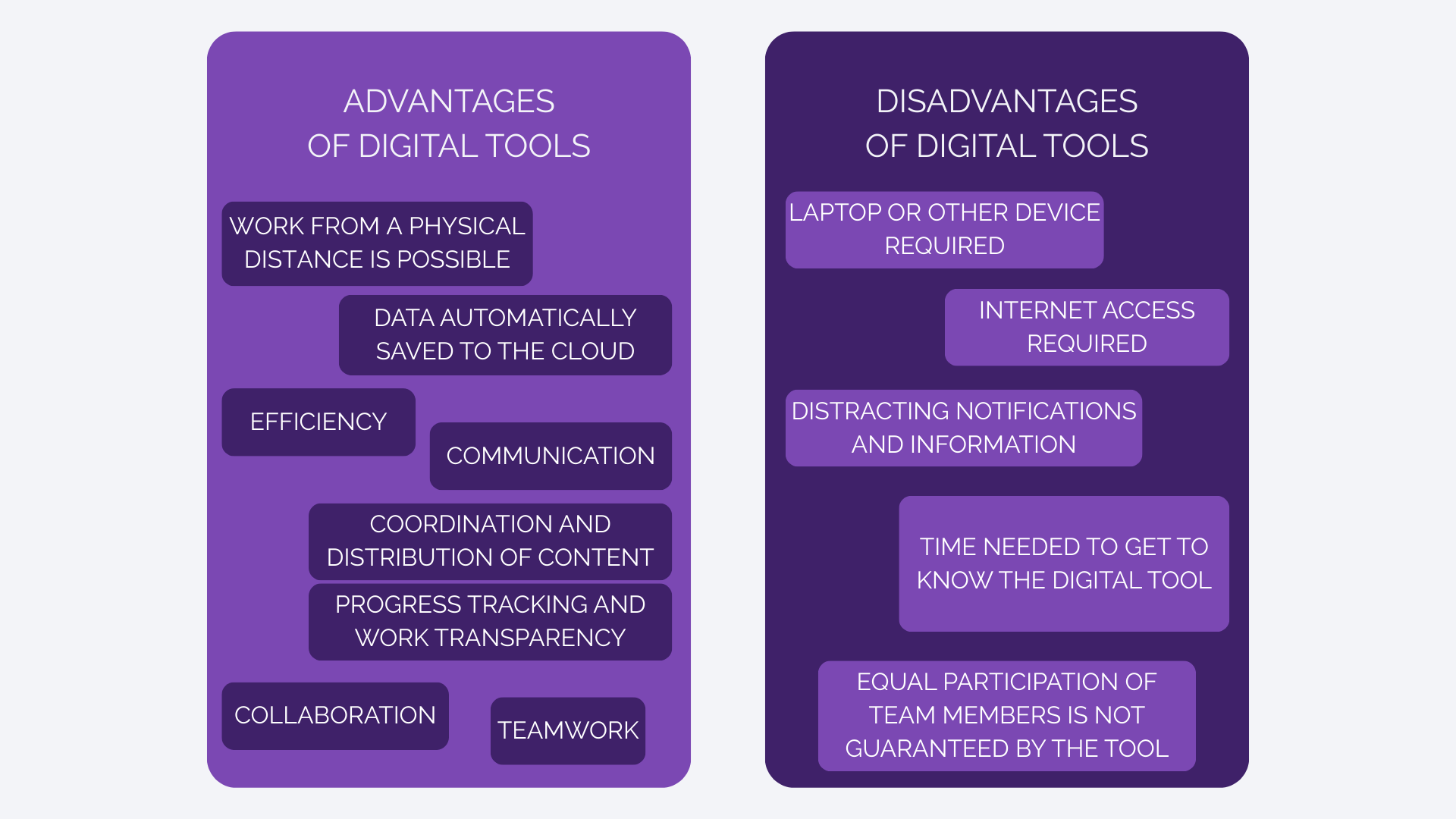
Group work tools can significantly enhance collaborative learning, but their real value depends on the context of application and the willingness of students to actively participate. Teachers have an important role in selecting appropriate tools and implementing rules that ensure a balance between technical capabilities and pedagogical goals.
4. Other digital tools
In addition to the functionality provided by the LMS itself, external digital tools that further enrich the educational environment are increasingly used in teaching practice. Thus, for example, tools for visual expression and presentation, such as Canva, Prezi, Genially, and Powtoon, can be used to create educational materials, presentations, and digital posters of high quality in terms of content and aesthetics. Tools such as Miro, Padlet, Google Workspace (Docs, Sheets, Slides), Microsoft Teams, and Slack enable structured collaboration on shared documents, managing group projects, sharing feedback, and coordinating work in real time or asynchronously.
Mentimeter and Socrativ tools are often used to encourage engagement and real-time assessment, allowing for anonymous student participation, reflection, voting, or formative assessment during class. Using these tools can further motivate students, especially those less inclined to verbal interaction, and create an inclusive learning environment.
6. Conclusion
The quality implementation of collaborative activities in the digital space requires clearly structured tasks, adequate technical and pedagogical support, and systematic moderation and guidance of students. In this sense, the role of the teacher includes designing instructions, monitoring progress, encouraging discussion and reflection, and evaluating student contributions. It is also crucial to develop students' digital literacy, not only in terms of technical skills, but also in the form of academic communication, ethical use of sources, and a collaborative culture.
Background Colour
Font Face
Font Size
Text Colour
Font Kerning
Image Visibility
Letter Spacing
Line Height
Link Highlight
Paragraph Width
Text Alignment