Integration of digital technologies into the educational process
| Site: | Loomen za stručna usavršavanja |
| Course: | Planning and Implementation of Online and Hybrid Teaching |
| Book: | Integration of digital technologies into the educational process |
| Printed by: | Gost (anonimni korisnik) |
| Date: | Saturday, 24 October 2026, 1:18 AM |
Description
In this activity, you will learn more about the integration of digital technologies in the educational process.
Table of contents
- 1. Introduction
- 2. The difference between online, blended and hybrid teaching
- 3. Choosing digital tools for working with learning outcomes
- 4. LMS for content management and communication
- 5. SAMR model
- 6. TPACK framework
- 7. Continuous education of teachers to raise and maintain the level of digital competences
- 8. OER contents
- 9. Universal Design for Learning (UDL)
- 10. Adapting classroom teaching materials to the online environment
1. Introduction
In modern education, there is an increasing emphasis on the need for meaningful and purposeful integration of digital technologies into the teaching process. However, mere knowledge of technology is not enough for its effective application. It is necessary to understand how technology can be connected to subject content and pedagogical approaches.
The integration of digital technologies into the educational process is becoming an increasingly important aspect of modern education. It does not only involve the use of computers or the Internet, but also the thoughtful inclusion of digital tools, resources, and methods to improve the quality of learning and teaching. Effective integration enables greater interactivity, accessibility, and personalisation of the educational experience, and provides teachers with new opportunities to differentiate teaching, monitor progress, and collaborate with students. At the heart of this process is the pedagogical purpose, and technology is a support for the achievement of educational goals, not an end. In this activity, you will learn about some of the ways in which digital technologies can be integrated into the educational process:
- selection of digital tools for working with learning outcomes
- using LMS for content management and communication
- application of SAMR and TPACK frameworks for planning technology integration levels
- continuous education of teachers to raise and maintain the level of digital competences
- creation and use of OER content
- ensuring accessibility and inclusivity with UDL
- adaptation of classroom teaching materials to the online environment
2. The difference between online, blended and hybrid teaching
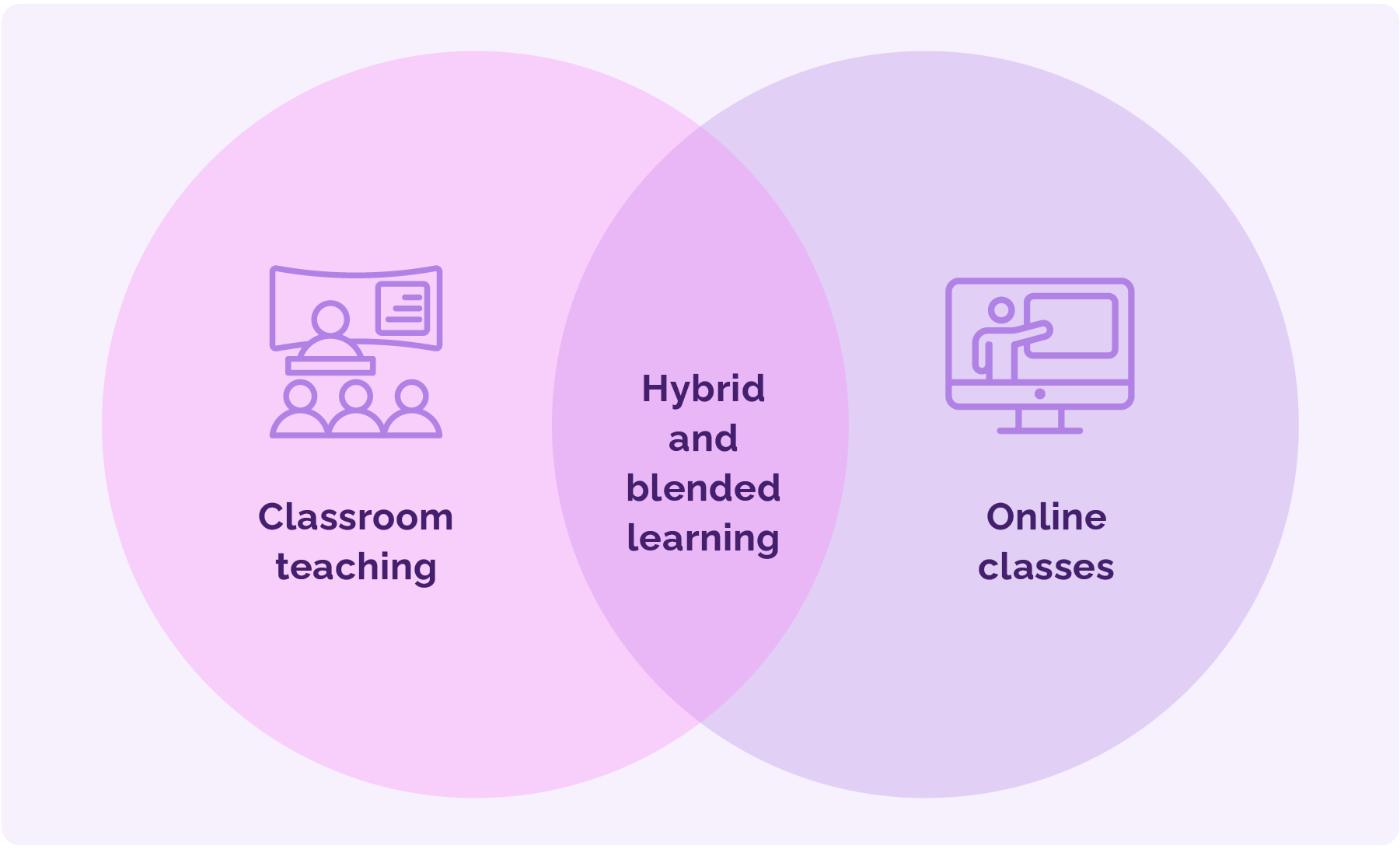
Online learning refers to an educational model that takes place entirely over the internet. In this approach, all teaching materials, activities, communication, and assessment are made available to students via digital platforms. Teaching can be synchronous when all participants join at the same time via video call, or asynchronous, when students access content at a time that suits them best. Effective online learning requires carefully designed digital resources, clear instructions, and support for students in distance learning.
Blended learning combines online activities and in-person learning, with the two components taking place separately and complementing each other. Part of the learning takes place via an online platform, where students access content, participate in forums, or complete assignments, while another part of the learning takes place live in the classroom through lectures, discussions, or exercises. It is crucial that both components are planned as part of a single learning design. For example, students can complete a survey online, view introductory content, and participate in a forum assignment, and then analyse the results together and continue working in groups in a learning meeting.
Hybrid teaching refers to teaching in which some students are present in the classroom, while others are engaged online at the same time. The teacher teaches both groups simultaneously, supported by technology that enables the transmission of images and sound and the use of digital materials. This approach allows for greater flexibility but requires careful planning and technical support to ensure that all students have an equal opportunity to participate.
Before the COVID-19 pandemic, the terms blended and hybrid learning were often used interchangeably without a clear distinction. Today, a more precise distinction is increasingly accepted, with blended learning referring to a combination of separate online and face-to-face activities, while hybrid learning refers to the simultaneous delivery of instruction in both physical and digital environments.
Distinguishing between these three models is important for quality teaching planning. Each model carries specific pedagogical and organisational requirements, and their success depends on good preparation, clarity in communication, and alignment with student needs.
3. Choosing digital tools for working with learning outcomes
In modern education, it is crucial that digital tools are tailored to work with defined learning outcomes. This means that every tool, activity, and resource must be designed to support the achievement of specific outcomes. In the alignment process, it is important to consider three levels:
- vertical alignment between outcomes at the level of the study programme and the outcomes of an individual course
- horizontal alignment between outcomes, teaching activities, and assessment
- compliance with student workload, i.e., that digital activities match the real time and effort required to achieve the outcome.
Such an approach allows the tools to be not only technical accessories, but designed elements of pedagogy that help the teacher to structure the course in a targeted way, and the student to understand what and how he learns. One of the tools that can help teachers plan their lessons and constructively align them with learning outcomes is Balanced Learning Design Planning (BDP).
Balanced Learning Design Planning (BDP) tool
The BDP tool is available free of charge as an online solution at the link and is an example of an innovative digital tool aimed at aligning with learning outcomes. Its key features are as follows:
- focus on learning outcomes: defining course outcomes with weighted values
- constructive alignment: linking outcomes, activities, and evaluations
- planning student workload: defining the duration of activities and total workload
- learning/design analytics dashboard: visualising the balance between goals, activities, and assessments
- automatic export to Moodle LMS: export of courses in structured Moodle format
- support for different pedagogical approaches: flexible planning for different teaching styles
- design collaboration and sharing: public sharing and teamwork in courses
- UI-assistant (experimental): help in course design using artificial intelligence
- free and accessible version: available to everyone at no charge
- wide international user base: used in more than 40 countries
The BDP tool helps align digital tools with learning outcomes by enabling transparent definition and linking outcomes with activities, visual display of priorities, workloads, and assessments, thereby helping to identify possible imbalances in e-college design. And finally, everything in the lesson plan can be automatically exported to the Moodle LMS as an activity or resource (including a basic set of initial settings), reducing the amount of unnecessary manual copying and time-consuming migration of content between systems.
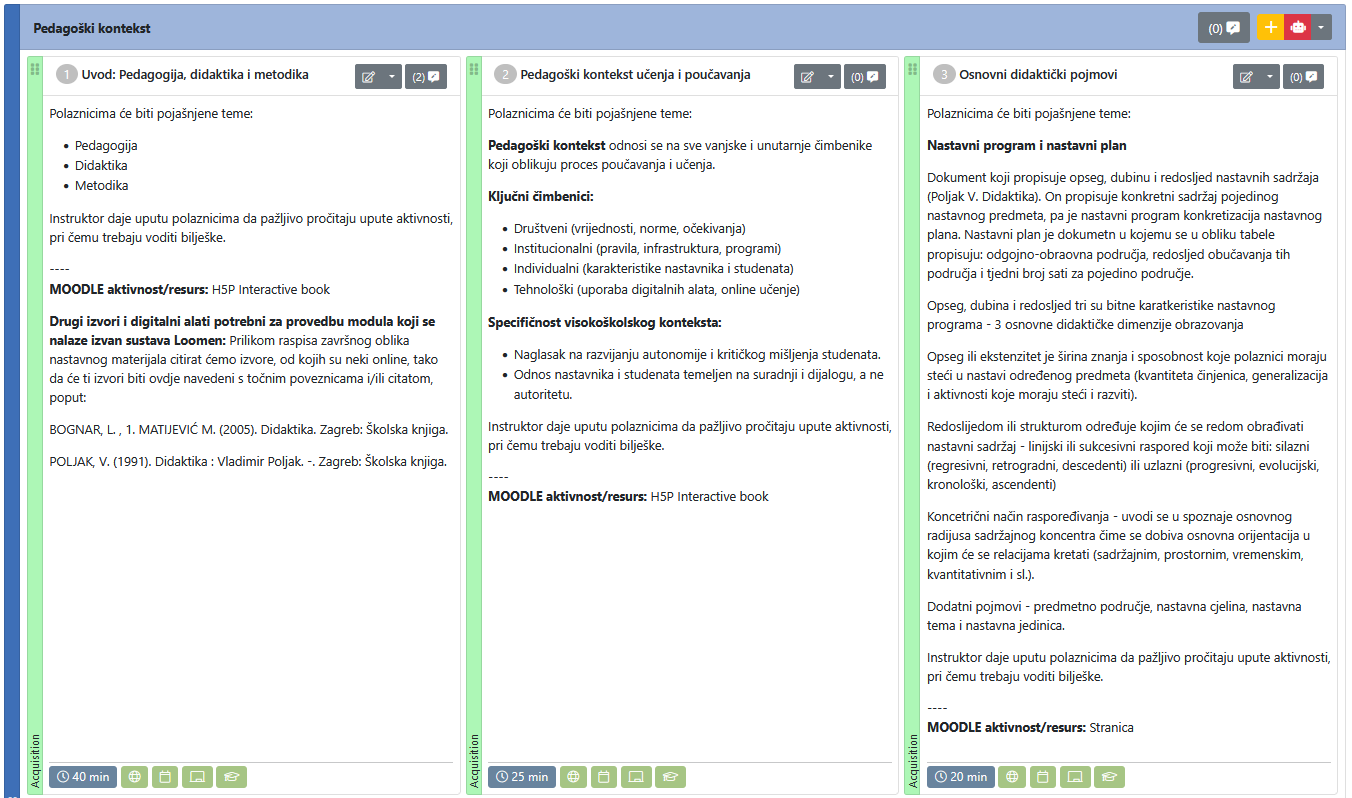
Layout of the BDP tool with a display of individual activities, their content, type of execution, type of MOODLE activity/resource, and the like.
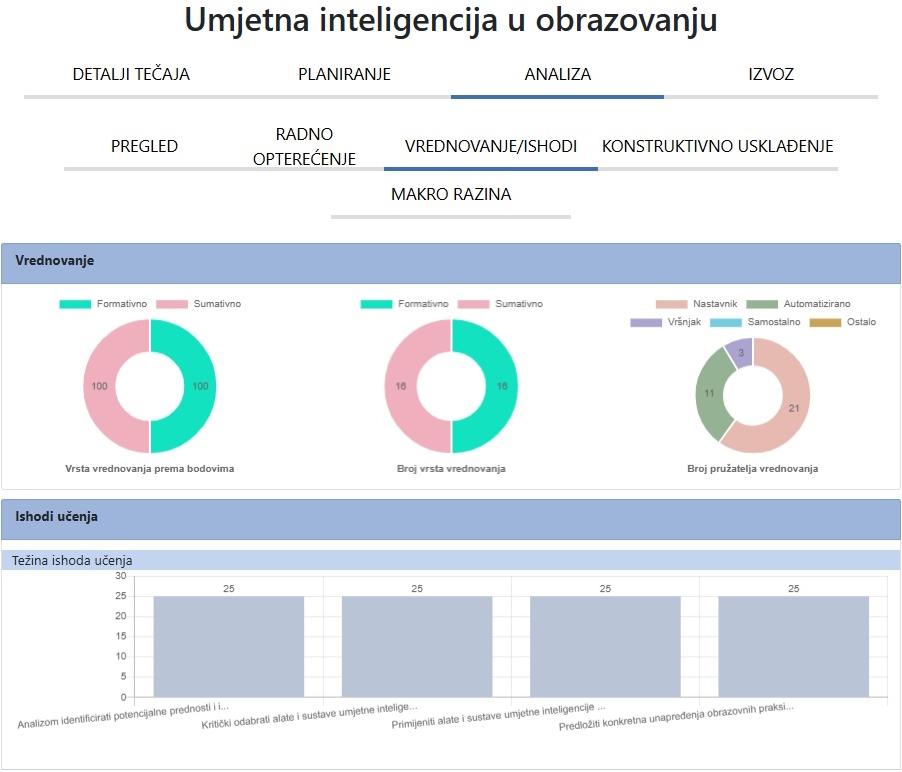
GDP tool layout
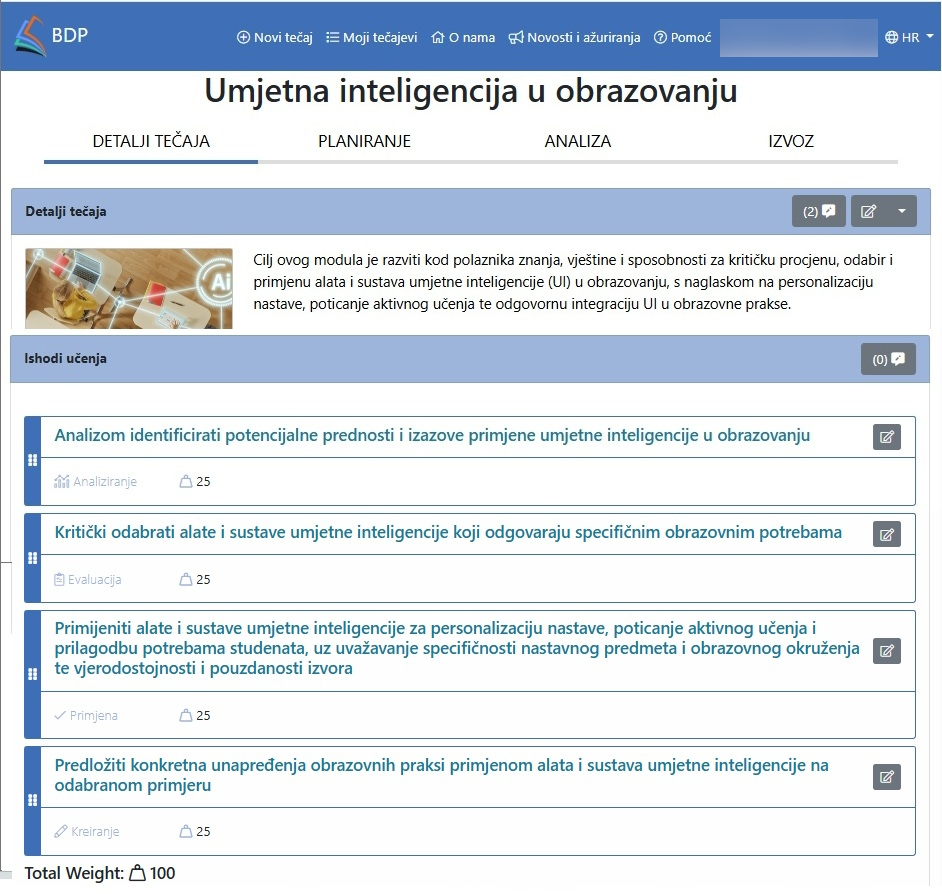
In addition to the GDP tool, you can also try the ABC tool available at the link.
4. LMS for content management and communication
Introduction
Learning Management Systems (LMS) have become a fundamental tool for planning, organising, and implementing teaching in a digital environment. LMS platforms enable teachers to manage educational content in a structured manner, monitor student activities, and enable multi-directional communication, thereby significantly contributing to the efficiency and quality of the educational process. In the Republic of Croatia, at all educational levels, the most widespread use of Moodle LMS is primarily because it is a free, open-source solution, localised in the Croatian language, with many features and add-ons for expanding it.
Some of the functions of an LMS are:
Course content management
In learning management systems (LMS), such as Moodle LMS, Canvas, or Blackboard, course content can be structured in different ways — by weeks, thematic units, or modules, providing students with a clear and organised path through the course. The teacher can publish a variety of teaching materials, including PDF documents, presentations, videos, and e-scripts, allowing for a combination of traditional and multimedia learning formats.
In addition to static materials, the LMS offers the creation of interactive activities, such as quizzes, assignments, forums, or SCORM objects, which encourage active learning and allow students to apply the acquired knowledge. For each content block, it is possible to set clearly defined goals and learning outcomes, which gives students a landmark in the learning process and allows teachers to assess achievements more easily.
One of the important functionalities is the customisation of content visibility: materials and activities can be opened gradually, in accordance with the dynamics of the lesson or individual student progress. Also, the LMS allows for easy integration of external resources, such as knowledge bases, digital repositories, or open educational resources (OER), thus expanding the availability of quality resources and enriching the learning experience.
Activity monitoring and evaluation
For teachers, an LMS is a tool for monitoring student engagement and performance. The system provides a detailed overview of access to teaching materials and records how much time students spend on different activities, which helps to identify those who are lagging or need additional support, as well as those who need additional content because they achieve better results in a shorter unit of time. Records of submitted tasks allow for easy tracking of compliance and reduce administrative burden. Through a combination of automatic and manual grading, teachers can ensure a balance between objective results and pedagogical assessment. Generated progress reports, whether for an individual or an entire group, allow teachers to intervene in a timely manner, adjust the pace and content of classes, and make informed decisions in teaching planning.
For the student, the LMS offers clear and continuous feedback on his/her own progress. An overview of access to materials and activity records helps him/her assess his/her own engagement, while progress reports provide an overview of the results achieved and those areas that (may) require additional work. The visibility of submitted assignments and grades in the system reduces uncertainty and increases the sense of control over the learning process. Automatic grading allows for quick feedback, while teacher comments provide guidelines for further improvement. The student thus gains a comprehensive insight into his/her educational path, which motivates him/her to continuously monitor his/her own work and become more actively involved in the learning process.
Communication and collaboration
For teachers, the LMS is a central point of communication with students. Through the forum activity, teachers can open thematic discussions that encourage critical thinking and interaction, but also monitor the level of student engagement. Private messages or comments within the activity allow for an individualised approach, allowing teachers to respond to questions in a timely manner, provide feedback, or guide students in their learning. The system of notifications and announcements (along with the existence of redundant distribution channels, such as the Notifications forum on the Moodle LMS, where notifications written by the teacher are also sent via email within 30 minutes of being posted) ensures that all students receive important information at the same time, thereby increasing transparency and reducing the possibility of misunderstandings. Interactive tools, such as wikis or the Workshop activity that allows for peer assessment, provide teachers with insight into the collaborative work of students and allow them to evaluate not only the result, but also the learning process.
For the student, the LMS is a space where he can feel included in the learning community. Forums allow him to ask questions, express his opinions, and learn from his colleagues by exchanging ideas. Private messages and comments facilitate direct contact with the teacher, which increases the feeling of support and availability. Notifications and announcements help the student stay organised and informed about all obligations. By using interactive tools, such as shared files or wikis, the student actively participates in collaborative work, learns from others, and develops teamwork skills. Peer assessment further encourages critical thinking because the student not only receives feedback but also evaluates the work of their colleagues.
Adaptability and inclusiveness
A quality LMS ensures accessibility for all students, including those with disabilities, thus realising the principle of equal opportunities in education. This includes full compatibility with screen readers and other assistive technologies that help students with visual impairments or other difficulties in accessing digital content. Multimedia materials are enriched with transcripts and subtitles, which not only help people with hearing impairments but also students who learn in another language. The LMS must be scalable and adapted to different devices, from computers, tablets, to smartphones, which allows for the flexibility of learning anytime and anywhere (of course, with the limitations of motivation, internet access, and device availability). It is especially important that students can choose the language and script of the interface, which contributes to inclusivity and easier navigation in the system. More advanced LMS solutions also offer adaptive learning paths: the system analyses the student's progress and offers personalised content and tasks, thus supporting individualised and more effective learning.
Integrations with other systems
Modern LMSs do not function as closed systems but offer integration options with a range of external tools and platforms that enrich the learning and teaching experience. In this way, the LMS becomes a central point that connects different digital resources and services. For example, integration with video conferencing tools (e.g., Zoom, MS Teams, BigBlueButton) allows for live teaching and recording of lectures within the same environment. Connection with plagiarism checking tools (e.g., Turnitin) increases academic integrity and transparency of grading. Systems are often complemented by library databases (online journals and books), e-portfolio solutions, or collaboration tools such as Google Workspace or Microsoft 365. For students, this means easier access to all the necessary resources in one place, while teachers gain more efficient tools for teaching management and progress monitoring. Such integration reduces the fragmentation of the digital environment and enables a more harmonious, efficient, and motivating educational experience.
Conclusion
Using an LMS does not just mean transferring teaching materials into digital form but also represents a fundamental transformation of the way teaching is organised and how interaction between teachers and students takes place. For teachers, this means that the LMS becomes a central place where the course structure is planned, thematic units are formed, and teaching activities are linked to clearly defined learning outcomes. Through the LMS, teachers can provide students with continuous access to all resources, from teaching materials, links to additional resources and tools, to detailed instructions and assessment criteria, thus ensuring a high level of transparency and consistency. With pedagogical support, teachers use the LMS not only as a tool for distributing content but also as a space for encouraging discussion, active participation, and collaborative learning, for example, through forums, joint projects, and online workshops.
From a student perspective, an LMS provides a clearer overview of all assignments and resources in one place, which reduces uncertainty and increases the sense of control over one’s own learning. Through an LMS, students can track their progress through automated feedback, quiz results, and teacher feedback on assignments. In addition, an LMS encourages active student engagement in the learning process by providing them with the opportunity to discuss, collaborate, and share ideas in a digital environment. Students also feel part of a learning community by providing ongoing communication and connection with teachers and peers. In this way, an LMS not only facilitates the technical aspect of teaching but also significantly contributes to the achievement of educational goals and strengthens engagement in a digital educational environment.
5. SAMR model
The following link is available in Croatian only. Participants may use free AI-powered translation tools to access the provided materials.
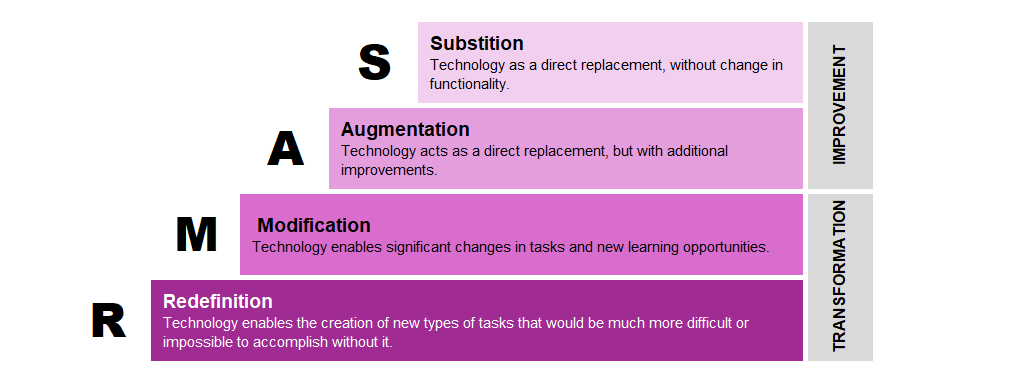
The SAMR model was developed in 2010 by Ruben Puentedura and consists of four levels of online learning, roughly ranked according to their transformative power. SAMR is a reflection tool that can help teachers think about how the integration of digital technology supports learning in specific educational contexts/situations and activities. The abbreviation "SAMR" stands for Substitute (en. substitution), Expansion (en. augmentation), Reshaping (en. modification), and Redefinition (en. redefinition).
The individual phases of the model can be described as follows.
In the Substitute phase, technology is used to solve a task that could equally well be done without the use of technology, e.g., students solve a printed task on paper or use a digital source such as a book.
In the Expansion phase, technology is used for a task that would otherwise take much longer or be more difficult (complex) if students were to solve it without the use of technology, e.g., students solve an online exam with closed questions that the distance learning system automatically evaluates and scores, students edit text on a computer while adding images, sound, or video, and the like.
The Compensation (en. Substitution) and Expansion (en. Argumentation) phases represent the foundation of the transformation of the educational process, which is actually carried out in the remaining two phases: Reshaping (en. Modification) and Redefinition (en. Redefinition).
In the Transformation phase, technology provides students with new learning opportunities. For example, after writing a seminar, students can record it as a short video and share it with their colleagues. They can also create an infographic or poster with interactive elements (such as video, audio, and links to other resources).
In the Redefinition phase, technology allows to create new types of tasks that would be much more difficult to achieve or impossible without the use of technology, such as recording and producing an interactive video on a topic, creating a digital book, an interactive timeline with plenty of multimedia content and links to external content for each of the points/events, interactive maps with data collected during field research, and the like.
6. TPACK framework
What is TPACK?
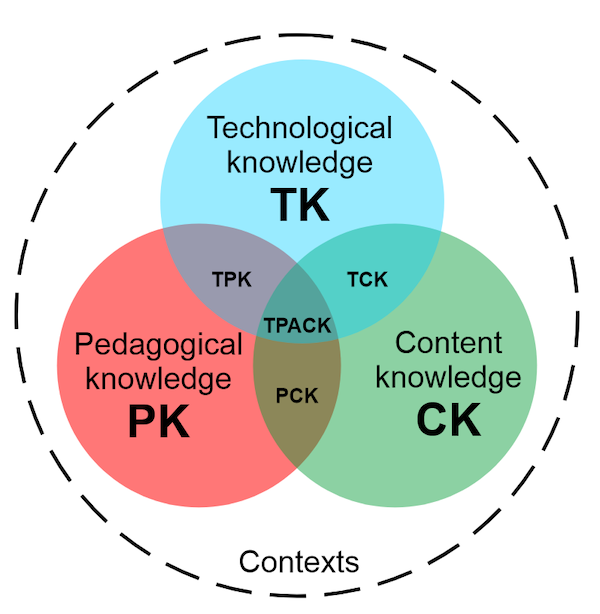
TPACK stands for Technological Pedagogical Content Knowledge. At the heart of the TPACK framework is TPACK knowledge, an integrated understanding of how to teach specific content using appropriate pedagogical strategies supported by appropriate technology. The model assumes that quality teaching with technology requires a focused overlap of three knowledge areas (CK, PK, and TK, whose additional intersections then encompass new sub-areas):
Subject Content Knowledge (CK)
The teacher's knowledge of the subject is to be learned or taught; it includes knowledge of concepts, theories, and ideas, organisational frameworks, evidence, as well as established practices and approaches for developing such knowledge.
Pedagogical Knowledge (PK)
Teacher knowledge of the processes, practices, or methods of learning and teaching includes, among other things, the overall purpose of education, its values and goals; relates to understanding the learning process, classroom management skills, lesson planning, and assessment.
Technological Knowledge (TK)
Knowledge of certain ways of thinking and working with technology, tools, and resources; working with technology can be applied to all technological tools and resources; includes a broad enough understanding of information technology to apply it productively at work and in everyday life, recognising when information technology can help or hinder goal achievement, and constantly adapting to information technology changes/developments.
Pedagogical Content Knowledge (PCK)
It is based on Shulman's idea of pedagogical knowledge applicable to the teaching of certain content; the emphasis is on the transformation of the teaching topic that occurs during its interpretation, finding different ways of interpreting it and adapting instructional materials to alternative concepts and prior knowledge; it covers the very core of the work of teaching, learning, curriculum, assessment and reporting.
Technological Content Knowledge (TCK)
Understanding how technology and content influence and constrain each other. Teachers must master more than the subject matter they teach; they must also have a deep understanding of how the subject matter (or the kinds of representations that can be constructed) is transformed by the application of technology. Teachers need to understand which specific technologies are best suited to addressing subject matter learning in their domains and how content dictates or even changes technology, or vice versa.
Technological Pedagogical Knowledge (TPK)
It represents an understanding of how teaching and learning can change when certain technologies are used in a specific way, which includes knowing the pedagogical advantages and limitations of a range of technological tools related to discipline and developing appropriate pedagogical designs and strategies.
Technological Pedagogical Content Knowledge (TPACK)
A combined form of knowledge that contains all three main components (content, pedagogy and technology); it is the foundation of effective teaching with technology, requiring an understanding of the concepts of technology application, pedagogical techniques that use technology in constructive ways for the purpose of teaching material, knowledge of what makes certain concepts difficult or easy to learn and how technology can help correct some of the problems that students (learners) face; knowledge of students' (learners') prior knowledge and theories of epistemology; and knowledge of how technologies can be used.
Why is TPACK important?
The model helps teachers to see technology not as an add-on to teaching, but as an active component of didactic reflection. By applying the TPACK framework, the teacher reflects on these questions:
- What is the goal of teaching?
- What content is key to understanding?
- Which method best suits the goals and content?
- What digital tools can enhance the learning experience?
In this way, technology becomes a means, not an end, and supports learning in a meaningful and effective way.
Applying the TPACK framework in lesson planning
When planning levels of technology integration, TPACK can be used as a tool for analysis and reflection:
- Low level of integration: technology is used passively, for the presentation of content.
- Medium level of integration: technology enables interaction and collaboration.
- High level of integration: technology is inseparable from the teaching process, enabling personalized, creative, and problem-based learning.
TPACK also helps teachers develop digital competencies, as it emphasizes not only the technical, but also the pedagogical function of technology.
TPACK and professional development of teachers
Developing TPACK competencies does not happen automatically. It is necessary to include the TPACK framework in teacher education and professional development, encourage teamwork and interdisciplinary projects, use reflective practice, i.e., analysis of one's own teaching scenarios with the TPACK model, and apply digital pedagogy in designing e-courses and OER content for teachers to fully acquire these competencies.
The TPACK framework provides a systematic approach to understanding and integrating technology into the educational process. Rather than using technology haphazardly or out of a need to modernise or because it's "modern," TPACK directs us toward thoughtful and contextualised application. Such an approach not only improves teaching but also strengthens the role of the teacher as a pedagogical expert in the digital age.
Example of using TPACK in practice
A higher education teacher who applies the TPACK framework in planning activities starts with a balanced connection of three types of knowledge: technological, pedagogical, and substantive. When planning the course, the teacher first defines the learning outcomes related to the key terms in the field (content knowledge). He then chooses a pedagogical approach that encourages active student participation — for example, collaborative learning through discussions or case studies (pedagogical knowledge). To support this approach, he decides to use digital tools such as Moodle forums or interactive whiteboards (technological knowledge).
In the activity, students analyse real examples from practice, discuss them in an online environment, and jointly create a digital representation of the solution to the problem. The teacher monitors the discussion, asks questions that encourage deeper understanding, and offers real-time feedback. In this way, technology is not an end, but a means that supports the pedagogical goal and understanding of professional content. Through reflection after the activity, the teacher evaluates the effectiveness of the selected tools and approaches and adjusts the design of the following teaching units as necessary. Such integration shows the full application of the TPACK framework in the planning and execution of lessons in a digital environment.
7. Continuous education of teachers to raise and maintain the level of digital competences
Introduction
In the context of the accelerated digital transformation of education, teachers' digital competencies are becoming a key prerequisite for quality, inclusive, and relevant teaching. They include not only technical mastery of tools, but also pedagogical integration of technology, the ability to adapt to digital trends, and critical reflection on the use of technology in teaching.
1. Why is continuing education necessary?
Digital technologies are constantly evolving — tools, platforms, methods, and student expectations are changing. What was relevant a few years ago may be outdated today. Therefore, continuous education is necessary to maintain relevant digital skills, keep up with pedagogical innovations, adapt to the digital environment and generational changes in learning, and ensure the quality and effectiveness of e-learning. Without regular professional development, digital skills quickly fade, which affects student engagement and learning outcomes.
2. Key areas of digital competence
According to a framework such as DigCompEdu (European Digital Competence Framework for Teachers), training should cover the following areas:
- professional digital behavior (security, data protection, digital ethics)
- selection and design of digital resources
- digital learning design (planning, evaluation, adaptability)
- managing digital interactions with students
- monitoring progress and providing digital feedback
- active student engagement through technology.
3. Forms and models of education
Continuing education should not be uniform or one-off. An effective system for developing digital competencies includes various forms.
- workshops and webinars focused on specific tools or methods
- online courses and MOOCs
- mentoring systems and communities of practice
- collaborative course development and exchange of good practices
- microqualifications and digital badges.
Education in context has a special value — that takes place with application in real classes, through reflection and support.
4. The role of institutions
Higher education institutions should recognise teacher education as a strategic priority, ensuring:
- access to training and learning platforms
- time and organisational conditions for training
- system for evaluating and recognising digital competencies
- incentives and recognition for teaching work in the digital environment.
It is equally important to develop a culture of lifelong learning within the teaching community, where digital literacy is not considered an additional obligation, but a professional responsibility.
Conclusion
Continuing education of teachers in the field of digital competences is not a luxury, but a necessity of modern education. It enables teachers to remain professionally relevant and ensures students a stimulating and high-quality learning experience. Only education systems that invest in the development of their teachers can successfully respond to the challenges of the digital age and build inclusive, adaptable, and resilient higher education.
8. OER contents
Introduction
Open Educational Resources (OER) are digital contents for learning, teaching, and research that are freely available, adaptable, and redistributed under licenses that enable open use. The use and production of OER content is increasingly recognized as a key strategy for improving the quality of education, increasing accessibility, and encouraging collaboration among teachers.
1. What is OER content?
Open Educational Resources (OER) encompass a variety of materials that can be freely used in education, research, and self-directed learning. These include digital textbooks, interactive simulations, presentations, tests, various interactive activities, as well as multimedia content such as videos, audio recordings, and texts. Some OER projects also offer complete e-courses that can serve as a foundation for learning or as a complement to existing programs.
OER contents are most often published under Creative Commons licences, which clearly define the terms of use, processing, and sharing. This enables teachers and students to be not only passive users, but also active creators: they can freely adapt the contents to their own context, upgrade them with examples, translations, or new activities, and share them again with others.
If you want to learn more about CC licenses, you can do so at this link.
2. Benefits and challenges of incorporating OER into teaching
The inclusion of open educational resources (OER) in teaching brings several significant benefits for students and teachers. First, OER increases the accessibility of educational materials by removing financial and geographical barriers, as students from different parts of the world can use the same textbooks, courses, or multimedia content without additional costs. The flexibility of use allows teachers to select, adapt, and combine materials according to their own needs and course objectives, while students can learn at the pace that suits them best.
In addition, OERs encourage open pedagogy, an approach in which students and teachers actively participate in the creation and adaptation of content. This develops a sense of community and responsibility for learning. The use of OERs also encourages collaboration and the exchange of good practices among teachers, as materials are freely shared, improved, and built upon. Finally, open content reduces the cost of education, which allows students and institutions to have more equitable and sustainable access to knowledge.
The challenges of using OER include the variable quality of the material (which should always be checked before including it in your own e-course or teaching), the need for regular content updates, technical sustainability, and sometimes insufficient visibility of the available content (if downloaded from external sources). Teachers also need to invest additional time and support in adapting OER to their own context (significantly less than if they were to create them from scratch, but this should still be considered).
3. Creating OER content – pedagogical, technical, and legal aspects
The creation of open educational content (OER) requires careful planning and coordination of pedagogical, technical, and legal aspects.
From a pedagogical point of view, it is important that the contents are clearly linked to the learning outcomes, structured in a logical and transparent way, and adapted to different learning styles. Teachers should use methods that encourage interactivity and engagement, for example, through tests, multimedia content, or self-checking tasks.
The technical aspect involves choosing formats and tools that allow for easy creation, sharing, and reuse of materials. Popular tools for creating OER include H5P for interactive content, Canva for creating graphics and presentations, Audacity for recording and editing audio, OBS Studio for recording and streaming lectures, and Moodle LMS for publishing and organizing content into e-courses. Accessibility is key, and therefore, content should be compatible with screen readers, mobile-friendly, and technically stable.
The legal aspect refers to the respect of copyright and the selection of an appropriate license. The most often used are Creative Commons licenses, which clearly define the terms of sharing, processing, and commercial use. Authors should be careful about the use of images, texts, and multimedia from external sources and check whether they have permission to include them.
In addition, attention should be paid to the quality of the material, ensuring that the content is up-to-date, accurate, methodologically well-designed, and aligned with educational standards. In this way, OER becomes not only free but also quality content that truly contributes to education.
4. Platforms and tools for OER
There are numerous platforms that offer access to OER content. Examples include OpenStax (digital textbooks), OER Commons (open repository of educational materials), MERLOT (multidisciplinary content database), and MIT OpenCourseWare (full contents of e-courses) or Khan Academy (interactive courses and video materials). Such sources significantly contribute to the democratisation of education and encourage a culture of knowledge sharing.
5. The role of teachers and institutions
The successful inclusion of open educational content (OER) requires a combination of individual teachers' efforts and institutional support that should facilitate their work. Teachers have a key role because they become designers of digital educational materials: they create new content, adapt existing OER materials to their educational context and the specifics of e-colleges, and continuously evaluate their quality and pedagogical value. Thus, they move from the traditional role of lecturers to active creators of knowledge. Such an approach requires developed digital and authoring competencies, which include knowledge of tools for creating digital content, understanding of the principles of open pedagogy, and awareness of copyright and licenses.
Institutions have a responsibility to create an environment that encourages teachers to use and develop OER. This includes systematically evaluating and recognising work on open educational content, offering professional development and training programs, as well as technical and advisory support. It is also important that institutions promote open education as part of their strategy and quality culture. Only by working together with teachers and institutions can the sustainability and wider use of OER in higher education be ensured.
Conclusion
OER contents are not only educational materials - they are a tool for the democratisation of knowledge, support for inclusive and quality education, and an opportunity to strengthen cooperation, innovation, and transparency in the education system. By actively engaging in the production and use of OER, teachers take an active role in shaping open, relevant, and sustainable education for the future.
You can find more information about OER in this course.
9. Universal Design for Learning (UDL)
What are the guidelines for UDL?
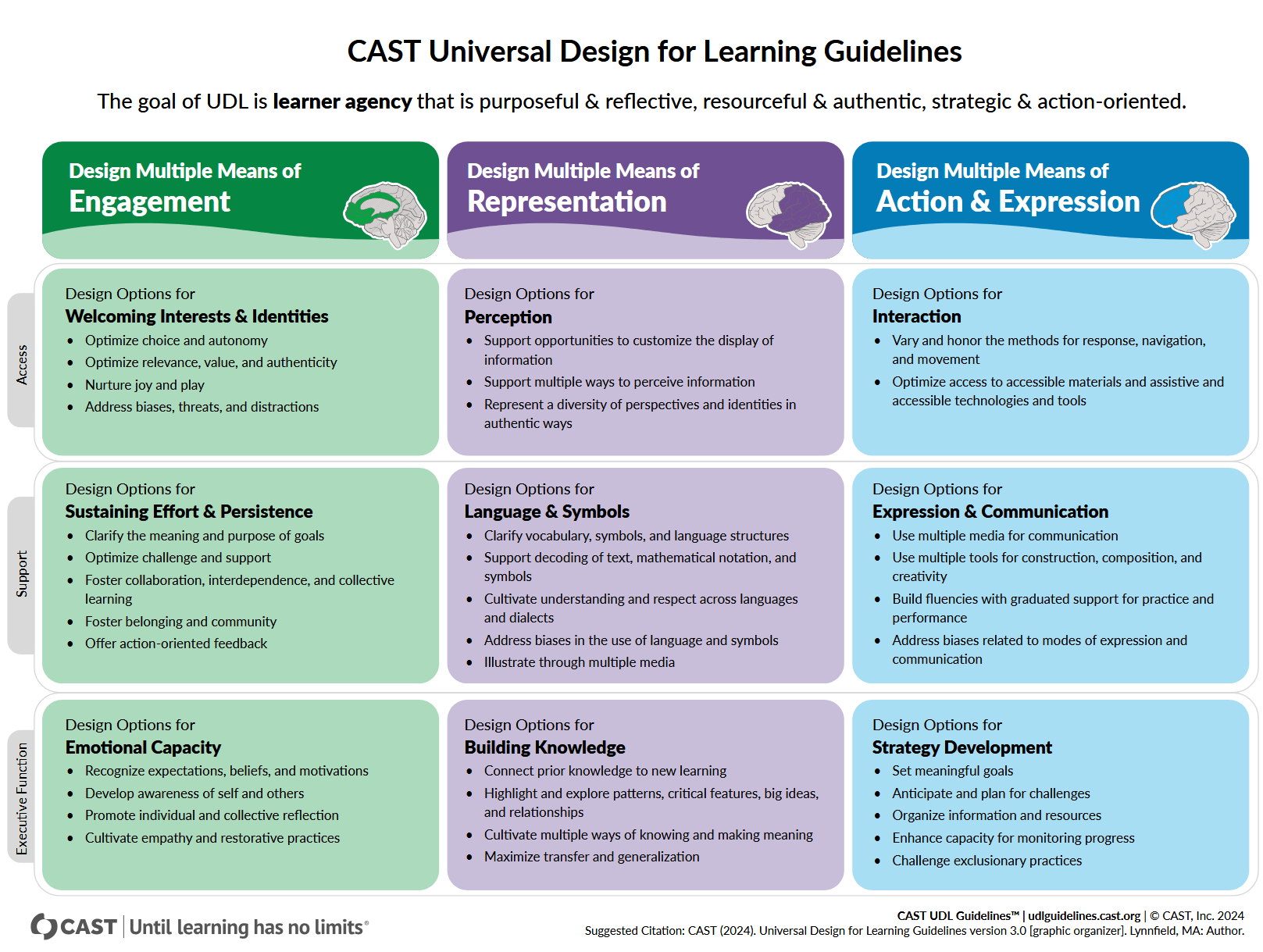
The Universal Design for Learning (UDL) Guidelines are a fundamental framework for creating curricula and teaching units that provide the best access and results for every individual, initially created in 2008. More information is available here: https://udlguidelines.cast.org/. There are several versions of the UDL guidelines; the latest, from July 2024, is UDL 3.0 (more on this at: https://udlguidelines.cast.org/more/about-guidelines-3-0/).
- They are used in the development of curricula.
- The design process leads to flexible content and lessons that can be used by all students.
- It starts from the assumption that every student's brain is different and provides multiple opportunities to access each learning network so that each individual can learn in the best possible way for them.
- In addition to learning the content being taught, students will also understand its importance and how it can be applied in their context.
UDL guidelines shape the educational environment to support student autonomy, which should be:
- purposeful — internalised self-efficacy, acting in ways that are personally and socially meaningful
- reflexive — self-awareness and metacognition to recognise internal motivations and external influences that support learning and adaptations when necessary
- resourceful — understanding and applying an individual's advantages, strengths, resources, and linguistic and cultural capital
- authentic — increasing understanding and deepening understanding in authentic ways
- strategic — setting goals and monitoring learning through planning
- action-oriented — independent and group action in achieving learning goals.
UDL aims to change the design of the environment, not frame the problem as a perceived deficiency within the student. When environments are intentionally designed to minimise barriers, every student can engage in meaningful learning.
Designing learning environments that support student independence requires continuous examination of the relationship between educators and students and the creation of a space where students can individually and collectively understand content through interaction and reflection. Furthermore, supporting student independence requires recognising the dimensions of culture and identity and examining where prejudices and expectations can be obstacles for students to fully realize their independence.
In the context of online and hybrid learning, UDL guidelines provide a framework for designing activities that are accessible, flexible, and inclusive for all students. They encourage teachers to anticipate different ways of participating, expressing, and presenting content in a digital environment at the planning stage. The UDL approach allows for the adaptation of teaching materials to different learning styles and technical capabilities, thereby reducing barriers to participation in online activities. In this way, the digital environment becomes a space that supports individual differences and enables every student to actively and meaningfully participate in learning.
Quick tips about UDL
- Different groups — different materials — different activities.
- Working in a group (a common goal creates bonds and develops community belonging).
- Using various digital tools.
- Provide students with autonomy, the feeling that they can decide for themselves how they will learn (this will increase their motivation).
- Basis of work with students: TPS - Think-Pair-Share.
- Students with difficulties should have their activity time extended, and gifted students should be set different goals (more demanding, complex, and challenging).
10. Adapting classroom teaching materials to the online environment
Introduction
The digital transformation of education has brought numerous challenges, but also opportunities for improving the quality of teaching. One of the key challenges is the adaptation of traditional classroom teaching materials to the digital, online environment. This is a process that goes beyond the mere transfer of content to digital platforms — it requires pedagogical, technical, and didactic transformation of teaching materials to make them functional, useful, and accessible to students in a virtual environment. Teachers often own digital teaching materials, but the design and purpose of these materials are more oriented towards classroom use and less towards independent student work in an online environment.
1. Pedagogical-didactic adaptation
Classroom materials often presume the physical presence of a teacher, spontaneity of interaction, and the ability to directly explain content. In an online environment, materials need to be reshaped to encourage independent and active learning. This includes:
- a clear introduction to the topic, goals, and expectations
- asking questions for reflection and self-examination
- visual organisation of information (e.g., infographics, summaries, tables)
- specifying deadlines for working with some content
- inclusion of diverse forms of material (text, video, audio, tests).
2. Technical adaptation
Materials prepared for the classroom (e.g., PowerPoint presentations, notes, instructions) must be adapted for display and distribution via e-learning or educational content sharing systems (e.g., Moodle, MS Teams, or Google Classroom). Basic technical adaptations include:
- use of formats available on different devices (e.g., PDF, MP4, HTML5)
- adding subtitles and transcripts to video content
- compressing large files for easier download (but this is not possible with video and audio recordings because they are already compressed)
- checking the accessibility of teaching materials (contrast, font size, existence of alternative text/description for images).
3. Interactivity and engagement
The digital environment requires a greater degree of active student involvement. Therefore, classroom materials should be enriched with tools and activities that enable two-way communication and collaboration:
- by incorporating knowledge checks and feedback within the content
- using forums and comments for discussion
- by implementing tasks that encourage the application of knowledge (case studies, projects)
- gamification of content for additional motivation.
4. Accessibility and inclusivity
Online materials must be accessible to all students, including those with diverse needs and limitations. Accommodation includes, among other things:
- ensuring compatibility with screen readers
- structuring content using headers and tags
- using simple language and clear navigation
- avoiding content that requires special programmes to view (to a reasonable extent).
5. Evaluation and feedback
Unlike a classroom environment where the teacher can immediately spot misunderstandings, in an online environment, it is crucial to include mechanisms for self-checking and feedback. Materials should include:
- built-in tests with answer explanations (i.e., specific feedback)
- student feedback capabilities/functionality
- instructions for additional learning, repetition, or corrections (with an emphasis on self-regulated learning if there is a need for it).
Conclusion
Adapting classroom teaching materials to the online environment does not mean copying them literally, but rather transforming/reshaping them into a form that is meaningful, effective, and stimulating for digital learning. Such materials must be pedagogically well thought out, technically feasible, and didactically effective. Only in this way can they meet the needs of the modern student and support the achievement of defined learning outcomes in the online context.
Background Colour
Font Face
Font Size
Text Colour
Font Kerning
Image Visibility
Letter Spacing
Line Height
Link Highlight
Paragraph Width
Text Alignment