Inclusion in the online teaching environment
| Site: | Loomen za stručna usavršavanja |
| Course: | Planning and Implementation of Online and Hybrid Teaching |
| Book: | Inclusion in the online teaching environment |
| Printed by: | Gost (anonimni korisnik) |
| Date: | Saturday, 24 October 2026, 10:43 PM |
Description
In this activity, you will learn more about the basics of inclusion in an online learning environment.
1. Inclusion in the online teaching environment
Inclusion in online education is not just about enabling technical access to teaching content or virtual classrooms, but also about creating conditions for full and equal participation of all students in the educational process. This means that every student — regardless of disability, chronic health problems, psychosocial challenges, family and work obligations, low income, or limited digital skills — must have a real opportunity to understand the content, engage in discussions, communicate with teachers and colleagues, and demonstrate their knowledge through various forms of assessment.
The concept of inclusion in online education includes both emotional and social aspects: a sense of belonging to an academic community, access to real-time support, the ability to ask questions without fear, and empowerment through flexible learning formats. Students should not feel like passive recipients of content, but rather active participants in an educational process to which they can adapt, but which must adapt to them. In this sense, inclusive teaching is not an add-on, but a standard that must be built into all phases of teaching planning and delivery.

One of the key challenges in practice is to ensure that digital technology does not become a barrier, but a tool that enables access, adaptation, and empowerment. This means using technology in a thoughtful and responsible way: choosing tools that support a diversity of needs and capabilities, providing multiple channels of communication, adapting tasks and deadlines when necessary, and providing students with different ways of expressing and assessing knowledge.
Therefore, inclusion in online education must be viewed holistically, meaning that it does not depend only on the individual teacher, but on the entire system — from the way courses are designed and the tools used, through technical support and administrative procedures, to the culture of the institution and its willingness to adapt. Continuous support, professional development of teachers, active involvement of students in the creation of lessons, and constant evaluation of practices are key elements of inclusive digital education that leave no one behind.
The following link is available in Croatian only. Participants may use free AI-powered translation tools to access the provided materials.
For more information on the social dimension of higher education and inclusion, be sure to visit the page of the Institute for Educational Development at the link.
2. UDL in practice: more than theory
Universal Design for Learning (UDL) is not just a theoretical framework, but a series of practical approaches that enable more inclusive and accessible teaching for all students. Applying UDL means thoughtfully planning content and activities so that differences among students, their abilities, prior knowledge, learning styles, and needs are considered. This includes offering teaching content in multiple formats, such as text, audio, video, infographics, interactive quizzes, and simulations. This enables students to access information in a way that is most natural and effective for them. In addition, students can choose how to demonstrate their knowledge by writing an essay, creating a visual representation, an audio recording, or a video presentation, which further increases motivation and a sense of control over learning.
In digital education, especially in online and hybrid environments, UDL stands out further because it allows for greater flexibility in time, space, and access to content. Structuring courses into thematic units of varying complexity allows students to move at their own pace, gradually build understanding, and choose the level of depth with which they want to approach the material. Such an approach is particularly beneficial for students who have difficulty organising, working under pressure, and those who study alongside other commitments (work, family, health).
The application of UDL implies the systematic removal of obstacles in education, already at the course planning stage. Instead of subsequently introducing adaptations for students with disabilities, classes should be designed to be accessible to all from the beginning. This means that assessment criteria are clearly explained, task instructions are available in multiple formats, and key concepts are presented visually, aurally, and interactively. Such an approach reduces the need for individual exemptions and makes it easier for teachers to organise courses because all students work within the same, inclusive system.
Another important dimension of UDL is encouraging self-regulation and active participation of students. When a student can choose the way to access the content and the form of expressing knowledge, their autonomy and sense of ownership of learning increase. In addition, UDL supports the development of metacognitive skills as students learn to recognise which strategies work best for them. This not only contributes to a better mastery of the material in a certain course but also develops, in the long term, the abilities necessary for lifelong learning in various academic and professional contexts.
Short task
The following document is available in Croatian only. Participants may use free AI-powered translation tools to access the provided materials.
Study the document "Application of Universal Design in Higher Education" from the Office for Students with Disabilities of the University Counseling Centre of the University of Rijeka, take notes, and try to conduct an analysis according to the questions below:
How can universal design principles such as flexibility, fault tolerance, and ease of use be concretely implemented in digital course offerings (e.g., in LMS) to reduce barriers for students with diverse needs?
- Analyse how certain principles (e.g., “observable information” or “low physical effort”) can be adapted when designing online materials and tasks.
- Consider specific digital practices that promote equitable use and intuitive user experience.
2. How could institutional support and structural adjustments (e.g., standardised lecture design, clear instructions, and different material formats) become part of standard practice in higher education courses, rather than being introduced individually as needed?
- Consider the benefits of systematically establishing inclusive practices (e.g., availability of subtitles during lectures, transcripts, visual support) in terms of equality and quality organisation of teaching content.
3. How can the application of universal design for learning (UDL) contribute to better motivation, autonomy, and self-regulation in learning among students, especially those with different learning styles or additional challenges?
- This can include elements such as multiple formats of teaching materials, different ways of demonstrating knowledge (text work, visual presentation, audio support), and the ability to learn at your own pace.
You should use the above notes as a basis for work in a later activity called Project Assignment "Make your e-course more inclusive" where they will help you greatly.
3. WCAG guidelines
When we talk about accessibility in the digital world, we primarily mean the accessibility of online content and applications, native applications for mobile devices and desktop computers, electronic books and content in learning management systems, and other digital content.
The following link is available in Croatian only. Participants may use free AI-powered translation tools to access the provided materials.
According to CARNET data presented in the 2025 Guidelines for Ensuring Digital Accessibility, studies show that between 10% and 20% of the population has some form of disability related to visual, hearing, motor, or cognitive impairment. Each of these categories requires certain adjustments in the creation and design of digital content, and in most cases, such adjustments benefit all users, not just people with disabilities.
Back in 2005, the European Commission defined content accessibility as the removal of barriers that prevent people from accessing and using digital content, or the degree to which people with disabilities can use digital content, websites, and applications.
When we talk about factors that influence digital accessibility, we usually mean:
- meaning and form of digital content, immediate information (text, image, sound)
- native applications, web browsers, and audio/video playback programmes, and other programs and tools used by users of digital content
- assistive technology (screen readers, specially designed keyboards, scanning programmes, etc.)
- user knowledge and experience in using digital content
- people who develop and shape online and offline digital content and original applications
- programmes and tools for creating multimedia presentations, web pages, and native applications
- programmes and tools for evaluating the accessibility of original applications, web pages (HTML and CSS validators, etc.).
The 2018 Web Content Accessibility Guidelines (WCAG 2.1) provide a concrete framework for creating digital educational materials that are understandable and usable by everyone, regardless of physical or cognitive abilities. Basic steps include adding alt text for images and graphs, logically organising content using structural tags (headings, paragraphs, lists), ensuring sufficient contrast between text and background, and using legible fonts and clear visuals. Although the WCAG 2.2 guidelines were released in 2023, they are not yet recommended for full adoption.
It is equally important to avoid content that limits accessibility, such as scanned PDFs without search and markup capabilities, auto-playing videos without user control, or complex interactive elements that are not accessible via keyboard. WCAG-based accommodation not only benefits people with disabilities, they improve the learning experience for all students, including those who use mobile phones, study in adverse conditions (poorly lit spaces, noise), or have temporary difficulties (injuries, fatigue, stress).
Additional recommendations when ensuring digital accessibility:
- when digital content uses tabular displays containing a large amount of data, they are accompanied by a concise explanation in Croatian.
- all elements that are not permanently displayed are opened and closed by touching (clicking) the mouse (not by hovering the cursor over the button)
- navigation menus have only the first level of navigation visible, while sub-levels of the menu are initially hidden or reduced
- drop-down menus and/or submenus do not have many sub-levels of navigation, nor a large number of links on one level
- the use of drag and drop elements is avoided
- images and complex images (e.g., graphs and diagrams) have a short audio title in Croatian, with an appropriate textual title (so-called alt attribute) and a description in Croatian
- audio and video clips have subtitles and/or transcripts of the text in Croatian
- audio and video clips have a short audio title in Croatian, with an appropriate textual title and description in Croatian
- buttons on audio and video recordings have a short audio title in Croatian, along with a textual title in Croatian
- audio, video, and music used in audio and video must be pleasant, unobtrusive, and appropriate for the content in which they are used
- dynamic content, except for audio and video, can be stopped or started at will
- if a website uses visual verification and confirmation (CAPTCHA), alternative auditory verification is also used
- on web pages that have a lot of text, images related to the content are inserted to make it easier for people who originally use the Croatian sign language to understand the text.
- avoids the need to simultaneously use two or more keyboard keys for a specific command
- the text part is divided into smaller blocks separated by a blank space.
Digital Accessibility Validators
To check the digital accessibility of content, so-called validators, or verification tools, are used. They are all available as online solutions and are free, and do not need to be installed on your devices. You usually need to enter the address (URL) of the content for which you want to check the accessibility, and such tools will, after conducting an analysis, provide you with a report with an overview of how accessible the content is, and what measures need to be taken to improve it (including links to instructions on how to do this).
- The A11Y Project — accessibility checklists for online content
- HTML Codesniffer — browser add-on
- Colour Contrast Analyser — checking colours and contrast
4. Digital divide
The digital divide is not limited to the lack of an internet connection or device but encompasses a wider range of problems: lack of digital literacy, emotional security, self-confidence, and institutional support. Disadvantaged students often do not have the same starting positions as their colleagues — either because of socio-economic status, geographic location, minority language, or parental responsibilities.
In the context of online learning, these factors can lead to reduced engagement, passivity, or even complete dropout from education. To bridge the digital divide, it is necessary to conduct regular surveys of students' needs, involve them in shaping the teaching process, provide flexible deadlines, multi-channel access to content, and ongoing technical and emotional support. Transparent communication, safe spaces for questions, and supportive teaching practices are key to reducing feelings of isolation and insecurity.
Main groups of students who remain outside the system due to the digital divide:
Students from rural and less-connected areas
Although they have a computer, their internet connection is sometimes unstable or too slow to participate in video lectures. As a result, they miss part of the live classes, cannot submit assignments via the platform on time, or have difficulty collaborating in group projects. Since 2017, the Faculty of Humanities and Social Sciences, University of Zagreb, has been conducting research into the internet speed of students in the locations where they live and study. The results indicate that connection speeds are the lowest and connections are the most unstable in rural areas, on islands, and other locations with poor traffic and infrastructure connections. As a result, students miss part of the live or synchronous classes, often cannot submit assignments via the platform on time, or have difficulty collaborating in group projects that require a quick response.
How can HEI help such students? It can:
- enable recordings of lectures, but also additional formats that do not require high transmission speeds, for example, lecture transcripts, only sound files, etc.
- develop "light" versions of LMS content and mobile applications optimised for slower internet
- provide training for teachers on how to prepare digital content that is optimised for slower internet
- provide more access to the faculty network (in addition to the wireless network, provide network sockets on desks in libraries and reading rooms) or subsidised mobile data packages for students.
Students of lower socioeconomic status
They do not have the opportunity to purchase more modern devices or reliable equipment (cameras, headphones with a microphone). They often share one computer with other family members, which further reduces their ability to follow classes regularly.
How can HEI help such students? It can:
- provide loan options for used equipment (laptops, tablets, headphones that have been scrapped by teachers)
- organise financial assistance programmes or discount vouchers for technical equipment
- Provide access to computer labs, reading rooms, and common areas outside of normal working hours.
Students with low levels of digital literacy
Although they have technical equipment, they are not familiar with LMS systems, do not understand how to use security settings, submit assignments, or participate in forums. Lack of self-confidence and fear of mistakes lead to passivity.
How can HEI help such students? It can:
- organise short online workshops and webinars on using LMS systems, communication tools, and digital security
- establish a helpdesk with clear instructions and quick answers to the most common technical questions students have
- encourage peer support where older students would be mentors/advisors to newer ones
- in their materials, teachers can refer students to Srce and CARNET courses, e-learning support centres, the IT service, the library, and other digital technology support available at HEI.
Students whose native language is not Croatian and students with disabilities
Some students face language barriers because materials are not translated or subtitled. Students with visual or hearing impairments lack support in the form of transcripts, screen readers, or visual accommodations.
How can HEI help such students? It can:
- provide multilingual materials (and in several scripts), subtitles, and transcripts for video content
- implement Universal Design for Learning (UDL) and accessibility tools (screen readers, contrasting themes)
- include inclusive experts in the design of e-colleges or as help in redesigning existing e-colleges.
Students with additional responsibilities (e.g., parents or employed students)
They don't have the flexibility to participate in live classes because they are balancing work, family, and academic commitments. If there is no way to access recorded content later, they easily fall behind and lose motivation.
How can HEI help such students? It can:
- provide flexible deadlines for submitting assignments
- provide asynchronous participation options through recorded lectures and forum discussions
- encourage individual agreements with teachers for special situations.
5. Assistive technologies
Although most educational institutions have access to various assistive technologies, their use in practice often remains limited. Tools such as screen readers (e.g., NVDA, JAWS), text-to-speech (TTS), software magnifiers, large-character keyboards, and contrast settings are technically available, but many teachers and students do not know how to use them or even that they exist.
The reason for this often lies in the lack of education and system integration. It is necessary to include information about assistive technologies in introductory courses, technical support and advisory services, and to integrate the equipment and tools themselves into virtual and physical learning environments. It is also crucial that assistive technologies are not reserved only for “registered users with disabilities” but become a universal resource for everyone who wants to use them, including students with temporary difficulties.
The following links and documents are available in Croatian only. Participants may use free AI-powered translation tools to access the provided materials.
A shining example of the development of assistive technologies and digital tools for this purpose at the University of Zagreb is the Laboratory for Assistive Technologies and Assisted Communication at the Faculty of Electrical Engineering and Computing, University of Zagreb. If you want to learn more about assistive technologies, be sure to read the publication "Assistive Technology in the 21st Century — Applications and Perspectives " created as part of the "Platform 50+" project implemented by the Faculty of Education and Rehabilitation Sciences, University of Zagreb.
6. Professional development of teachers
Without well-trained teachers, no inclusion strategy in higher education can achieve its full potential. Teachers are the ones who shape the students’ experience every day, so their professional development is crucial for the successful implementation of inclusive practices. Continuous training in the areas of digital accessibility, universal design for learning (UDL), ethical aspects of digital education, and the use of assistive technologies must become the standard, not the exception.
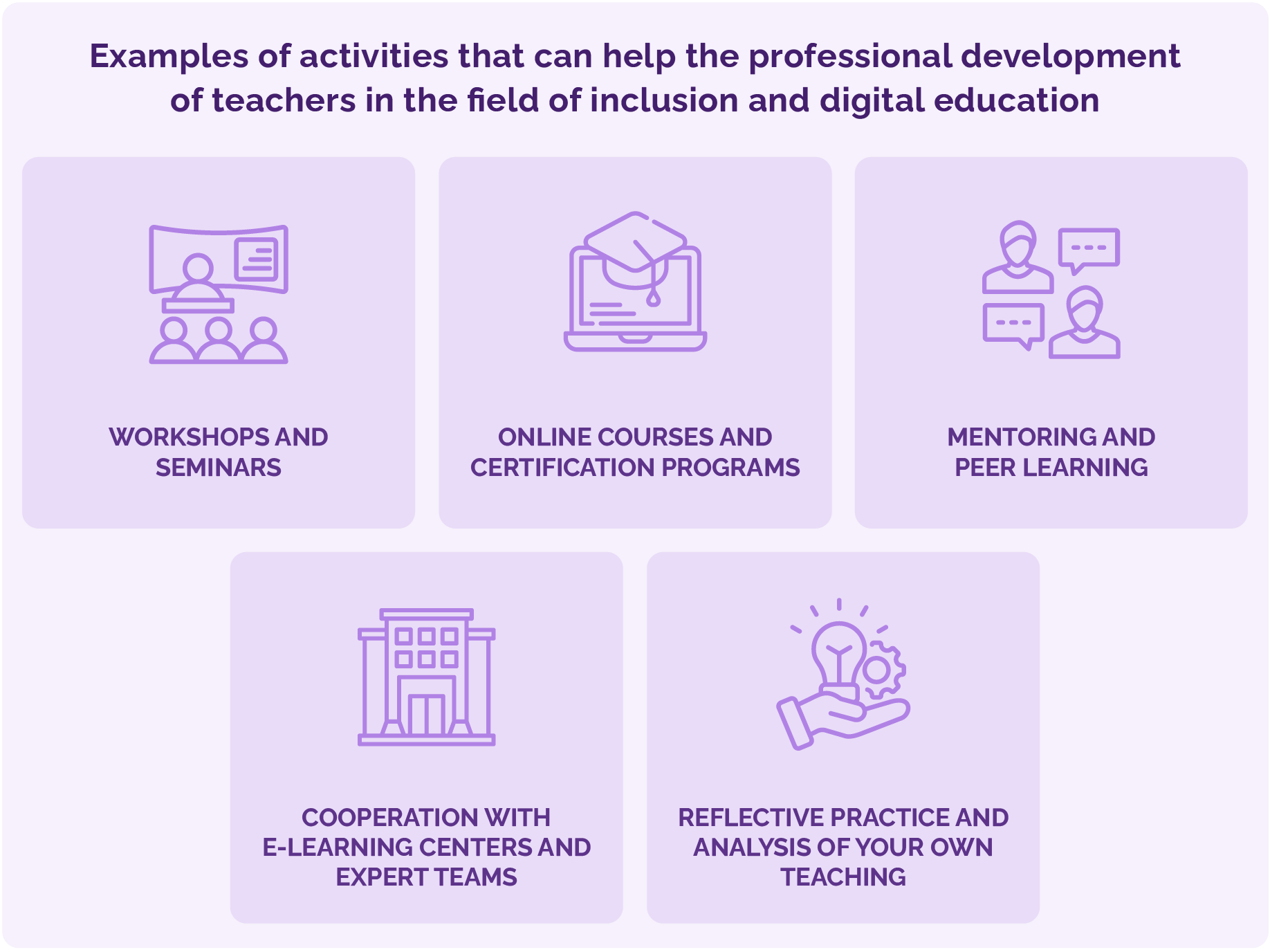
Such development involves a wide range of activities, from workshops and online courses to access to educational materials, guides, and practical examples of good practice. Particularly valuable are forms of mentoring and peer learning, where teachers share experiences and jointly find solutions to teaching challenges. This builds a sense of community and mutual support, which contributes to the quality of the teaching process and increases teachers' motivation to apply inclusive approaches.
Education should not be focused solely on technical skills in using platforms and digital tools. An equally important aspect is the development of pedagogical and ethical sensitivity. Teachers need to understand the diverse needs of students, recognise the barriers faced by vulnerable groups, and develop practices that promote equity and accountability. This builds trust and reduces the risks of digital exclusion.
Institutions also play a role in the professional development of teachers. E-learning centres, instructional designers, and quality assurance teams should provide expert support in the design and delivery of courses. Such an institutional framework allows inclusion to not remain at the level of individual enthusiasm of individual teachers, but to become a systematic and strategic goal of higher education. Professional development thus becomes the foundation on which to build a culture of inclusion, lasting, sustainable, and focused on all students.
Examples of activities that can help the professional development of teachers in the field of inclusion and digital education:
7. Literature
- Universal Design for Learning. Faculty of Humanities and Social Sciences, University of Zagreb, Office for Students with Disabilities. https://prilagodba.ffzg.unizg.hr/?p=498
- Guidelines for students with mental disorders and chronic illnesses. University of Zagreb. https://www.unizg.hr/fileadmin/rektorat/Studiji_studiranje/Podrska/SSI/Smjernice_postupanja_za_studente_s_psihikim_smetnjama_i_kronicnim_bolestima.pdf
- Guidelines for equalizing study opportunities for people with dyslexia. University of Zagreb. https://www.unizg.hr/fileadmin/rektorat/Studiji_studiranje/Podrska/SSI/smjernice_disleksija.pdf
- Guidelines for ensuring the accessibility of teaching materials for e-learning. University of Zagreb. https://www.unizg.hr/fileadmin/rektorat/Studiji_studiranje/Podrska/SSI/Smjernice_za_osiguravanje_pristupacnosti_nastavnih_materijala.pdf
- Teaching and learning outcomes. University of Zagreb. https://www.unizg.hr/fileadmin/rektorat/Studiji_studiranje/Podrska/SSI/Izvodj_nastave.pdf
- Guidelines for ensuring digital accessibility. CARNET. https://www.carnet.hr/pristupacnost/
- Digital accessibility of teaching materials for a better learning experience. Online course by Srce. https://www.srce.unizg.hr/edu/primjena-e-ucenja-u-obrazovnom-procesu/oblikovanje-digitalnog-sadrzaja/dig-pristup
- INCLUSIVE EDUCATION - UNIC teaching guide for university educators. UNIC teaching guide for university educators. https://unic.eu/storage/app/media/ctl/TeachingGuides/UNIC%20Teaching%20Guide%20IE.pdf
- Strategy for the Development of Student Support at the University of Zagreb from 2013 to 2025. University of Zagreb. https://www.unizg.hr/fileadmin/rektorat/O_Sveucilistu/Dokumenti_javnost/Dokumenti/Strateski_dokumenti/Izvjesca/Strategija_razvoja_podrske__studentima.pdf
Background Colour
Font Face
Font Size
Text Colour
Font Kerning
Image Visibility
Letter Spacing
Line Height
Link Highlight
Paragraph Width
Text Alignment