Creating a successful virtual learning environment
| Site: | Loomen za stručna usavršavanja |
| Course: | Planning and Implementation of Online and Hybrid Teaching |
| Book: | Creating a successful virtual learning environment |
| Printed by: | Gost (anonimni korisnik) |
| Date: | Saturday, 24 October 2026, 2:39 PM |
Description
In this activity, you will learn more about the concept of a virtual educational environment as a structured digital space designed to support learning or teaching at a distance.
1. Introduction
A virtual learning environment is a structured digital space designed to support distance learning and teaching. Such a space is not just a place to store educational materials, but an integrated system that integrates various tools for content delivery, organisation of educational activities, monitoring of student progress, communication between participants, and evaluation of learning outcomes. By using various functionalities such as forums, quizzes, video lectures, collaborative learning tools, and automatic and manual assessment systems, a virtual environment allows teachers to plan and implement educational processes in a structured way, while providing students with flexibility, autonomy, and access to learning regardless of physical location.
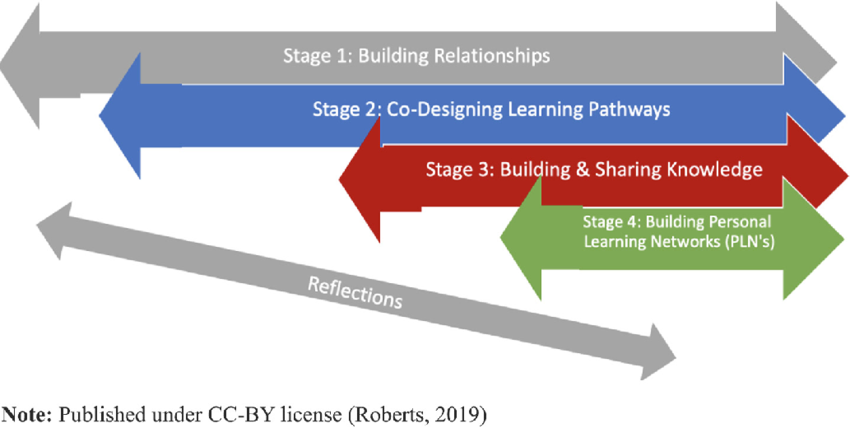
OLDI (Open Learning Design Intervention) model is a useful framework authored by Verena Roberts, which recognises four phases: building relationships, jointly shaping the learning path, creating and sharing knowledge, and creating personal learning networks. The OLDI approach allows educators to iteratively develop and adapt virtual environments based on feedback and real-world student experiences. More information is available at the link.
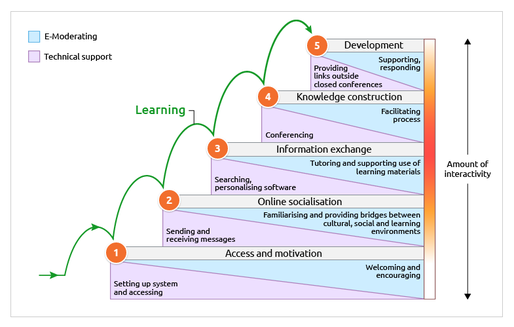
It is also useful to consult Gilly Salmon's five-stage model, which is based on the idea that if online learning is to be successful and stress-free, learners need to be supported through a structured developmental process. The five-stage model provides a framework or step-by-step support for a structured and time-phased programme of e-activities. The five-stage model envisages strong support and development for learners at each stage of their learning journey through the online learning process:
- approach and motivation
- online socialisation
- information exchange
- knowledge building
- development.
Each of the phases consists to some extent of two important components: e-moderation and technical support, with an increasing amount of interactivity from the first, lowest step, or the approach and motivation phase, all the way to the last, highest step of development.
Be sure to watch the short video in which author Gilly Salmon explains her 5-stage model.
2. Pedagogical aspects of successful virtual learning
A successful virtual learning environment does not depend solely on technical solutions, but on a carefully designed pedagogical approach that activates students and encourages them to participate, collaborate, and reflect. The key is the difference between simply transmitting information and creating an authentic learning experience that engages students on multiple levels.
This includes creating stimulating activities that develop critical thinking, encourage dialogue between participants, and enable students to apply the knowledge gained in different contexts. In this sense, a successful virtual educational environment is shaped as a dynamic and interactive space where technology serves as a means, not an end.
You can see examples of digital tools related to individual pedagogical aspects of successful virtual learning below.
Maintaining student engagement and motivation
To maintain motivation, tools that allow for immediate interaction and feedback can be used. For example, H5P allows for the creation of interactive content within Moodle, such as quizzes, timelines, and word guessing games. Scoring and badge systems like Moodle Badges can be used to gamify learning, and tools like Mentimeter or Kahoot! introduce game elements into the classroom and encourage a competitive spirit. Regular weekly forums, automated notifications, and personalised comments on assignments further strengthen the sense of involvement and progress.
Developing a sense of presence and social inclusion
To encourage social presence, Zoom, BigBlueButton, or Microsoft Teams can be used for holding regular synchronous meetings. Also, asynchronous tools such as forums in Moodle LMS or Padlet allow students to share opinions, videos, and reflections at their own pace. The use of virtual group work rooms and structured assignments in smaller groups, such as in Google Docs or Miro, further encourages a sense of belonging and collaboration among students.
Adapting content and activities to different student needs
By using tools for creating accessible materials, such as Microsoft Sway or Read&Write, the teacher can provide multi-channel access to the content (text, sound, video, visualisations). Moodle allows conditional unlocking of resources and activities, making it easier to personalise your learning journey. Also, including transcripts and subtitles for videos on YouTube or Panopto increases accessibility. Format conversion tools, such as SensusAccess, can help students with reading disabilities.
Evaluation and monitoring in an online context
Digital assessments can be effectively conducted through the Moodle activity Test, with the possibility of random question generation, time limits, and automatic grading. Interactive activities of the H5P type, such as Dialogue Cards, Dictation, Interactive video, and many others, enable simultaneous acquisition, repetition, and evaluation. For formative assessment, Google Forms or Edpuzzle interactive video quizzes can be used. The learning analytics dashboard in the Moodle LMS gives educators insight into student progress, engagement, and early signs of risk. Turnitin can be used to provide detailed feedback for analysing the authorship of submitted student papers. Rubrics in Moodle LMS can be used in numerous activities for transparent and uniform evaluation according to pre-defined and set criteria.
Digital competences of teachers and students
To build or improve students’ digital competences, it is useful to introduce mandatory introductory courses, such as Digital Literacy for Students, which can cover topics such as basic skills in using digital tools and learning platforms, including file management, online safety, academic integrity, and the basics of digital communication. It could also cover the application of collaborative tools, effective searching and evaluating sources, and the use of learning systems such as LMSs. A useful supplementary resource for more information on students’ digital literacy can be found at the link. On the other hand, frameworks such as DigCompEdu offer clear frameworks and self-assessment tools for teachers.
3. Conclusion
Creating a successful virtual learning environment requires careful planning, thoughtful application of pedagogical models, and continuous adaptation to student needs. Key factors such as clarity of course structure, active student involvement, availability of support, and effective use of technology collectively contribute to a quality learning experience. Examples of these are the models presented in the Introduction to Instructional Design Methods section, planning activities in accordance with the selected model, and application of appropriate tools, examples of which are listed in the Pedagogical Aspects of Successful Virtual Learning section.
For higher education institutions, the development of a virtual environment means not only technical modernisation, but also the empowerment of teachers, the building of a learning community, and ensuring educational inclusivity. A quality e-course does not stem from the tools themselves, but from their purposeful and pedagogically based application in the service of students and educational goals.
Background Colour
Font Face
Font Size
Text Colour
Font Kerning
Image Visibility
Letter Spacing
Line Height
Link Highlight
Paragraph Width
Text Alignment