Independent exploration of resources in Moodle and external digital tools
| Site: | Loomen za stručna usavršavanja |
| Course: | Learning Design |
| Book: | Independent exploration of resources in Moodle and external digital tools |
| Printed by: | Gost (anonimni korisnik) |
| Date: | Monday, 2 November 2026, 4:38 PM |
Table of contents
- 1. Introduction
- 2. Digital resources and tools in Moodle
- 3. External digital tools suitable for integration into Moodle
- 4. Aligning digital tools with learning outcomes and the learning design
- 5. Criteria for selecting a digital tool
- 6. Conclusion
- 7. Questions for self-assessment and practical application
- 8. Literature
1. Introduction
You have developed a learning design for a specific course in accordance with the principles and some of the models of learning design. For example, learning design based on the Balanced Learning Design Planning (BDP) model and tool enables the planning of educational activities that are aligned with learning outcomes, pedagogical methods, and types of resources.
After transferring the BDP learning design into Moodle in the previous steps, or after organising the course based on a learning design created using another model, it is now time to further enrich your activities with available digital tools and resources - both within the Moodle environment and through the integration of external tools. This material provides guidelines for this enhancement.
2. Digital resources and tools in Moodle
Moodle, as a learning management system (Learning Management System – LMS), includes a wide range of built-in functionalities that support different types of learning and modes of delivery, from asynchronous to synchronous and interactive learning. When translating your course learning design into Moodle, you have already used some of the resources listed here, but we hope you will also discover those you have not used before.
The basic resources and activities in Moodle include:
- File and folder
- Page and book
- Quiz
- Assignment
- Forum and chat
- Lesson
- Workshop
- Database
- Glossary
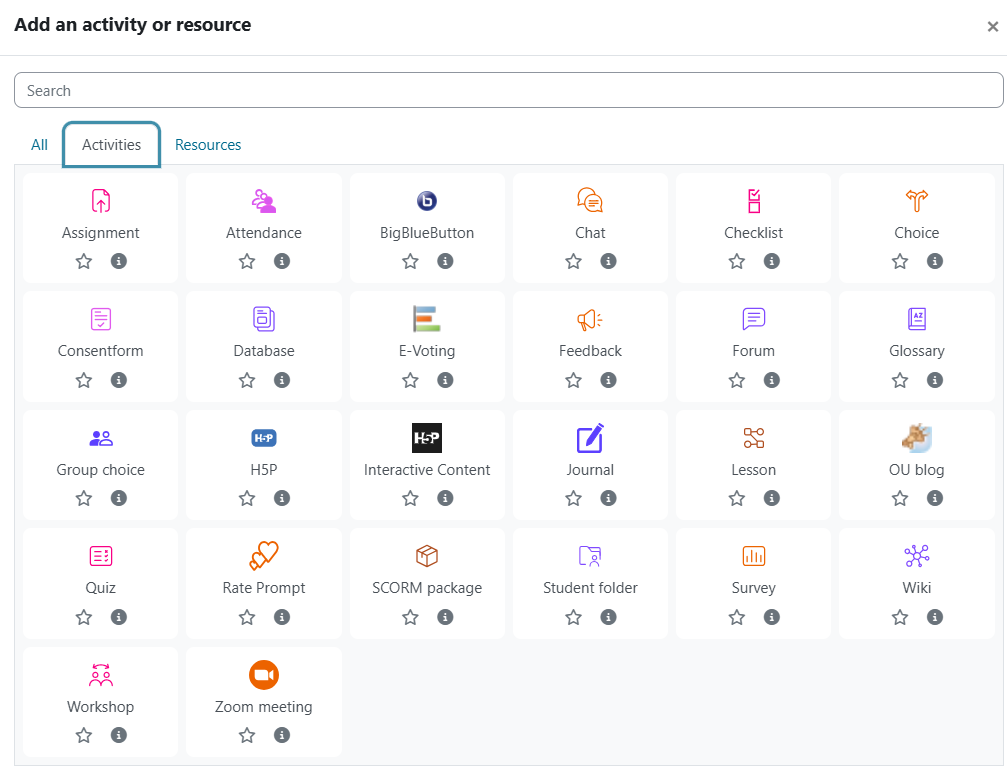
Figure 8. Activities in Moodle
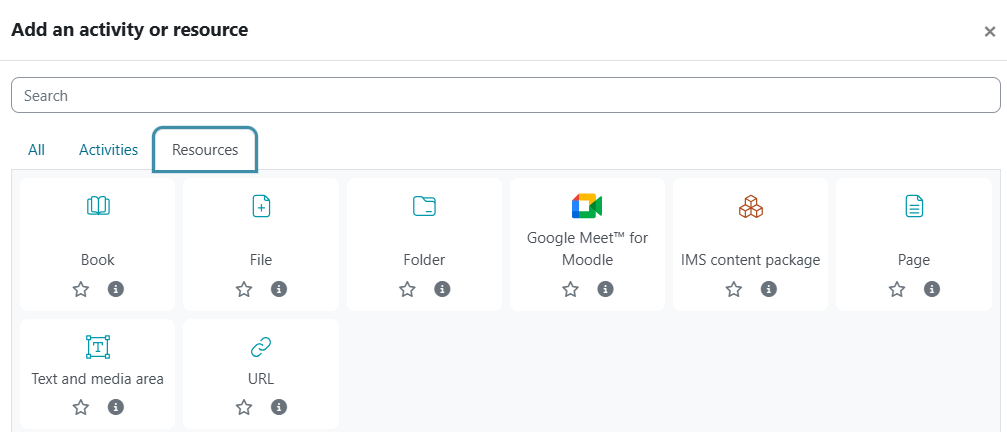
Figure 12. Resources in Moodle
More information about resources and activities in Moodle can be found in the guide in English and in the version in Croatian.
Examples of using resources and activities in Moodle:
- A forum for guided discussions involving students and instructors, or a forum for student teams working on the same project
- A quiz for checking understanding of basic concepts, used as an element of formative assessment with automatic feedback
- An assignment for reflective tasks such as essays and research reviews, assessed based on defined criteria
- A workshop for assessment, self-assessment, and peer assessment of complex tasks such as project outcomes, evaluated using a rubric
3. External digital tools suitable for integration into Moodle
In addition to the tools available within Moodle, it is also possible to integrate external tools into Moodle that extend the functionalities of learning and teaching.
Artificial intelligence–based tools
Today, a particularly important role is played by learning and teaching tools based on generative artificial intelligence. An overview of some of these tools and their descriptions can be found, for example, on the website AI for Education . When using such tools, it is important to consider their benefits and the need to systematically familiarise students with the possibilities of artificial intelligence (Divjak et al., 2025). On the other hand, risks arising from ethical aspects (data collection and processing) must also be taken into account, as well as the risk of excessive cognitive offloading through the use of artificial intelligence, which may affect users’ abilities for critical thinking and problem-solving (Lee et al., 2025; Anderson & Rainie, 2025).
4. Aligning digital tools with learning outcomes and the learning design
When deciding to include a digital tool in your learning design, it is important to consider the following:
- the educational objectives and learning outcomes of the course (discipline-specific and generic)
- the competences developed through the use of digital tools (e.g., digital skills, collaborative skills)
- the types of knowledge being developed (e.g., declarative, procedural, metacognitive)
- the type of learning activities in the learning design (knowledge acquisition, discussion, practice, creation of artefacts, assessment)
- the selection of tools that should support the planned learning activity and contribute to the achievement of discipline-specific or generic learning outcomes.
5. Criteria for selecting a digital tool
When selecting a digital tool, use the following criteria:
- Pedagogical relevance – the tool should support pedagogical processes so that students can achieve learning outcomes more effectively and efficiently and remain motivated to learn, rather than the digital tool becoming an end in itself. When using generative artificial intelligence, it is important to assess how it affects the development of students’ cognitive abilities.
- Ease of use – the tool should be appropriate to students’ digital skills so that excessive time is not spent on mastering technical aspects instead of achieving learning outcomes. Clear instructions should be provided to support students in using the tool.
- Accessibility – students must not be placed at a disadvantage. They should not be exposed to additional costs (which would disadvantage students with fewer financial resources), so preference should be given to free tools, or the higher education institution should provide access to licensed tools for students and teachers. It is also necessary to check whether the tool is suitable for students with disabilities, if such students are part of the target population.
- Technical compatibility – digital tools should be interoperable and compatible with other tools used by the higher education institution.
- Data privacy and security – if data about students and their activities are collected, students’ informed consent must be ensured, and the higher education institution must verify compliance with legal regulations at the national (Croatian) and EU levels.
- Cost-effectiveness – the price paid by the higher education institution for the use of digital tools must be justified by the benefits. This is particularly important when introducing commercial tools.
6. Conclusion
By selecting and integrating digital tools appropriately within the Moodle environment, it is possible to significantly enhance the quality of education and student motivation, especially in today’s context where artificial intelligence is increasingly present. It is important to consider course objectives and intended learning outcomes, the target group (students), and the roles that individual activities play within the overall learning design. At this stage, the goal is to further refine the activities already transferred from the prepared learning design by making effective use of the resources and tools available in Moodle and the wider digital environment.
7. Questions for self-assessment and practical application
Self-assessment questions
-
What is the role of learning design in the context of course planning, and how is it connected to the selection of digital tools?
-
List at least three basic types of activities and resources in Moodle and explain their purpose in the learning process.
-
What are the main criteria that should be considered when selecting a digital tool (e.g., pedagogical relevance, accessibility, security)?
-
Explain the difference between internal Moodle tools and external digital tools (e.g., H5P, Padlet, Mentimeter) in terms of functionality and integration.
-
What are the benefits and potential risks of using tools based on generative artificial intelligence in higher education?
Questions for reflection and practical application
-
How would you select digital tools in your course to best support the planned learning outcomes and the types of activities in your learning design?
-
Which tool from Moodle or outside it could significantly enhance student engagement and collaboration in your teaching, and why?
-
How can you ensure that all students have equal opportunities to access and use the selected tools (technical, financial, accessibility considerations)?
-
How do you plan to inform and prepare students for the responsible and critical use of tools based on artificial intelligence?
-
If you had to assess the added value of a digital tool, what would be your criteria for success (pedagogical, technical, ethical, motivational)?
8. Literature
Anderson, Rainie. Expert Views on the Impact of AI on the Essence of Being Human. Elon University’s Imagining the Digital Future Center. April 2, 2025.
Divjak, B., Svetec, B., Horvat, H. (2025). Generative AI in mathematics education: analysing student performance and perceptions over three academic years. International Journal of Technology Enhanced Learning.
Divjak, B., Svetec, B., Vondra, P., Bađari, J., Grabar, D. (2025). Learning Design with an AI Assistant . In: Cristea, A. I., Walker, E., Lu, Y., Santos, O. C., Isotani, S. (eds), Artificial Intelligence in Education. AIED 2025. Lecture Notes in Computer Science, vol. 15877. Springer, Cham.
Lee, H.-P., Sarkar, A., Tankelevitch, L., Drosos, I., Rintel, S., Banks, R., & Wilson, N. (2025). The impact of generative AI on critical thinking : Self-reported reductions in cognitive effort and confidence effects from a survey of knowledge workers. In Proceedings of the 2025 CHI Conference on Human Factors in Computing Systems (CHI ’25), Article 1121, pp. 1–22. Association for Computing Machinery.
Background Colour
Font Face
Font Size
Text Colour
Font Kerning
Image Visibility
Letter Spacing
Line Height
Link Highlight
Paragraph Width
Text Alignment