The Role of Licenses in Knowledge Transfer
| Site: | Loomen za stručna usavršavanja |
| Course: | Open Education and Open Science |
| Book: | The Role of Licenses in Knowledge Transfer |
| Printed by: | Gost (anonimni korisnik) |
| Date: | Monday, 2 November 2026, 10:33 AM |
1. Introduction
The following links and documents are available in Croatian only. Participants may use free AI-powered translation tools to access the provided materials.
An open license is a way for a copyright holder (the author or another rights holder) to authorise the use of their works by the general public. It may be indicated on the work itself or at the place where the work is distributed. The most well-known open licence is the Creative Commons (CC) licence, although other licences also exist, such as the GNU General Public License (GPL), the MIT Licence, and the Apache Licence. These licences are most commonly applied to software and other digital products, allowing their free use, modification, and distribution.
For teachers, researchers, and students, Creative Commons (CC) licences represent a key tool for the effective management and sharing of knowledge in a digital environment. Information technologies offer significant opportunities for accessing and disseminating content, but they also introduce challenges related to the protection of intellectual property. CC licences offer a simple and flexible way to regulate the use of digital materials, ensuring that authors retain control over their work while users understand the exact terms of use.
Higher education institutions rely heavily on the rapid exchange of information and content, as well as on openness, ranging from teaching materials and scientific articles to research data and student work. In this context, CC licences are essential for navigating the complex landscape of intellectual property in the digital age.
They enable authors to clearly indicate how their works may be used – whether they may be shared, adapted, or used for commercial purposes. This facilitates access to and sharing of educational resources for students and teachers, as well as the dissemination of research results among scientists, thereby encouraging collaboration and faster development.
Using CC licenses, authors can choose the level of protection that best suits them, ensuring they always receive attribution for their authorship (a moral right), even if they allow broad use of their work.
CC licenses also provide a transparent framework for lawful use. They help prevent unauthorised copying while simultaneously promoting open science and access to education.
2. What are Creative Commons (CC) Licences and How Do They Work?
The following link is available in Croatian only. Participants may use free AI-powered translation tools to access the provided materials.
Creative Commons (CC) is a set of licensing agreements designed specifically to allow potential users of protected content to quickly check and obtain information regarding the conditions under which a protected work is available for use.
From the author’s perspective, CC licences are standardised agreements that allow authors to clearly define how their works of authorship may be used in a digital environment.
They do not replace traditional copyright, but rather complement it. This means that authors retain their rights while simultaneously granting certain freedoms of use to others, thereby facilitating and accelerating the use of digital works.
There are six types of CC licences in total, each named according to its key elements that define the rights and obligations of users. All of them share a common element: Attribution (BY), which means it is always mandatory to credit the author of the work. CC licence modules allow for the distribution, modification, and adaptation of the work while naming the original author (BY) in several forms – further sharing as a non-commercial work (NC), sharing without adaptation (ND), sharing under the same conditions as the original work (SA), or under other conditions.
More specifically, the differences between licences arise from combinations of the following three elements:
- NoDerivatives (ND) – modifications or adaptations of the work are not permitted
- NonCommercial (NC) – the work may be used only for non-commercial purposes
- ShareAlike (SA) – if the work is adapted, the new version must be licensed under the same terms as the original.
3. CC Licence Models
By combining these elements, specific CC licences are created that allow authors to precisely define the conditions under which their works may be used, as shown in the following table.
The same table also includes CC0 as a tool for waiving copyright, alongside the six CC licence models (Source).
Table 1: CC licence models
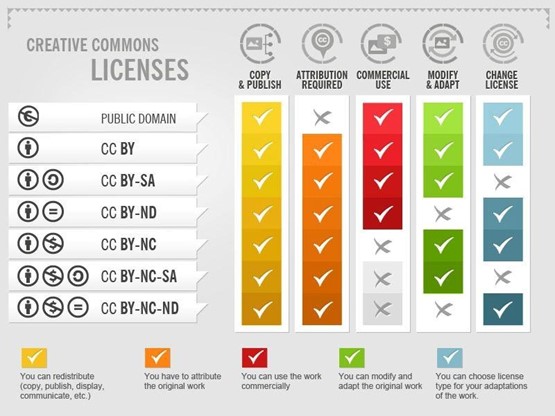
Figure 1: Adapted from Wageningen University & Research. (n.d.). What are Creative Commons licenses?
4. How to Apply a CC Licence To Your Work?
The first step is to select the appropriate CC licence for the material you wish to licence, based on the permissions you wish to grant. Once the licence has been chosen, it is important to include the relevant CC icon (or icons, depending on the licence) and a textual label on the material itself in accordance with the chosen licence.
Typical placement locations for CC licensing on different types of material include:
- on a document or presentation – on the first page, at the bottom of each page, or in a footnote
- on an image – in the image description, in a corner of the image itself (if it does not obstruct the content), or in the file metadata
- on a video – at the beginning or end of the video, or in the video description on the platform (e.g., YouTube)
- on a website – in the footer, next to the content to which the licence refers
The label usually includes:
- licence icons – symbols (e.g., CC BY for "Attribution", NC for "Non-Commercial", ND for "No Derivatives", SA for "Share-Alike"), which can be downloaded from the Creative Commons website
- full licence name – e.g., "Creative Commons Attribution 4.0 International Public Licence"
- link to the licence – it is important to include a link to the official licence text on the Creative Commons website so that users can read all the details
- author name and year – "© [Year] [Author Name]" or "Copyright [Year] [Author Name]"
Example label: © 2024 Ana Horvat, licenced under Creative Commons Attribution-ShareAlike (CC BY-SA)

Licence labels and their descriptions can be found on the Creative Commons website.
Below is a list of labels for different types of licences.
5. Self-Assessment and Reflection Questions
- If the goal is the maximum dissemination of educational or scientific content and works, while encouraging adaptation and reshaping for all purposes, which licence should be chosen (CC0, CC BY, or CC BY-SA) and why is that specific licence the most appropriate for achieving that goal?
- The CC BY-ND licence allows for the free use of content and works, but strictly prohibits modifications. When and why might it be important for an author in the academic or educational community to retain this clause (NoDerivs)?
- The CC BY-NC licence is often applied to protect against commercial misuse. Why do you think restricting commercial use (NonCommercial) might hinder or prevent the dissemination of a work, and why is it considered less aligned with the fundamental principles of open education?
- In what way do Creative Commons licences complement rather than replace traditional copyright, and why is this transparent framework crucial for navigating the world of intellectual property in the digital age?
- Why is providing a link to the official licence text crucial, and why is it not enough to simply display the CC icons on the material?
Background Colour
Font Face
Font Size
Text Colour
Font Kerning
Image Visibility
Letter Spacing
Line Height
Link Highlight
Paragraph Width
Text Alignment