Figure 3. Overview of the process of creating multimedia digital educational content.
Introduction to Multimedia Learning – Theory, Principles, and Tools
| Site: | Loomen za stručna usavršavanja |
| Course: | Developing Digital Teaching Content |
| Book: | Introduction to Multimedia Learning – Theory, Principles, and Tools |
| Printed by: | Gost (anonimni korisnik) |
| Date: | Monday, 2 November 2026, 2:07 AM |
Table of contents
- 1. Introduction to Multimedia Learning – Theory, Principles, and Tools
- 2. Theoretical Basis – Mayer’s Cognitive Theory of Multimedia Learning
- 3. Key Principles of Multimedia Learning
- 4. Visual Design Rules in Multimedia Content
- 5. Examples of Multimedia Learning
- 6. Digital Tools for Multimedia Learning
- 7. Conclusion
- 8. Multimedia Design in Digital Teaching
- 9. Literature
1. Introduction to Multimedia Learning – Theory, Principles, and Tools
What is Multimedia Learning?
Multimedia learning refers to the systematic use of various media formats (text, images, audio, video, animation) to enable more effective knowledge transfer and better understanding among students. In higher education, where complex concepts are often addressed, multimedia makes it possible to present content in ways that better align with different cognitive styles and learner needs (Mayer, 2009; Clark & Mayer, 2016).
It is grounded in insights from cognitive psychology, which emphasise the limited capacity of working memory. Because of this limitation, information overload can significantly reduce the effectiveness of learning (Sweller, 1994).
2. Theoretical Basis – Mayer’s Cognitive Theory of Multimedia Learning
Richard Mayer (2001) developed the Cognitive Theory of Multimedia Learning, whose three core principles are particularly relevant for instructional design:
-
Dual-channel processing – Information is processed through two separate channels: the visual/spatial channel (images, diagrams, video) and the auditory/verbal channel (spoken words, sound).
-
Limited working memory capacity – Each channel can process only a limited amount of information at a time, which requires careful selection and organisation of content to prevent cognitive overload.
-
Active processing – Learning is not a passive process; learners must actively engage in selecting, organising, and integrating information in order to construct meaningful and lasting knowledge.
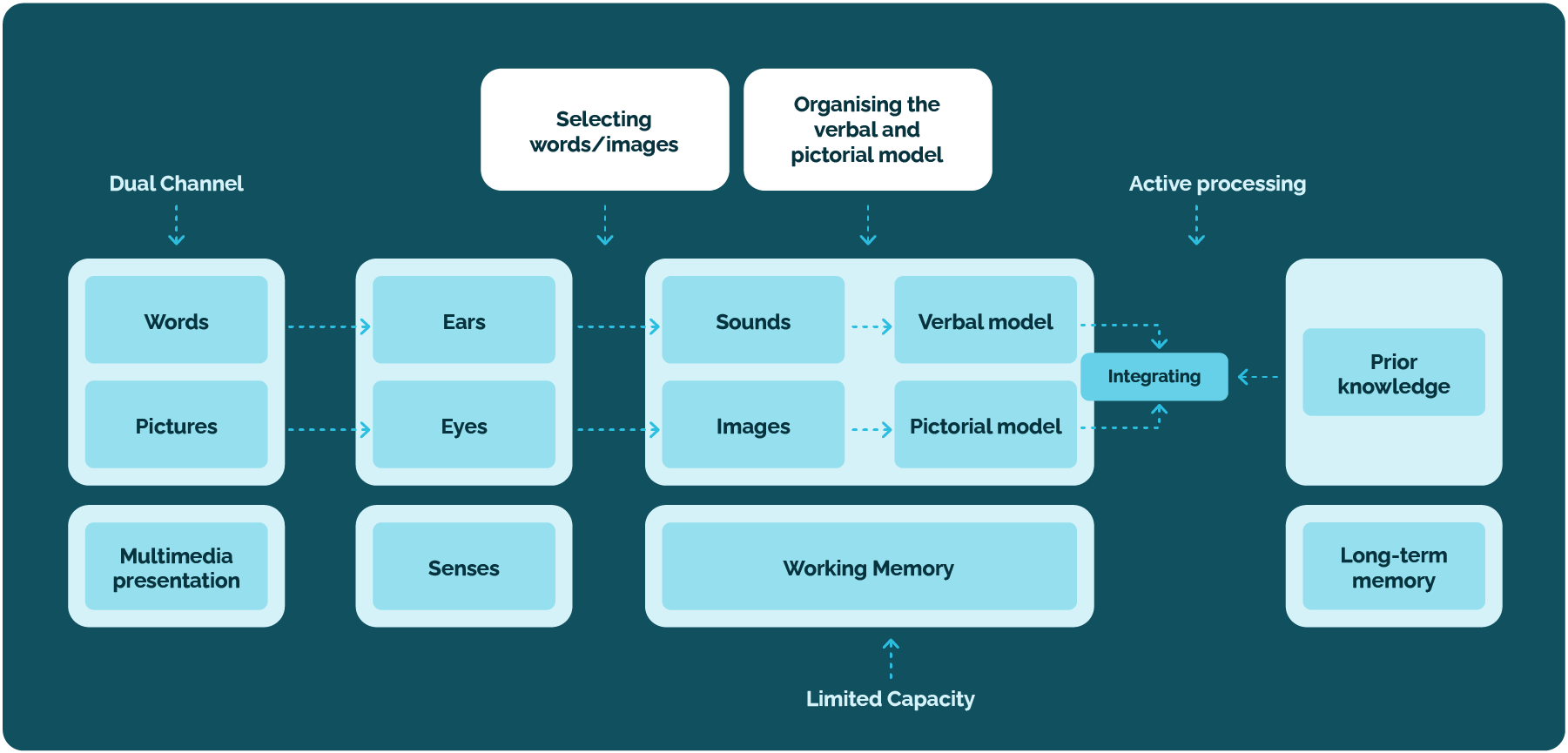
Figure 1: Mayer's Cognitive Theory of Multimedia Learning
3. Key Principles of Multimedia Learning
Table 1. Key Principles of Multimedia Learning
|
Multimedia Learning Principle |
Explanation |
Example of Application in Digital Tools |
|---|---|---|
|
Redundancy |
Avoiding the simultaneous presentation of identical content through multiple media to reduce cognitive overload. |
In presentations (Canva or PowerPoint), use short bullet points on slides while providing detailed explanations verbally. In H5P interactive presentations, avoid presenting the same information through parallel audio narration and text descriptions. In Moovly or PowToon animations, use brief on-screen text cues and provide more detailed explanations through audio narration. |
|
Segmentation |
Breaking down complex content into smaller, logically connected units to enable easier processing and understanding. |
Recording several short video clips in Loom instead of one long video lecture. Dividing complex explanations into multiple simpler, clearly structured slides in Genially. In Edpuzzle, inserting short pauses with questions or notes to allow learners time to process information before continuing. |
|
Pacing (Learner Control) |
Allowing students to control the pace of learning according to their abilities and prior knowledge |
H5P interactive video enables pausing, skipping, and rewatching specific sections of the content. Canva presentations allow students to move through slides independently, without automatic animations. H5P Course Presentation allows learners to browse slides individually, pause on specific parts of the content, and revisit previous learning steps. |
|
Cognitive Load |
Removing unnecessary information that is not aligned with learning outcomes in order to reduce the burden on working memory |
In Genially or Powtoon, use simple animations without excessive visual effects. In ThingLink, limit the number of hotspots to essential information so the visual layout remains clear and easy to understand. In BookWidgets quizzes, use consistent design and visual templates without unnecessary decorative elements. |
|
Modality |
Combining visual representations (images, diagrams) with spoken explanations instead of adding written text, to avoid overloading the visual channel |
In Edpuzzle, add voice-over comments to clarify key parts of the video instead of inserting additional text on the screen. In Loom, present diagrams or processes visually while providing spoken explanations without duplicating the same information in text form. In ThingLink, allow users to open audio hotspots with explanations of the functions of displayed elements, without cluttering the screen with text. |
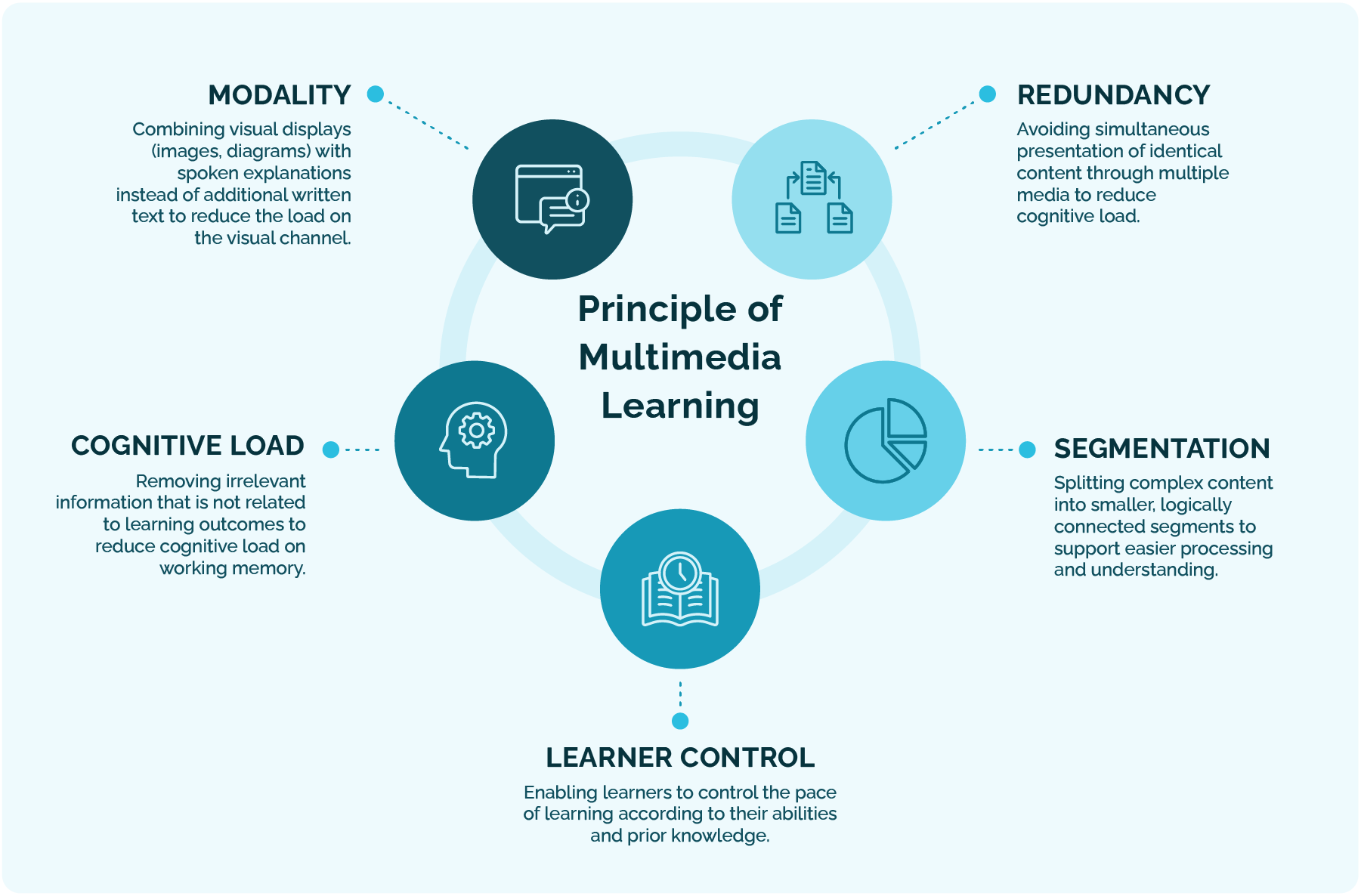
Figure 2: Principles of Multimedia Learning
4. Visual Design Rules in Multimedia Content
High-quality visual design is essential in education because it affects both the clarity of the material and student motivation. When creating multimedia content, it is important to:
-
Maintain simplicity – remove unnecessary elements that distract attention;
-
Ensure contrast – the text must be easily readable against the background;
-
Maintain consistency – use the same fonts, colours, and style throughout the material;
-
Organise content hierarchically – use headings, subheadings, and highlight key information;
-
Ensure accessibility – include captions, alt text, and adjustments for learners with visual or hearing impairments.
5. Examples of Multimedia Learning
Examples of segmentation
Examples of segmentation
6. Digital Tools for Multimedia Learning
Digital tools enable the creation of multimedia teaching materials that combine visual, auditory, and interactive elements, thereby supporting deeper understanding and increasing student engagement. Their role in teaching is particularly important in the context of cognitive principles of multimedia learning, as well-selected tools help reduce cognitive load, enable active processing, and provide control over the learning pace.
The following table presents key categories of digital tools along with their purposes, examples, and educational use cases, serving as guidance for instructors in selecting appropriate technological solutions for developing high-quality multimedia learning materials.
Table 2. Digital tools
| Tool Category |
Purpose in Multimedia Learning |
Examples of Tools |
Pedagogical Purpose |
|
Visual and Graphic Content |
Structuring and visually organising information for easier understanding |
Canva, Piktochart, Genially, Miro, Storyboard That |
Infographics, diagrams, representation of models and relationships |
|
Video Tools |
Multimodal explanation and demonstration of processes |
Loom, Moovly, Powtoon, PowerPoint |
Short video lessons, demonstrations of software and practical procedures |
|
Interactive Multimedia Content |
Active processing and monitoring of understanding during learning |
H5P, Edpuzzle, BookWidgets, ThingLink |
Interactive videos with questions, simulations, quizzes, interactive images |
|
Audio Tools |
Reducing the load on the visual channel and supporting auditory learning |
Vocaroo, Audacity |
Voice narrations, podcasts, instructions and reflections |
|
Presentation Tools |
Narrative structuring of content and guiding learners through the learning experience |
Canva, PowerPoint, Genially |
Presentations with verbal explanations, case studies, narrative approach |
|
AI Tools for Multimedia |
Accelerating creation and automating design with pedagogical oversight |
Canva Magic Design, SlidesAI, Gamma.app, Tome |
Rapid creation of visuals, presentations, and content drafts |
What Should Be Considered When Selecting Digital Tools?
The following aspects are needed to ensure that digital tools effectively support multimedia learning:
Alignment with Learning Outcomes
The tool must support the achievement of planned learning outcomes and match the type of knowledge being developed (e.g., conceptual, procedural).
Pedagogical Value
Key question: How does the tool contribute to learning?
Consider whether it fosters student activity, engagement, comprehension, or self-regulated learning.
Reduction of Cognitive Load
The tool should enable clear structure, focus attention on essential elements, and avoid unnecessary visual or auditory stimuli that could overload working memory.
Accessibility and Inclusiveness
The tool should support captions, alt text descriptions, and accommodations for students with visual, hearing, or motor impairments.
Technical Availability and Ease of Use
Consider installation requirements, online/offline functionality, user interface simplicity, and availability of user support.
Integration with LMS and Learning Analytics
Ideally, the tool should allow tracking of learner activities and simple content sharing within platforms such as Moodle.
Licensing and Costs
Check availability of free versions, educational licenses, and feature limitations in free-tier plans.
7. Conclusion
Multimedia learning represents a powerful tool for educators, but its effectiveness depends on the application of scientifically grounded principles of multimedia design. Careful selection of media, thoughtful visual design, clarity of the educational message, and strategic use of digital tools ensure that multimedia materials become more than a technical feature—serving instead as a meaningful vehicle for high-quality learning and the achievement of learning outcomes in line with the principles of constructive alignment.
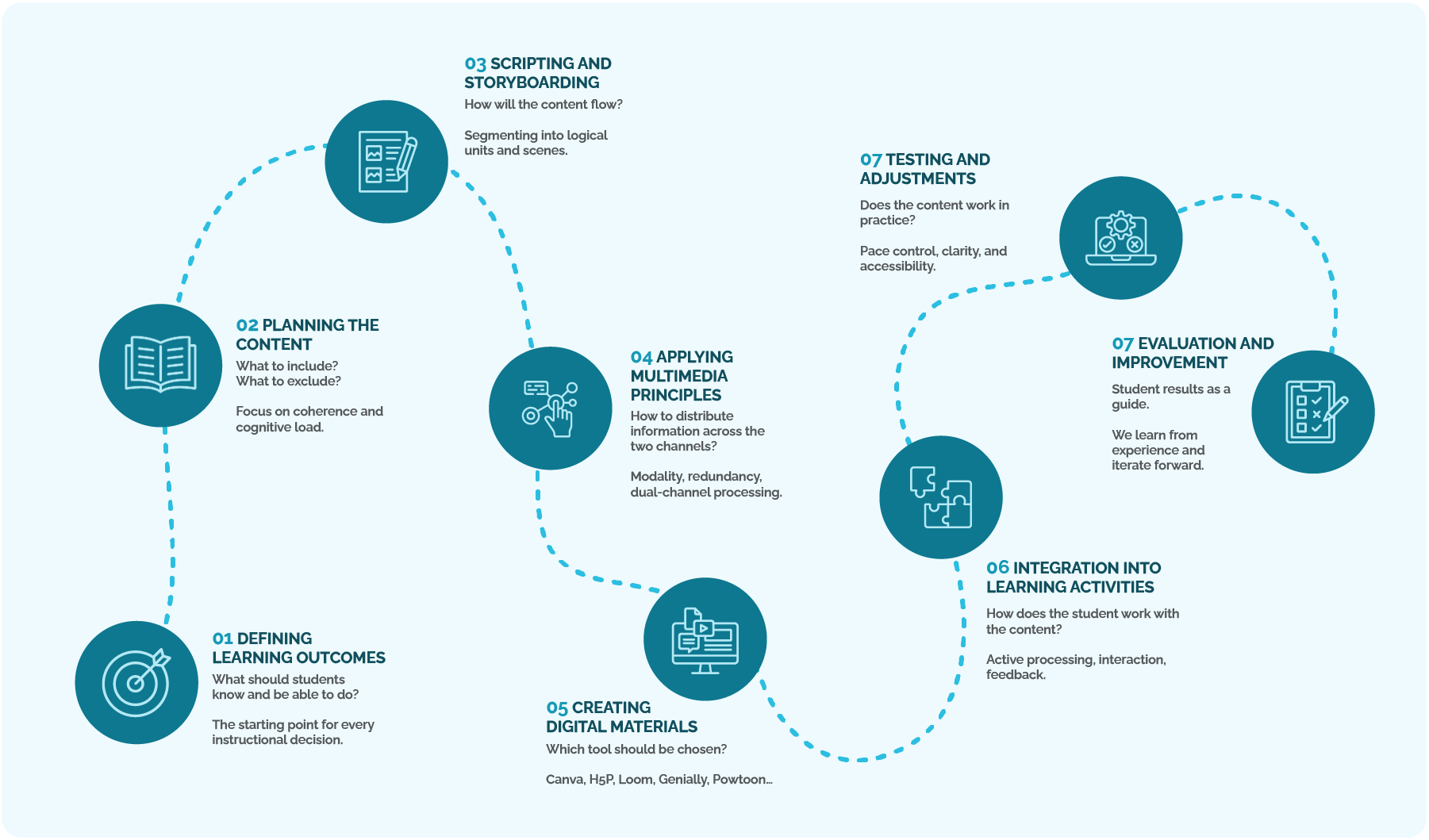
8. Multimedia Design in Digital Teaching
9. Literature
Mayer, R. E. (2009). Multimedia Learning (2nd ed.). Cambridge University Press.
Clark, R. C., & Mayer, R. E. (2016). E-Learning and the Science of Instruction: Proven Guidelines for Consumers and Designers of Multimedia Learning (4th ed.). Wiley.
Sweller, J. (1994). Cognitive Load Theory, learning difficulty, and instructional design. Learning and Instruction, 4(4), 295–312.
Background Colour
Font Face
Font Size
1
Text Colour
Font Kerning
Image Visibility
Letter Spacing
0
Line Height
1.2
Link Highlight
Paragraph Width
0
Text Alignment