Digital education brings numerous advantages, but also challenges, especially when it comes to using and sharing teaching materials. Today, teachers use images, texts, videos, and other online content on a daily basis, often without considering their legal status. This is precisely why understanding copyright and licensing has become a key competence for anyone who creates or uses digital educational resources.
Copyright and licences
| Site: | Loomen za stručna usavršavanja |
| Course: | Developing Digital Teaching Content |
| Book: | Copyright and licences |
| Printed by: | Gost (anonimni korisnik) |
| Date: | Tuesday, 3 November 2026, 12:07 PM |
1. Copyright and licences
2. Basic concepts
Copyright is part of the broader concept of intellectual property and protects an author's original works such as:
-
texts,
-
music,
-
images,
-
videos,
-
computer programs.
The author has the right to decide whether, how, and under what conditions their work may be used, published, or modified. Content protected by copyright cannot be freely used unless the author explicitly permits it or if the situation is covered by law (e.g., quoting for educational purposes, but with proper source attribution).
3. Creative Commons licences
-
-
CC BY (Attribution)
All uses are permitted, including commercial use and modifications, as long as the author is credited. -
CC BY-SA (Attribution – ShareAlike)
Use is permitted, including commercial use and modifications, but any new work must be licensed under the same terms. -
CC BY-ND (Attribution – NoDerivatives)
The work may be shared, including commercially, but not modified, and the author must be credited. -
CC BY-NC (Attribution – NonCommercial)
The work may be used and modified, but only for non-commercial purposes, with proper attribution. -
CC BY-NC-SA (Attribution – NonCommercial – ShareAlike)
Use and modification are allowed for non-commercial purposes, provided the new work carries the same licence and the author is credited. -
CC BY-NC-ND (Attribution – NonCommercial – NoDerivatives)
The most restrictive licence: the work may only be shared in its original form, without modifications, exclusively for non-commercial purposes, and with proper attribution.The Creative Commons (CC) licence system was developed to facilitate the sharing of knowledge. These are standardised permissions that allow authors to clearly specify how others may use their works. Creative Commons licences are based on four core conditions that can be combined to create different licence types:
-
BY (Attribution) – the work may be used as long as the author is credited;
-
NC (NonCommercial) – the work may be used only for non-commercial purposes;
-
SA (ShareAlike) – any derivative works must be distributed under the same licence;
-
ND (NoDerivatives) – the work can be used but not modified or adapted.
Based on these conditions, six main CC licences exist, ranging from the most open to the most restrictive.
-
-
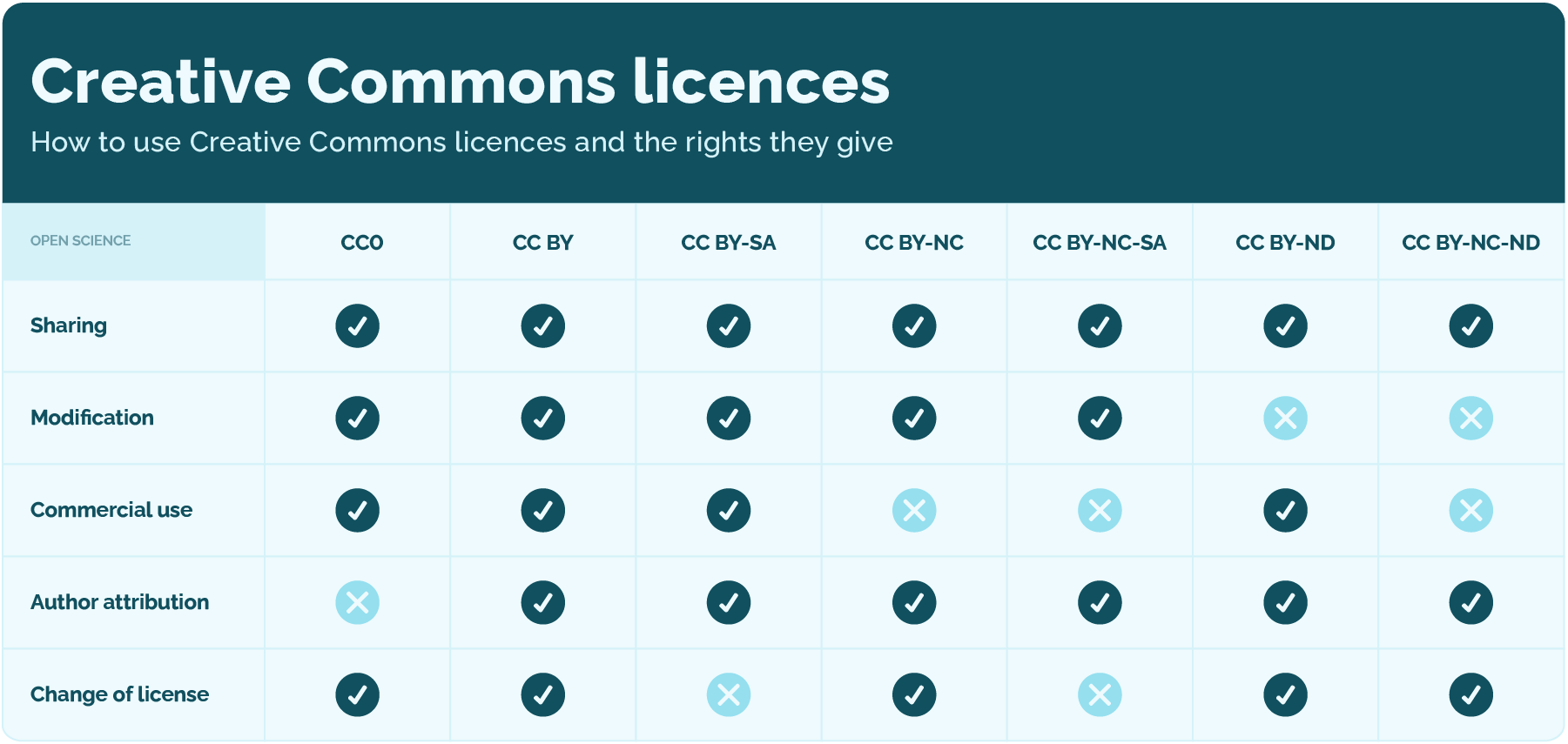
Figure 1: Creative Commons licences
4. Public domain and CC0
In addition to licences, Creative Commons also provides tools for waiving copyright:
-
CC0 (No Rights Reserved) – the author waives all rights to the greatest extent permitted by law, placing the work in the public domain so it can be used without any restrictions
-
Public Domain Mark – a label indicating that a work is already in the public domain (e.g., because the copyright term has expired).
5. Using content – what is allowed?
ChatGPT je rekao:
6. Obligation to cite sources
7. Verifying sources
In a digital environment, it is easy to encounter unreliable or false sources. When downloading content:
-
use trusted platforms,
-
check the credibility of the author and the website,
-
pay attention to the accuracy of the stated licences,
-
avoid materials without clearly specified usage conditions.
If you are unsure about the source, it is better not to use the content or to look for an alternative.
8. CC License Chooser
For your own teaching materials, it is useful to use the CC License Chooser tool.
CC License Chooser is a free online tool that helps you select the appropriate Creative Commons licence for authored works such as texts, images, videos, or presentations. It functions as an interactive guide through several simple steps.
The tool enables precise definition of the terms of use by asking the following questions:
-
Does the author want to be credited?
-
Is commercial use of the work allowed?
-
Are modifications of the work permitted?
In the end, the tool generates a ready-made licence text or HTML code that you can easily insert into your teaching material or LMS.
9. Conclusion
Background Colour
Font Face
Font Size
1
Text Colour
Font Kerning
Image Visibility
Letter Spacing
0
Line Height
1.2
Link Highlight
Paragraph Width
0
Text Alignment