Examples of summative and formative assessment supported by artificial intelligence tools and systems
| Site: | Loomen za stručna usavršavanja |
| Course: | Artificial Intelligence in Education |
| Book: | Examples of summative and formative assessment supported by artificial intelligence tools and systems |
| Printed by: | Gost (anonimni korisnik) |
| Date: | Monday, 2 November 2026, 1:17 PM |
Table of contents
- 1. Introduction
- 2. Examples of AI tools and systems
- 3. The role of the instructor in summative and formative assessment with the support of AI
- 4. Example of Copilot application in education (summative assessment)
- 5. Example: using the UI Perplexity tool in the context of formative and summative evaluation
- 6. Example of using ChatGPT in formative assessment
- 7. Example: How to generate a full test in ChatGPT
- 8. Example: Curipod for formative assessment
- 9. How can an instructor define a student's prior knowledge and context for artificial intelligence?
- 10. Example for the Mizou artificial intelligence tool
- 11. Example for the QuestionWell artificial intelligence tool
- 12. Example of integrating artificial intelligence tools and systems for formative and summative assessment
- 13. Conclusion
- 14. Literature
1. Introduction
Summative assessment is conducted at the end of a teaching cycle or part of a course to evaluate students' acquired knowledge and achievements. Examples include final exams, tests, or graded assignments.
Formative assessment occurs during the learning process and serves as feedback for both the student and the instructor. Its purpose is to identify deficiencies, assess understanding of the material, and adjust further instruction.
Artificial intelligence (AI) enables new approaches in both types of assessment:
- In summative assessment, AI tools and systems can automatically generate tests, analyse results, and assist in objective evaluation.
- In formative assessment, AI tools and systems provide personalised feedback, track progress, and adapt activities to meet students' needs.
2. Examples of AI tools and systems
Several AI tools and systems that support summative and/or formative assessment in education are available on the market, including:
-
-
An AI tool for quickly finding relevant information and generating question suggestions. It can be used to prepare questions for summative tests, assist with formative tasks, and analyse assessment results.
-
-
-
An AI tool for creating a variety of educational content, from summative assessment questions to personalised feedback in formative assessment. Instructors can generate tests, tasks, explanations, and analyse assessment results.
-
-
-
A platform that uses AI to continuously monitor and analyse student progress, providing personalised recommendations and feedback during the learning process (formative assessment).
-
-
-
An AI tool for detailed analysis of test and quiz results, enabling summative assessment with precise insight into students' areas of strength and weakness.
-
-
-
An AI platform for creating interactive learning activities that encourage active participation and provide immediate feedback, which is key to formative assessment.
-
-
-
An AI tool that helps teachers prepare questions, quickly find relevant information, and generate question suggestions. It can be used to prepare questions for summative tests, assist in formative assignments, and analyse assessment results.
-
3. The role of the instructor in summative and formative assessment with the support of AI
The instructor remains essential in preparing and delivering summative and formative assessments, as only they understand the specific needs and context of their learners. However, AI tools and systems can greatly support this process:
- Preparation: AI tools and systems, such as ChatGPT, Perplexity, and Copilot, can help instructors quickly generate high-quality questions and tasks for both summative and formative assessments.
- Delivery: Tools like Curipod and Mizou enable real-time tracking of learners’ progress and provide automatic feedback during instruction.
- Analysis and reporting: Diffit and Copilot can automate result analysis and report generation, while ChatGPT can assist in interpreting data, summarising key findings, and producing clear reports with recommendations. This saves instructors time and allows them to focus on further supporting learners.
In this way, artificial intelligence becomes a powerful ally for instructors, rather than a replacement, enabling them to spend more time on meaningful interactions and adapting classes to students’ needs.
4. Example of Copilot application in education (summative assessment)
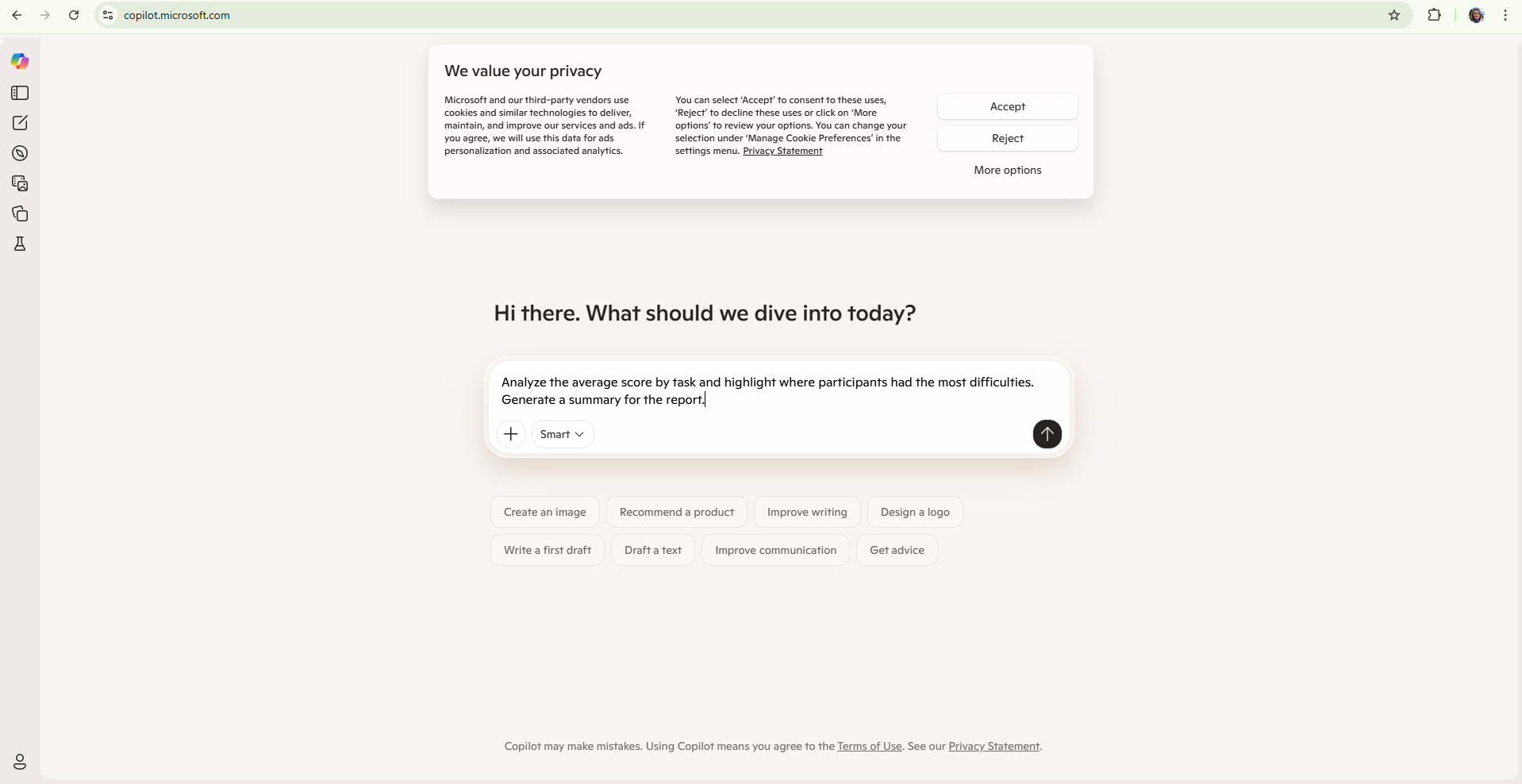
5. Example: using the UI Perplexity tool in the context of formative and summative evaluation
The instructor wants to prepare questions for the summative exam in the field of "Sustainable Development". The goal is to ensure that the questions cover current and relevant content, without taking too much time to prepare.
Start Perplexity and type the query:
"Write 5 multiple-choice questions about sustainable development with correct answers and a short explanation."
Perplexity automatically generates:
What is the goal of sustainable development?
a) Faster economic growth
b) Preserving resources for future generations (correct answer)
c) Increasing energy consumption
d) Maximising food production
Explanation: Sustainable development focuses on a balance between economic development, the environment, and society.
2–5. (additional similar questions, with answers and explanations)
The instructor then uses these questions to create exams and can adapt them to the knowledge level of the students or use them for formative quizzes during class.
What does this mean for the instructor?
- Fast creation of quality questions
- Up-to-date and accurate content with the help of artificial intelligence
- Ability to adapt to the level and needs of the participants.
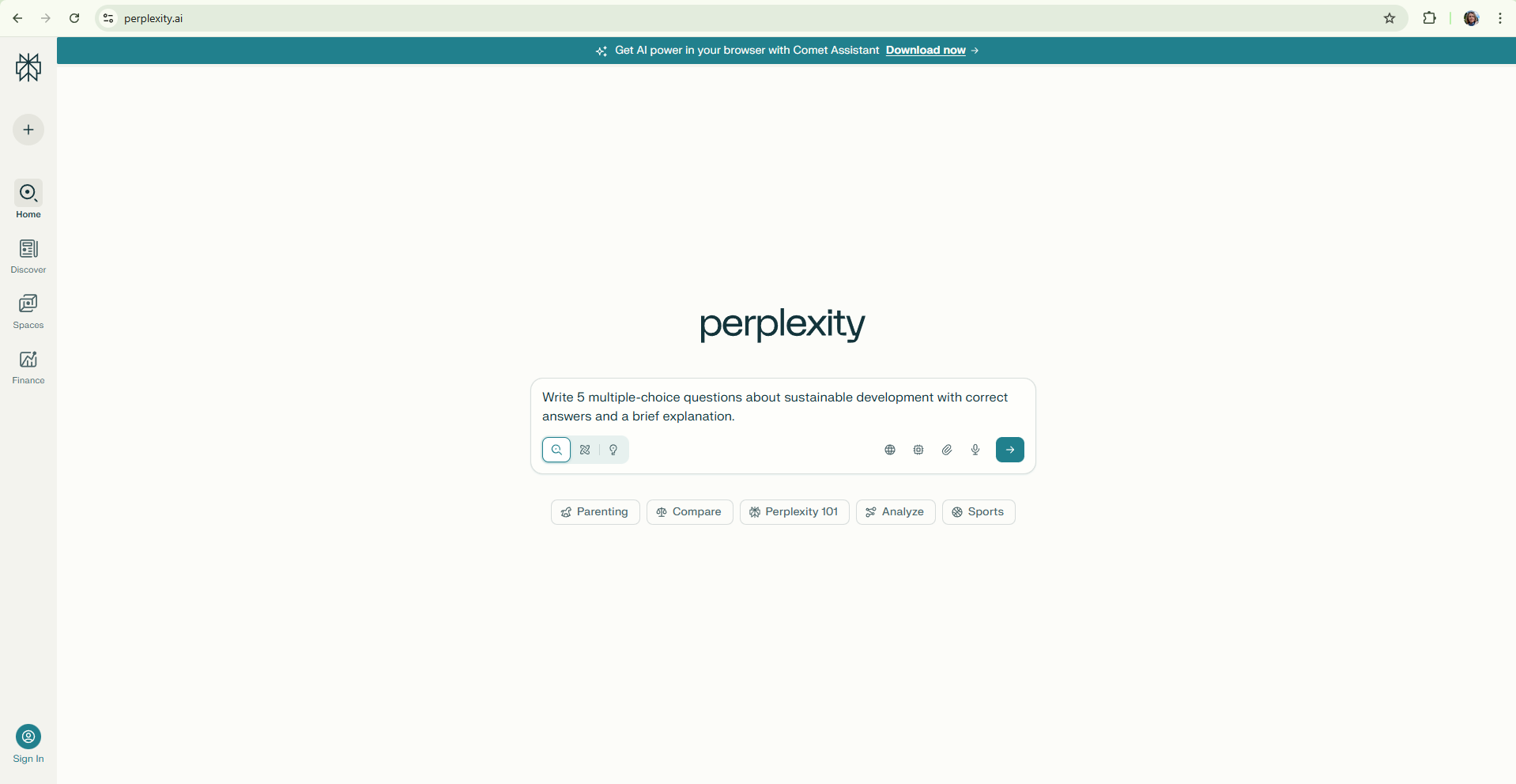
Figure. Perplexity's initial interface for generating content using artificial intelligence
6. Example of using ChatGPT in formative assessment
The instructor wants to provide personalised feedback to students after the essay. The goal is to save time while maintaining quality and an individual approach.
The instructor copies a student's essay and enters it into ChatGPT, along with the evaluation rubric, using the following prompt (picture):
"Evaluate this essay based on the following criteria: clarity of expression, argumentation, text structure, and accuracy of information. Write constructive feedback of 150 words."
ChatGPT automatically generates:
The essay demonstrates good structure and clarity of expression. The argumentation is logical, but examples that would further support the claims are missing. The introduction and conclusion are concise and effective. The topic is well-covered, but some information could be stated more precisely. We recommend that in the next version of the essay, you add at least one specific source and address the ethical aspect of the topic. This is an excellent foundation for further work!
In this way, ChatGPT helps the instructor provide quick, personalised, and constructive feedback, which encourages reflection and further learning, and saves the instructor time without sacrificing pedagogical quality.
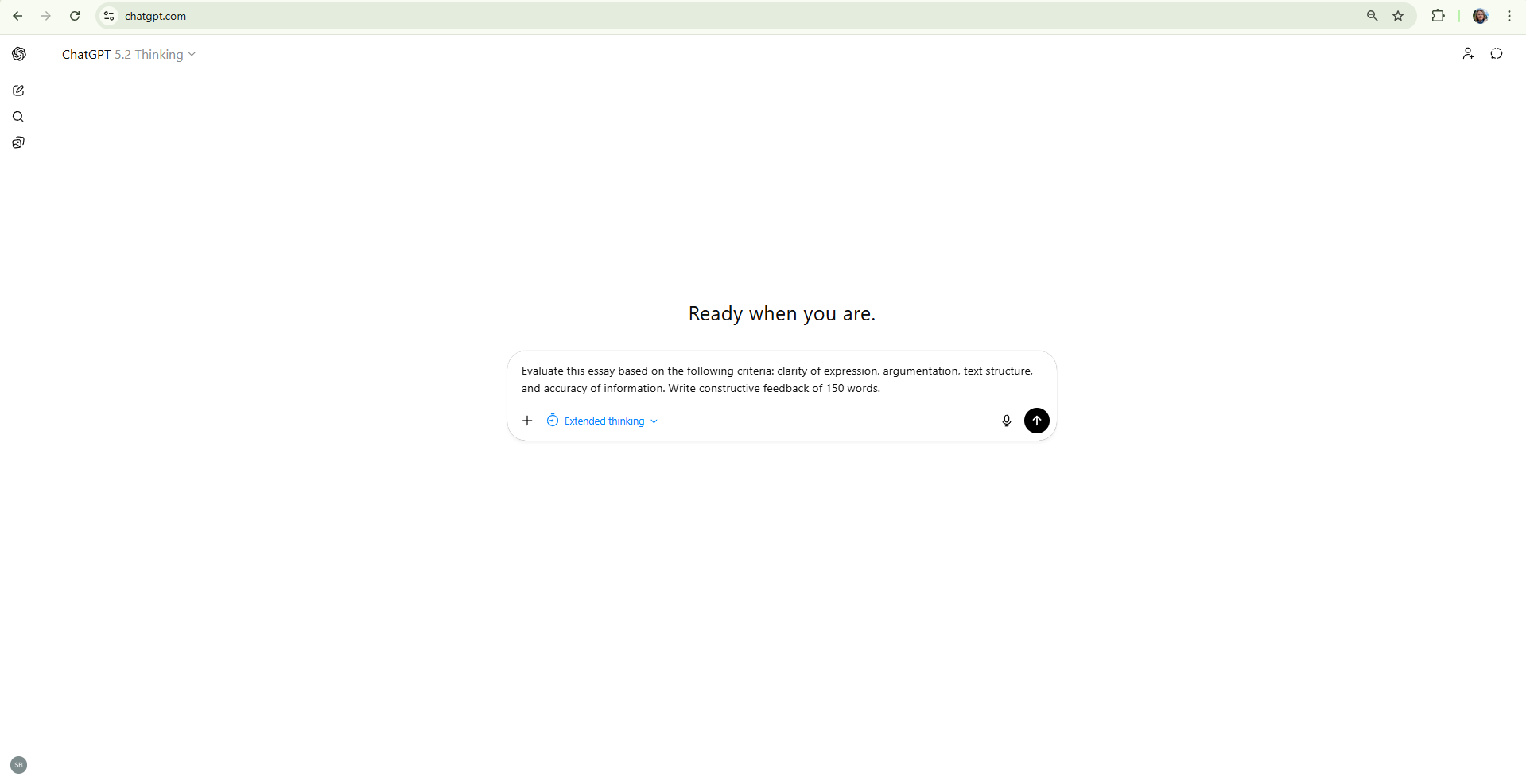
Fig. Initial interface of ChatGPT 5 (OpenAI) for generating content using artificial intelligence
7. Example: How to generate a full test in ChatGPT
The instructor defines the topic and scope of the test, such as “history of artificial intelligence” or “basics of computer networks”.
It is essential to explain in detail the characteristics of the participants and the educational context in which the test will be used. This includes the participants’ prior knowledge, age, learning objectives, and specific needs of the group. This information helps the AI system generate more appropriate questions and tasks.
The instructor then specifies the number and types of questions, for example: “Create a test with 10 questions: 5 multiple-choice, 3 short-answer, and 2 essay questions.”
The instructor also adds answer instructions, such as: “For multiple-choice questions, provide the correct answers.”
Optionally, the instructor may request explanations or an answer key to facilitate checking.
To create a test, the instructor enters the following prompt into ChatGPT:
"Please create a complete test on the history of artificial intelligence. The test should contain 10 questions: 5 multiple-choice with suggested answers and the correct answer marked, 3 short-answer questions, and 2 essay questions. For each multiple-choice question, write a short explanation of the correct answer. Adapt the test to the needs and knowledge level of the participants, taking into account their age and prior knowledge."
As a result, the instructor receives:
- A list of all 10 questions sorted by type
- For multiple-choice questions, suggested answers with the correct answer marked
- For essay and short-answer questions, clear indications of what is required
- Short explanations for multiple-choice questions to facilitate checking.
This procedure allows the instructor to quickly and efficiently create a high-quality, complete test tailored to the needs, knowledge level, and specific educational context of the participants.
8. Example: Curipod for formative assessment
Curipod is an AI tool that enables the creation of interactive quizzes, surveys, and assignments with instant feedback. It supports formative assessment and encourages active student participation during classes. Instructors use it to check understanding of the material, promote discussion, and monitor progress in real time.
Benefits for instructors:
- Allows rapid preparation of high-quality interactive assignments with minimal preparation time.
- Provides instant feedback to students, increasing engagement and motivation.
- Enables real-time progress monitoring and quick identification of areas needing additional support.
- Supports formative assessment and aids decision-making about the further course of instruction.
Although Curipod was originally developed for primary education, its simplicity and intuitive interface have led to increasing use in other educational settings. In higher education institutions, where MS PowerPoint is commonly used to create educational presentations, Curipod offers an easy transition to using AI tools in teaching.
Example of use:
The instructor logs into Curipod, selects the option to create a new activity, and enters questions related to the topic of sustainable development. They can upload their own educational content, such as a PowerPoint or PDF presentation, and turn it into an interactive lesson (Figure 1). They add questions or tasks (e.g., multiple choice, poll, open-ended question) to individual slides to encourage active participation (Figure 2). When the quiz is ready, they share a link or QR code with students, who connect via their devices (Figure 3). During the activity, Curipod displays answers in real time and automatically provides feedback on accuracy (Figure 4). Upon completion, the tool displays a summary of results and progress (Figure 5, Figure 6), allowing the instructor to see what content was understood and adapt the lesson to students' needs.
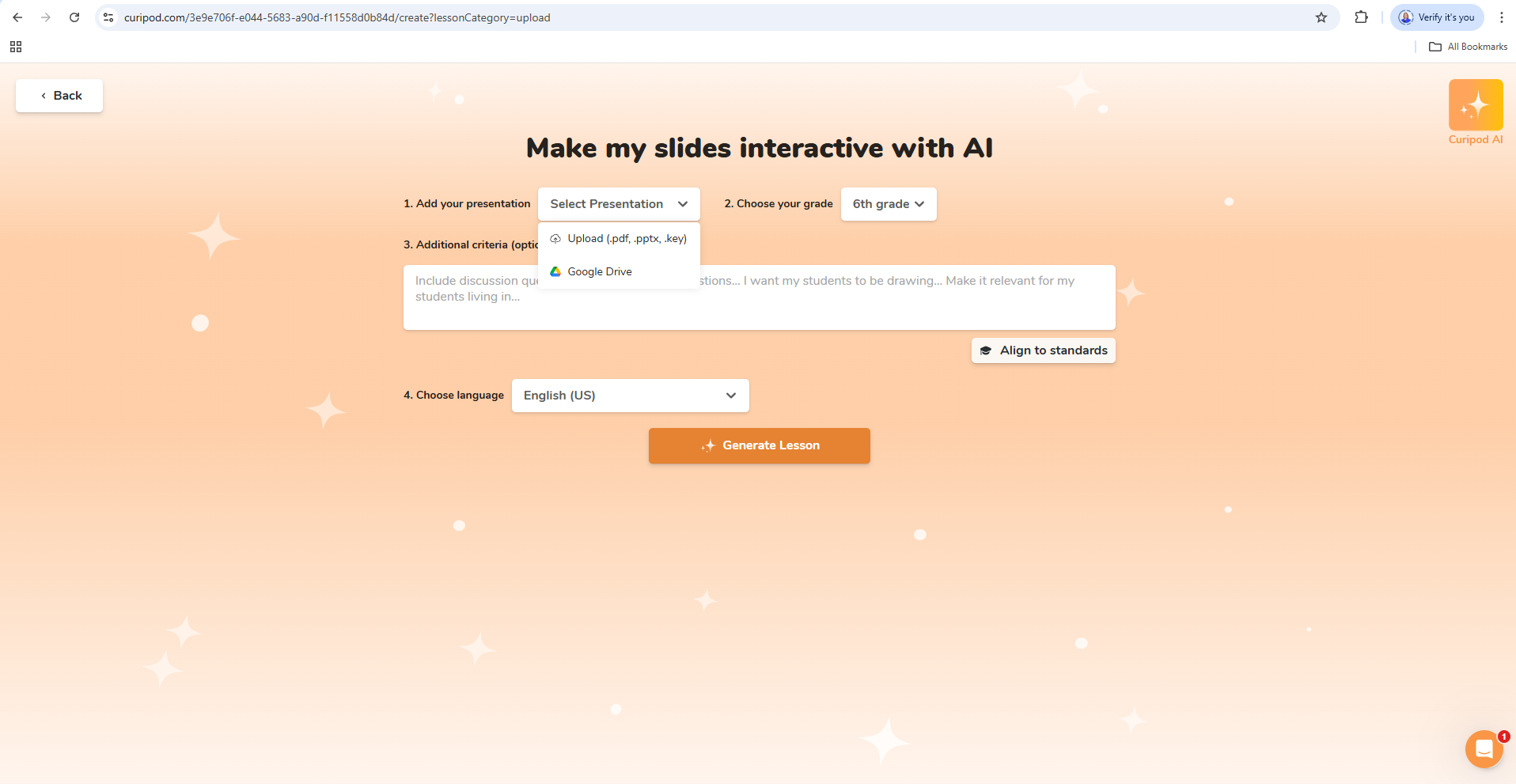
Figure 1. Curipod interface showing the option to create a new activity and upload your own educational content (PowerPoint or PDF)
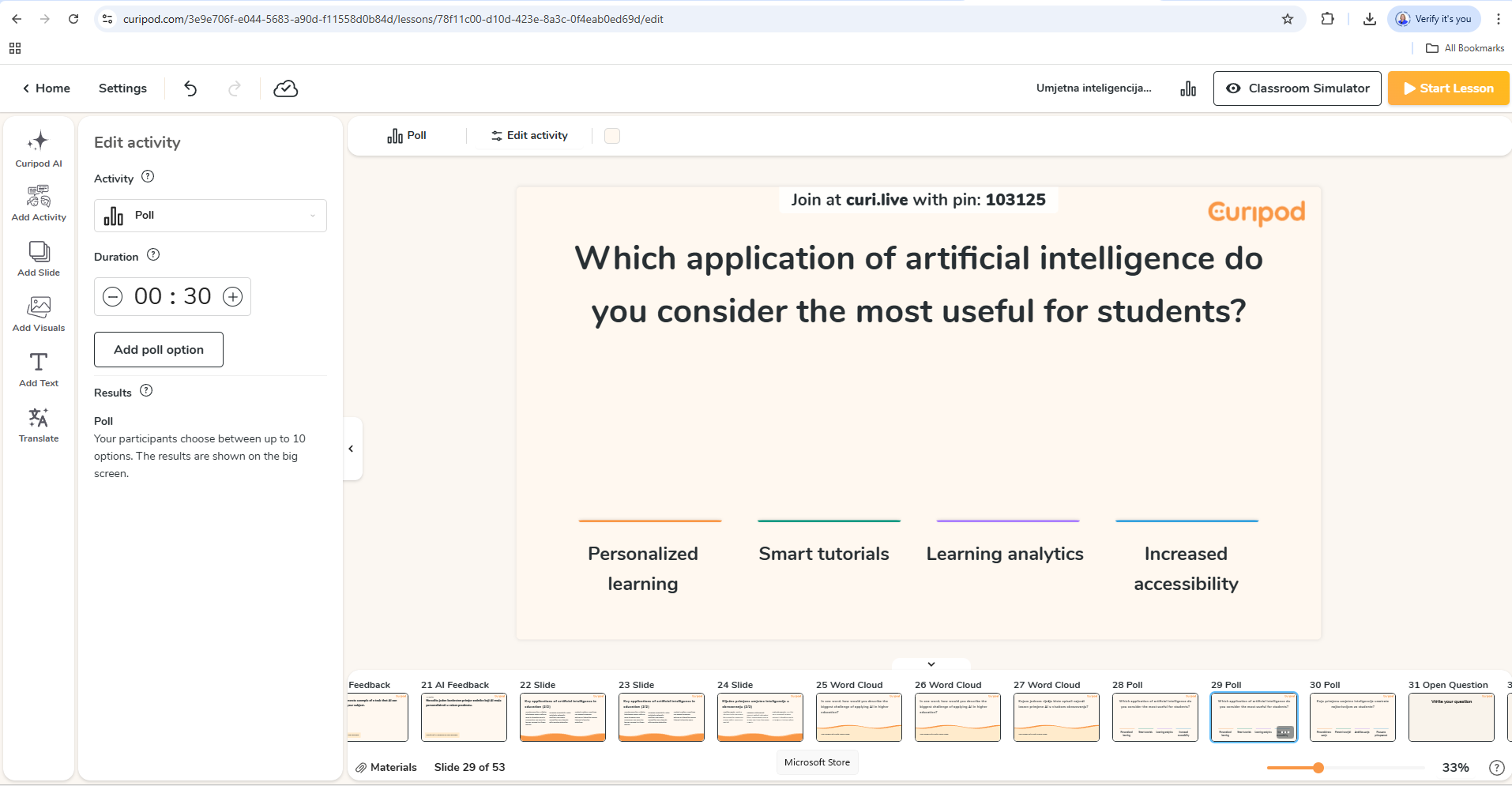
Figure 2. Adding interactive questions and tasks to individual lesson slides in Curipod
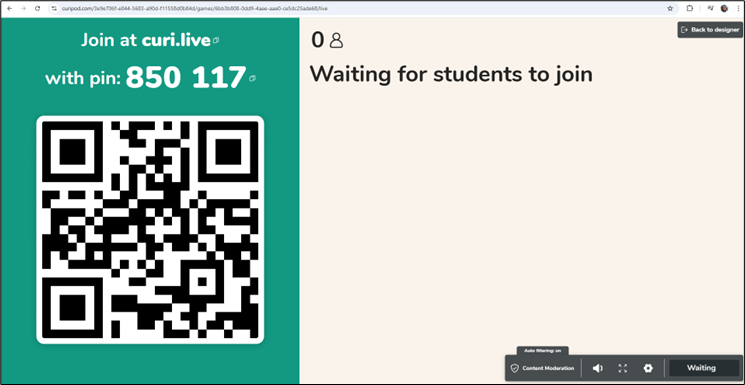
Figure 3. Generating a link and QR code for participants to access the activity via personal devices
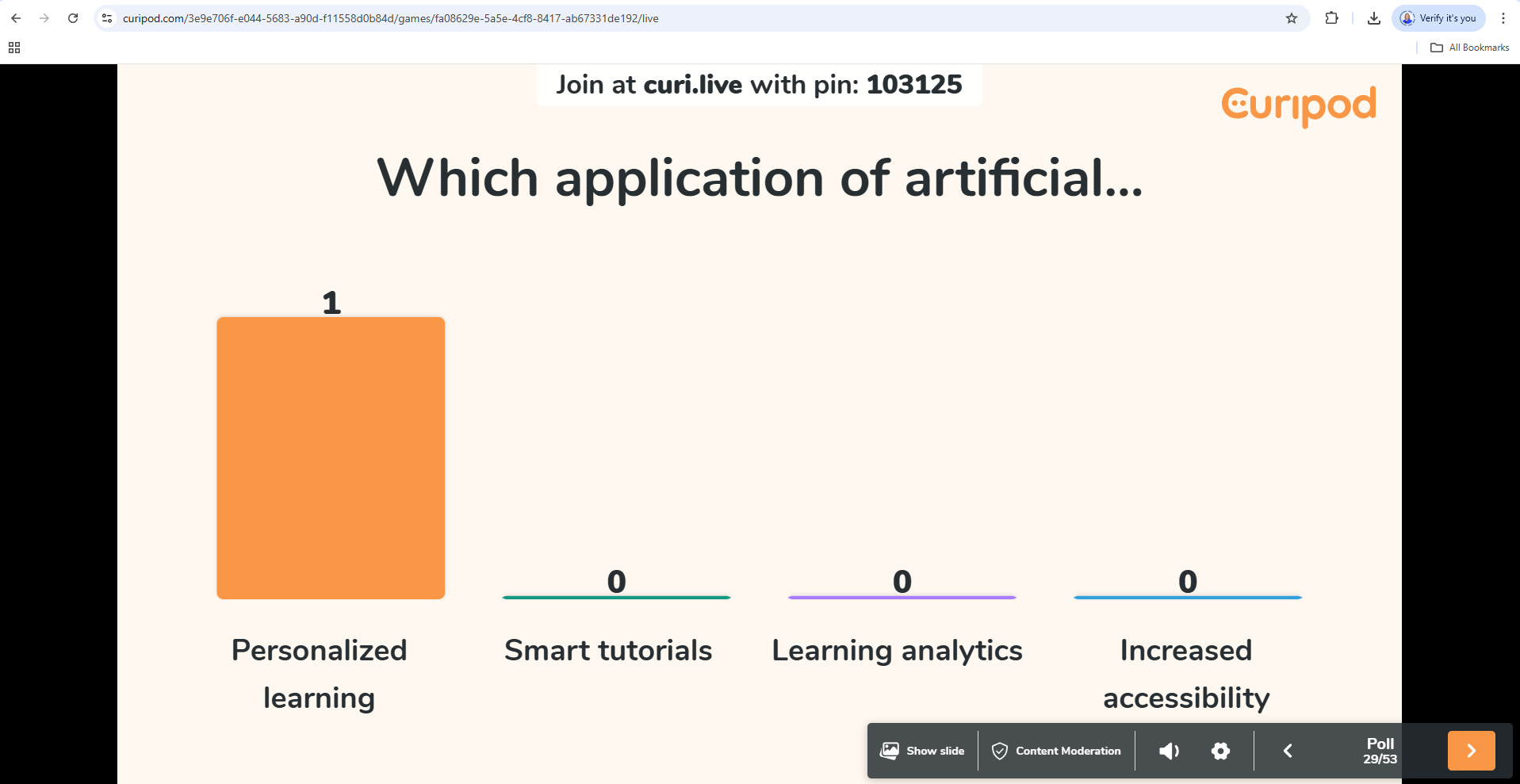
Figure 4. Real-time display of student responses and automatic feedback on response accuracy
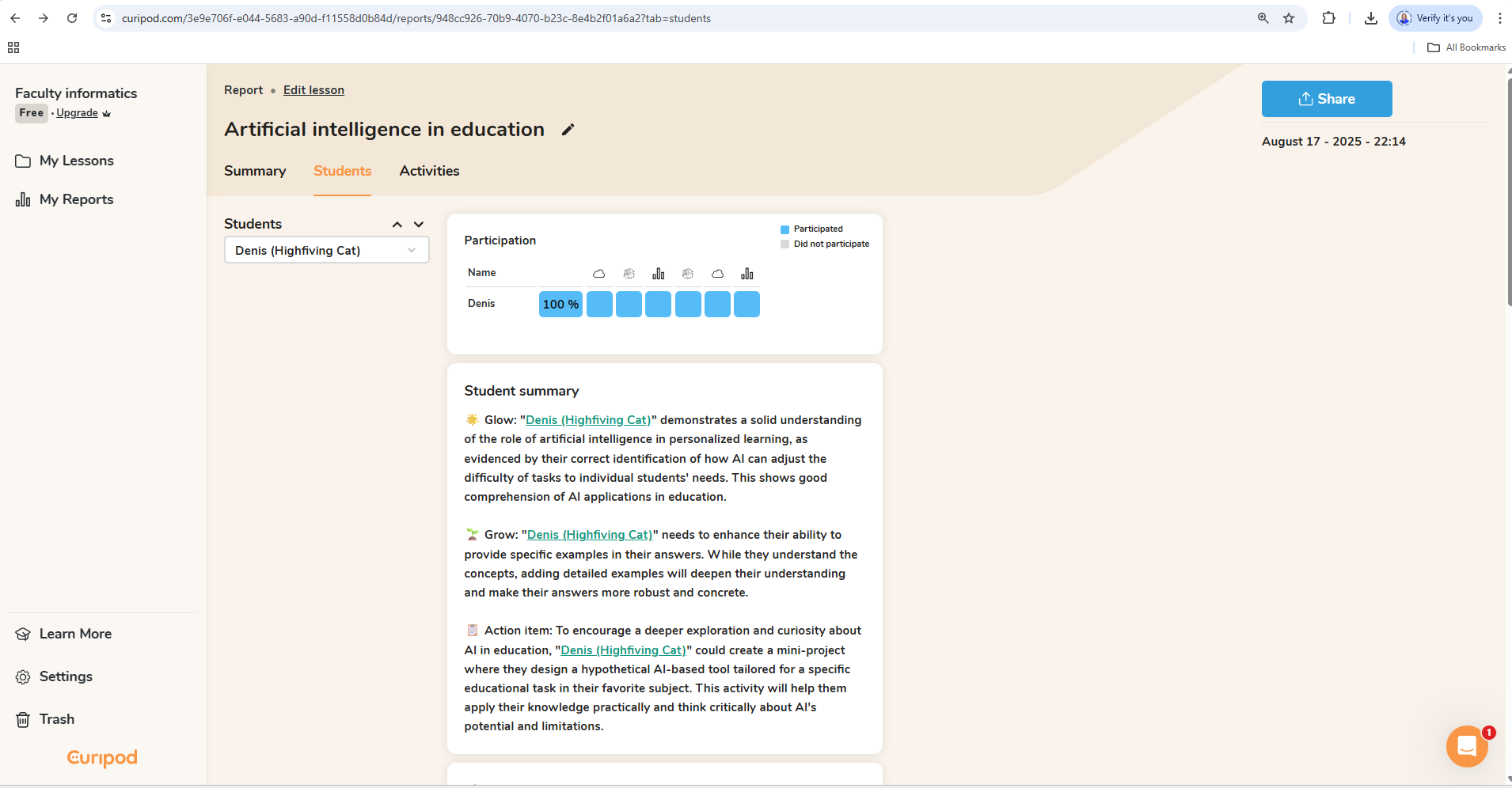
Figure 5. Summary of individual results and analytical presentation of participant progress after completing the activity
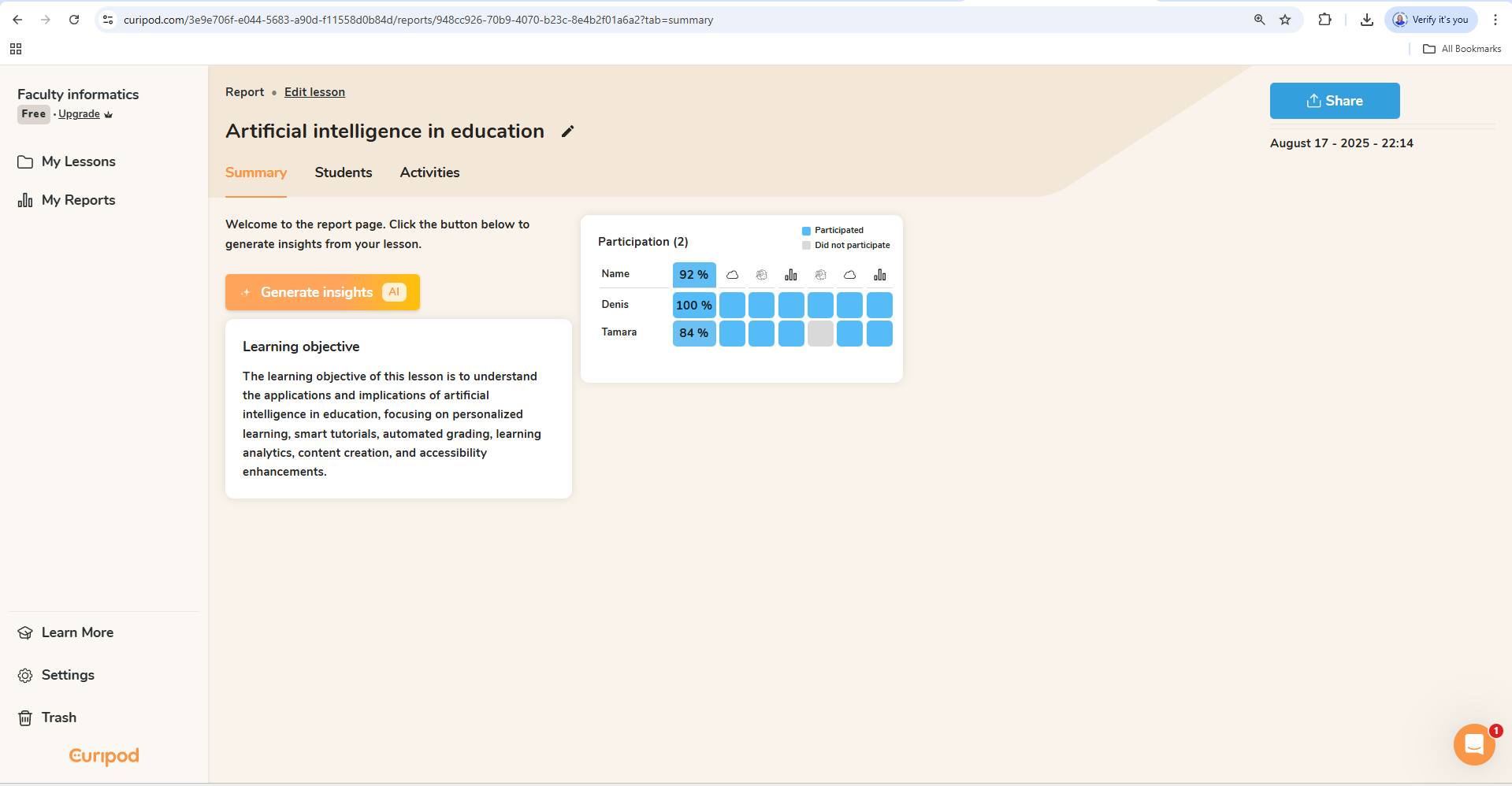
Figure 6. Summary of overall results and analytical presentation of participants' progress after completing the activity
9. How can an instructor define a student's prior knowledge and context for artificial intelligence?
- Brief description of the participants
The instructor can add a few sentences about the group of participants to the query, for example:
"The participants are first-year students in the IT department, with basic knowledge of computer networks and programming." - Knowledge level
It should be specified whether the participants are beginners, intermediate, or advanced users.
Example: "The participants are beginners with a basic understanding of the topics." - Specific learning objectives
What are the key skills or knowledge that the participants should demonstrate?
Example: "The objective is to check the understanding of basic concepts and their application in practice." - Question format and style
If the test is to be adapted to the participants, the questions can be specified to be simpler, with more examples, or more complex and analytical.
Example of how to format a query to ChatGPT:
"Please create a comprehensive test on the history of artificial intelligence for first-year computer science students with a basic computer science background. The test should contain 10 questions: 5 multiple-choice, 3 short-answer, and 2 essay questions. Adapt the questions to a beginner's level of knowledge, with clear instructions and brief explanations of the answers."
Questions for reflection:
How can an instructor describe the group of students and their educational context in as much detail as possible so that artificial intelligence can generate a more relevant and customised test?
What information do you consider key for quality content customisation?
Have AI tools and systems made it easier to create tests and analyse knowledge assessments (summative and formative)? Why or why not?
10. Example for the Mizou artificial intelligence tool
Mizou is a digital tool powered by artificial intelligence that enables teachers to design interactive teaching activities and monitor student progress during e-learning. It integrates AI elements for learning support, critical thinking development, and formative assessment. The tool allows teachers to define learning outcomes, input teaching content, and automatically generate activities such as an AI Chatbot or an AI Debate, which promote active and reflective learning.
Mizou is free for teachers and, thanks to its intuitive structure, is suitable for use in higher education.
What this means for the instructor:
- Monitoring student progress in real time
- Receiving personalised guidelines for further instruction
- Incorporating AI activities that foster reflection and critical thinking
- More effective planning of formative activities based on students’ actual needs
Example of application:
An instructor wants to monitor student progress during an e-course and receive personalised recommendations for teaching activities. The goal is to identify in real time which parts of the material are most challenging for students and adapt subsequent activities accordingly.
Procedure:
In Mizou, the instructor begins by selecting or creating an AI chatbot for a specific topic, such as "Debate on Artificial Intelligence in Education," and can access existing sessions and their status (Figure 1). In the editing interface, the instructor enters the activity name and basic instructions describing the chatbot’s role and the expected mode of communication with students (Figure 2).
Next, the instructor defines the learning outcome, selects the education level, and activity type. Based on the entered goals, the Mizou AI tool suggests different types of AI chatbots (quiz, discussion, essay, etc.), which the teacher can generate and customise (Figure 3). When the activity is ready, the tool automatically generates a link and QR code to share with students for access (Figure 4).
During the activity, such as an AI debate, the interface displays the conversation flow between the student and the chatbot, with the chatbot asking introductory questions and encouraging argumentative discussion (Figure 5). After students complete the activity, Mizou provides an overview of participants, activity duration, submission status, and a suggested grade based on AI analysis of the responses (Figure 6).
In addition to creating their own activities, teachers can review and try AI chatbots developed by the educator community and customise them as needed (Figure 7). Additional support is available through the Mizou AI Academy, which offers structured programs and certification modules to develop teachers’ competencies in pedagogical applications of AI (Figure 8).
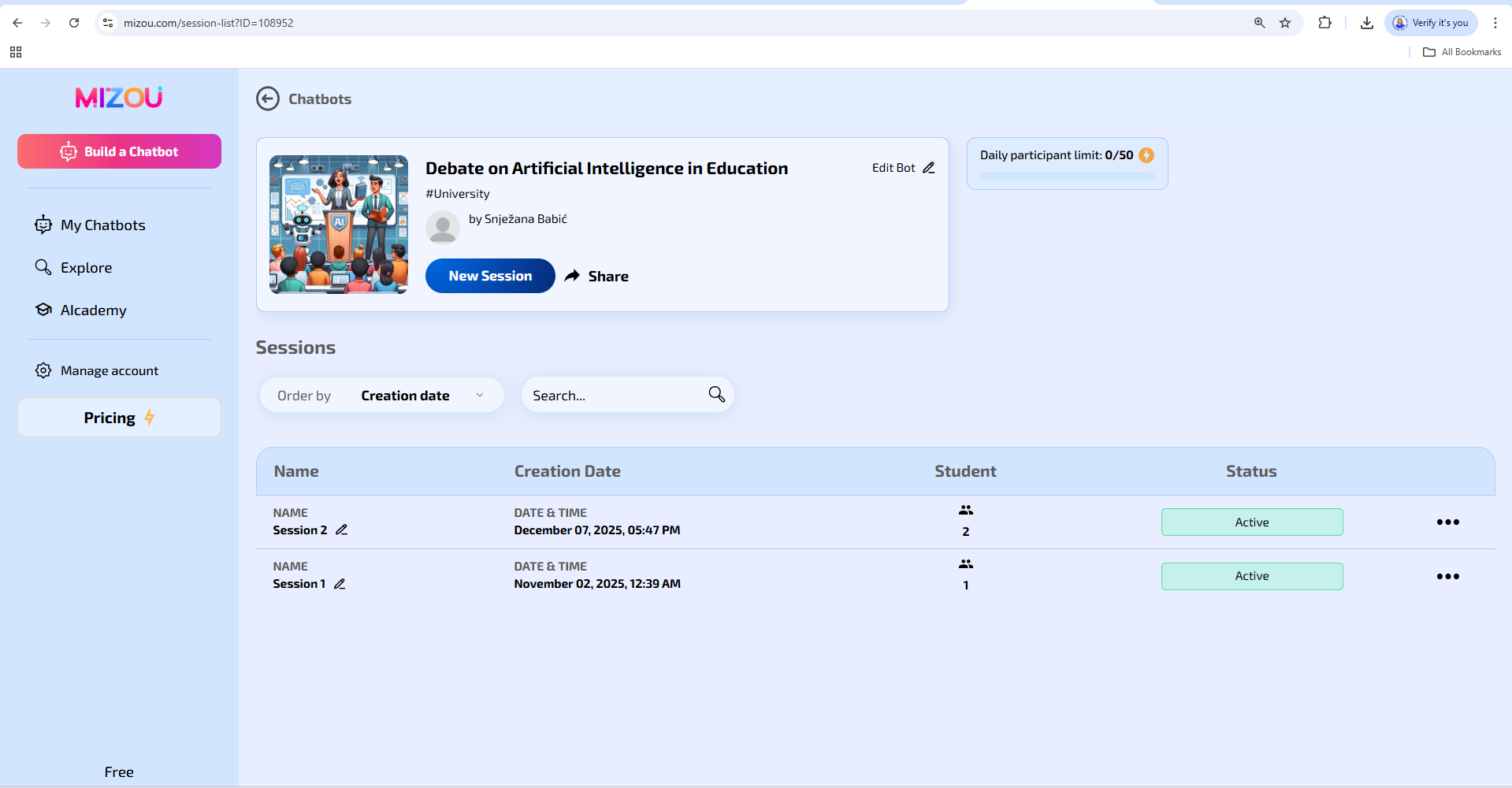
Figure 1. Overview of the created AI chatbot "Debate on artificial intelligence in education" and related sessions in the Mizou tool
(Source: screenshot by the author, 2025)
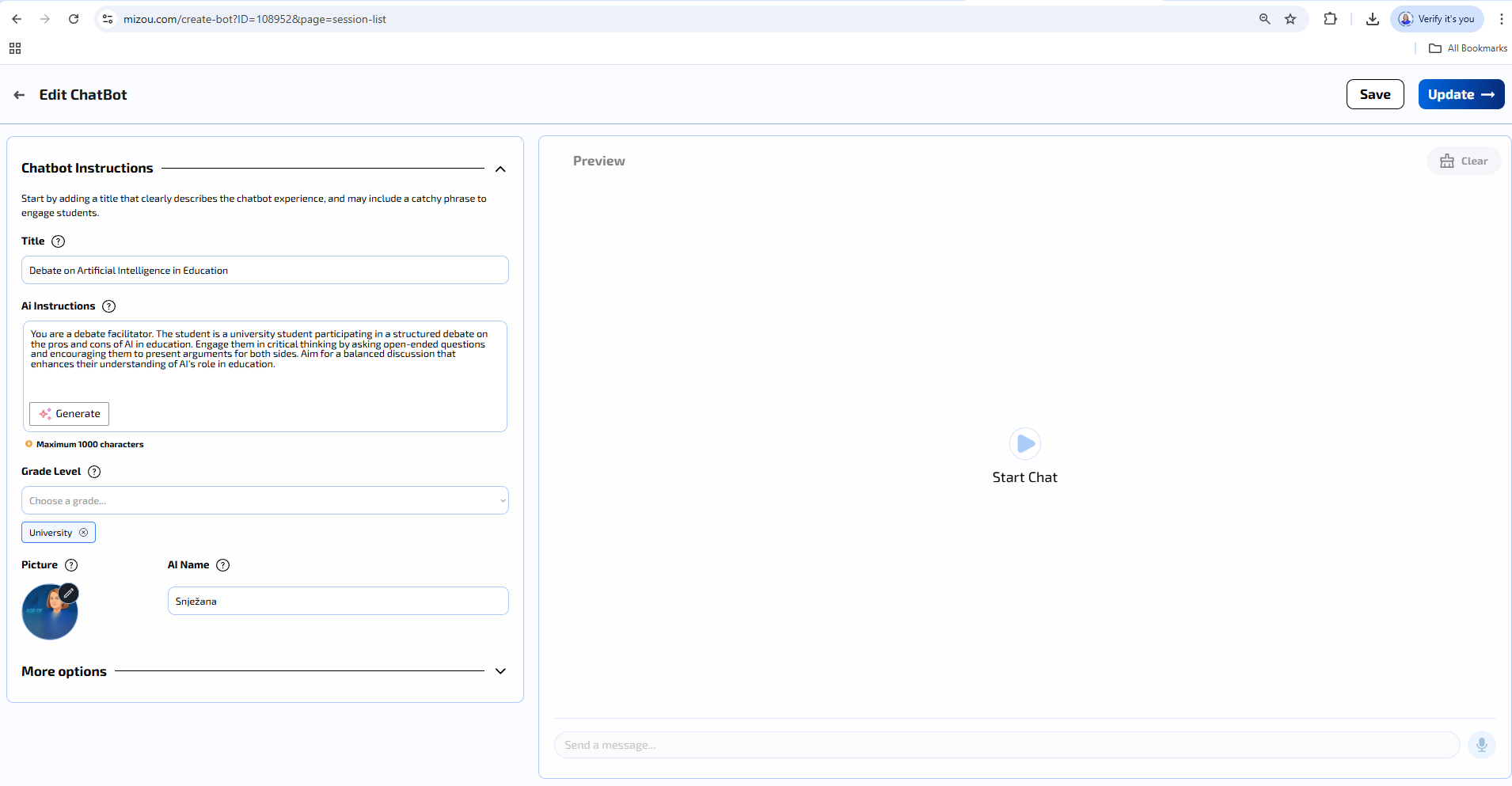
Figure 2. AI chatbot editing interface in Mizou with activity title and chatbot instructions input
(Source: screenshot by the author, 2025)
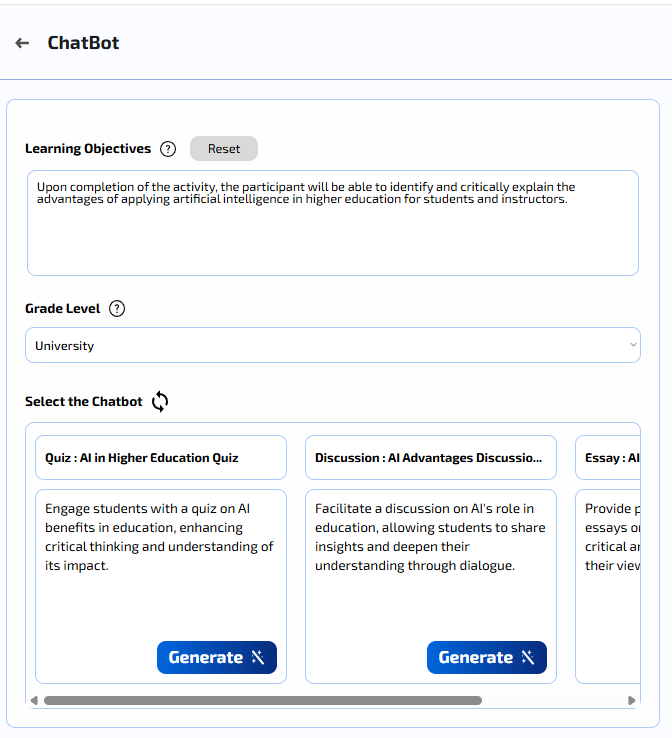
Figure 3. Defining learning outcomes, education level, and selecting an AI chatbot template (quiz, discussion, essay) in Mizou
(Source: screenshot by the author, 2025)

Figure 4. Link and QR code generation to access the activity in the Mizou tool
(Source: screenshot by the author, 2025)
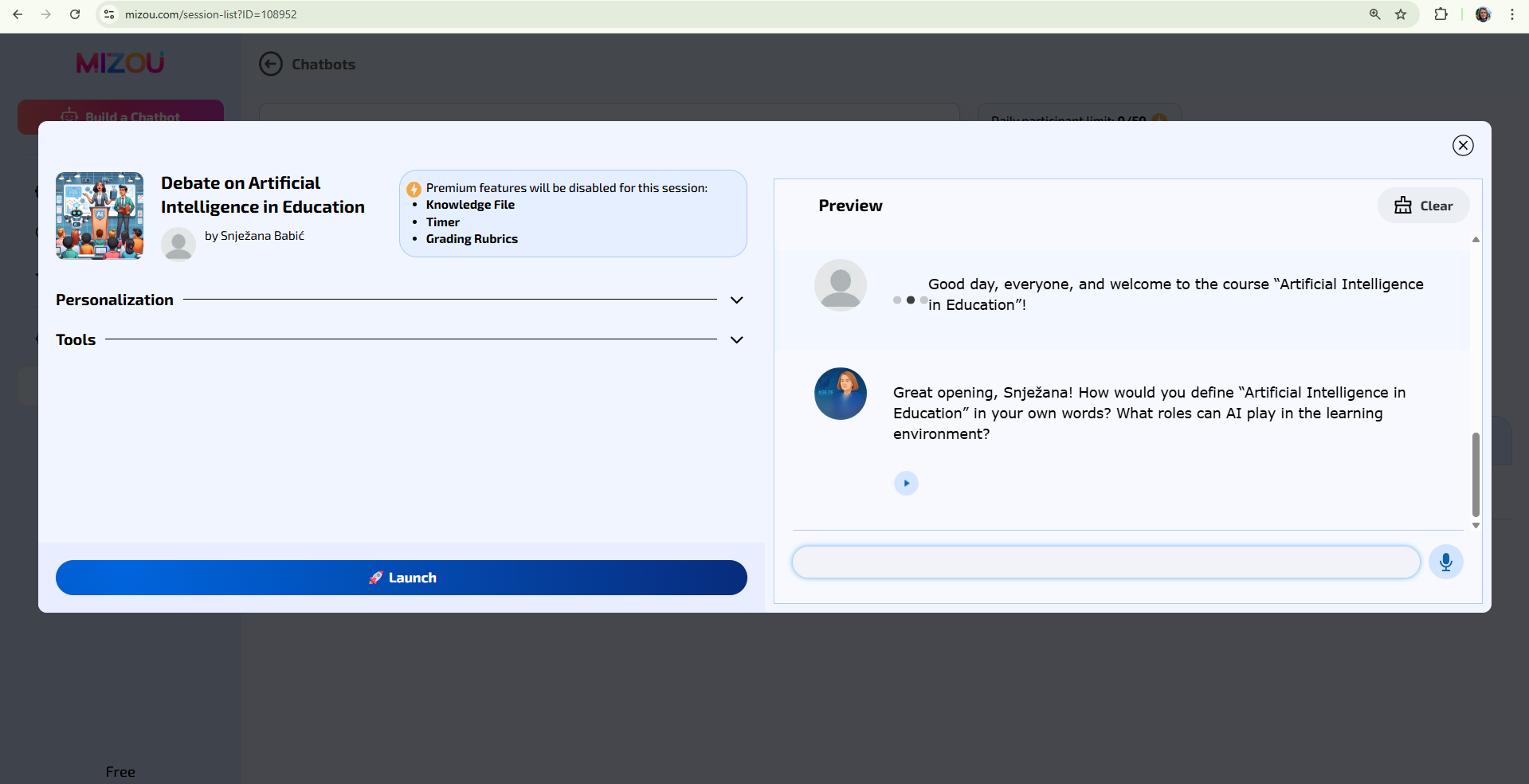
Figure 5. AI debate display in Mizou with a chatbot introduction message and space for student response
(Source: screenshot by author, 2025)
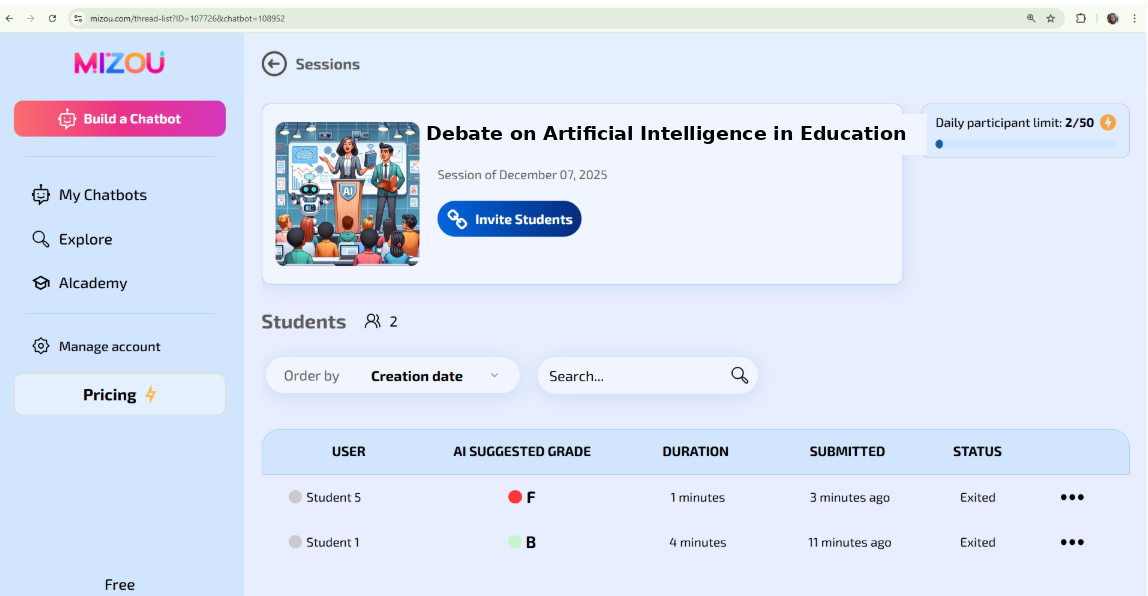
Figure 6. Session overview in the Mizou tool with a list of students, proposed AI grade, activity duration, and submission status
(Source: screenshot by the author, 2025; ChatGPT)
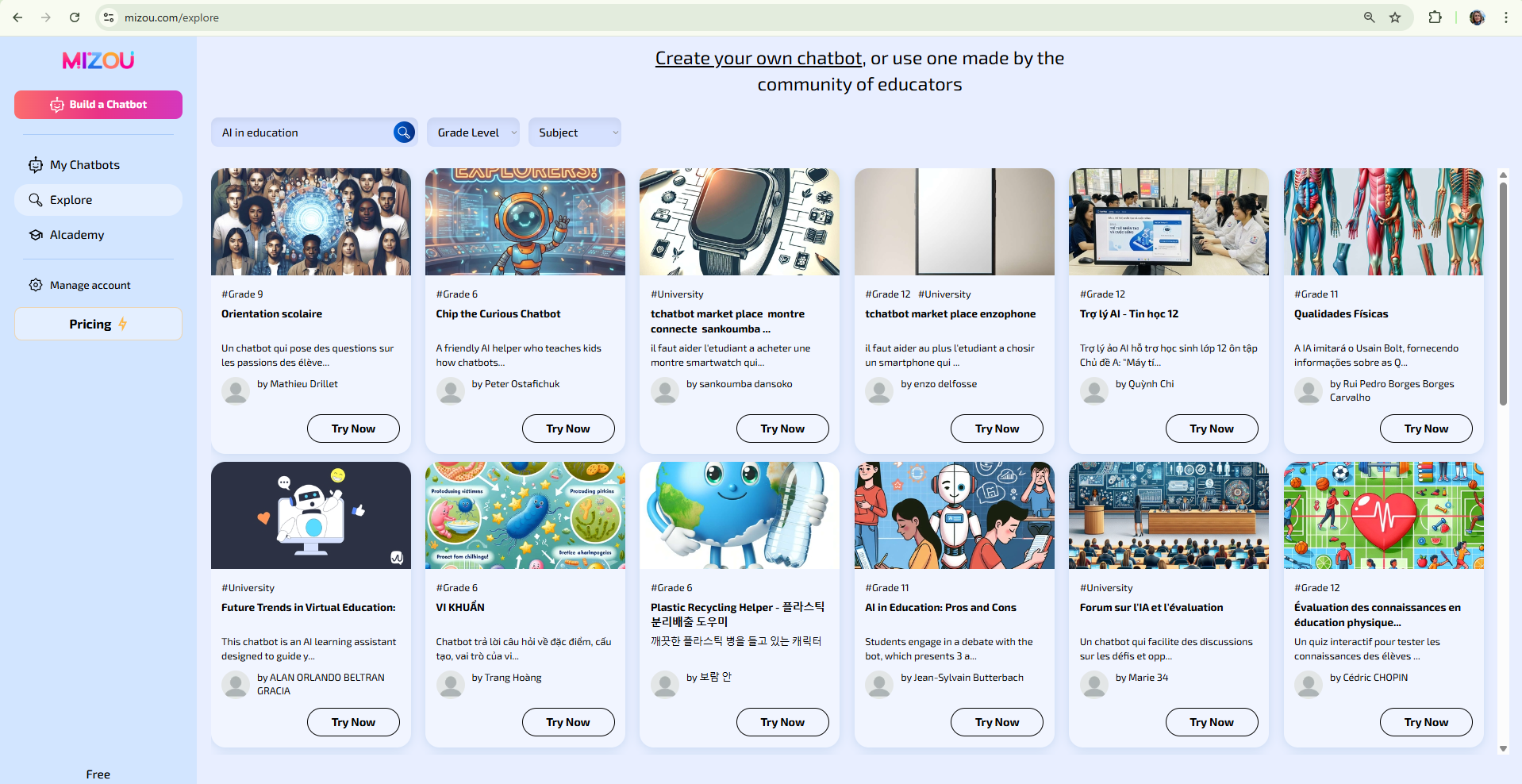
Figure 7. Overview of available AI chatbots and activities created by the teacher community in the Mizou tool
(Source: screenshot by the author, 2025)
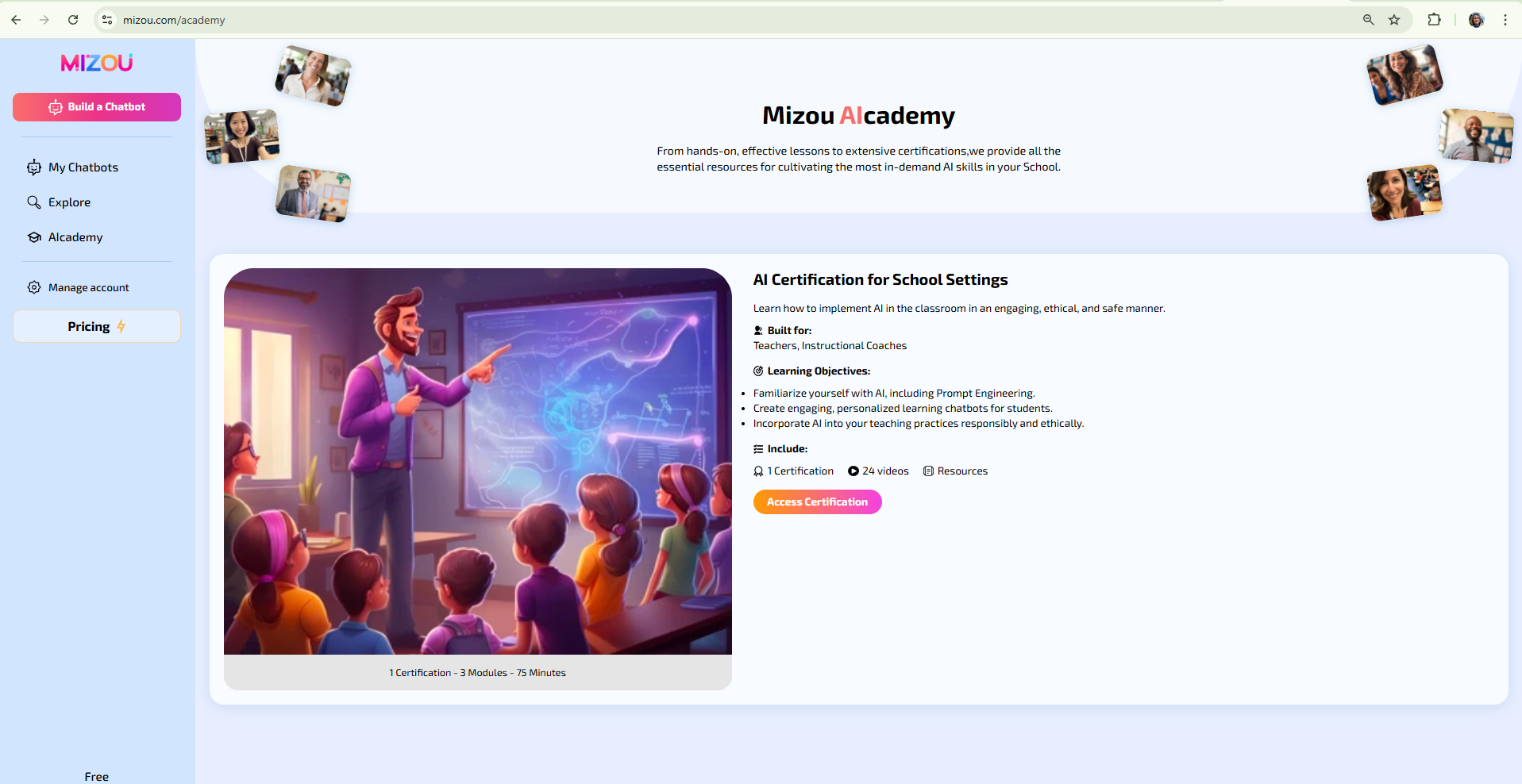
Figure 8. Mizou AI Academy interface view with an example of a teacher certification program
(Source: screenshot by the author, 2025)
11. Example for the QuestionWell artificial intelligence tool
Tool description:
QuestionWell is a digital tool that enables teachers to systematically and effectively design questions for exams, quizzes, and other forms of knowledge assessment. It was developed to support a pedagogically thoughtful approach to assessment and to facilitate the creation of tasks aligned with learning outcomes and levels of cognitive complexity according to Bloom's Taxonomy.
The teacher enters textual content into the tool, such as a passage from a textbook, an expert article, or their own teaching notes. Based on this input, QuestionWell automatically generates question and answer suggestions. Teachers can select the level of cognitive demand – from recognition and understanding to analysis, evaluation, and creation of new ideas – which enables differentiated knowledge assessment. The teacher can review, edit, and supplement the generated questions according to the specific objectives of the course (Figures 1 and 2).
The tool allows questions to be exported in multiple formats (CSV, Google Forms, Quizizz, Canvas, Moodle), making it suitable for integration into institutional e-learning systems. In this way, QuestionWell connects modern technologies with the didactic principles of higher education teaching and supports the development of quality and objective assessment methods.
Example of application:
An instructor of the course Artificial Intelligence in Education plans a final knowledge test to assess understanding of the ethical and pedagogical aspects of applying artificial intelligence in teaching. Instead of creating questions manually, the instructor uses the QuestionWell tool to speed up the process and ensure that the tasks are aligned with the learning outcomes of the course.
In the quiz creation interface, the teacher selects the number of questions, the type of task (e.g., higher-order tasks), the language, and the level of difficulty, and enters a summary of the teaching unit on which the questions will be generated (Figure 1). Then selects Bloom's levels of "Analyse" and "Evaluate" so that the questions encourage students to engage in deeper reflection and reasoned assessment. QuestionWell automatically generates a set of higher-order questions that promote analytical and critical thinking, with the original text displayed on the left and the question and answer suggestions on the right (Figure 2).
Such questions require students to connect theoretical knowledge with practical situations, analyse the relationships between technology, ethics, and pedagogical practice, and draw their own reasoned conclusions. The teacher then reviews the generated questions, changes the wording and difficulty of the tasks if necessary, and uses the "Modify with AI" option to further adapt the content to the students' level (Figure 3).
When satisfied with the selected set of questions, he/she selects the Export / Assign option and chooses the target platform, such as Moodle or another e-learning system, or exports to Word, Google Forms, or other tools (Figure 4). QuestionWell can also generate a task code and a QR code that the teacher shares with students for direct access to the quiz without additional import (Figure 5).
After students complete the quiz, the results are automatically displayed in QuestionWell: for each question, it is visible whether the answer is correct, partially correct, or incorrect, as well as the total number of points and the time taken to solve (Figure 6). In this way, the teacher gains insight into student performance on individual questions and topics and can identify parts of the material that require additional clarification or repetition in class.
What this means for the instructor:
- Time savings and increased efficiency in creating questions and tasks
- Linking questions to learning outcomes and Bloom's levels
- Direct integration with institutional e-learning systems
- Greater objectivity, transparency, and consistency in assessing knowledge
- Support for the development of higher-order and critical thinking skills in students.

Figure 1. QuestionWell tool interface for selecting the number of questions, task type, language, and difficulty level, and entering a course summary (Source: screenshot by the author, 2025)
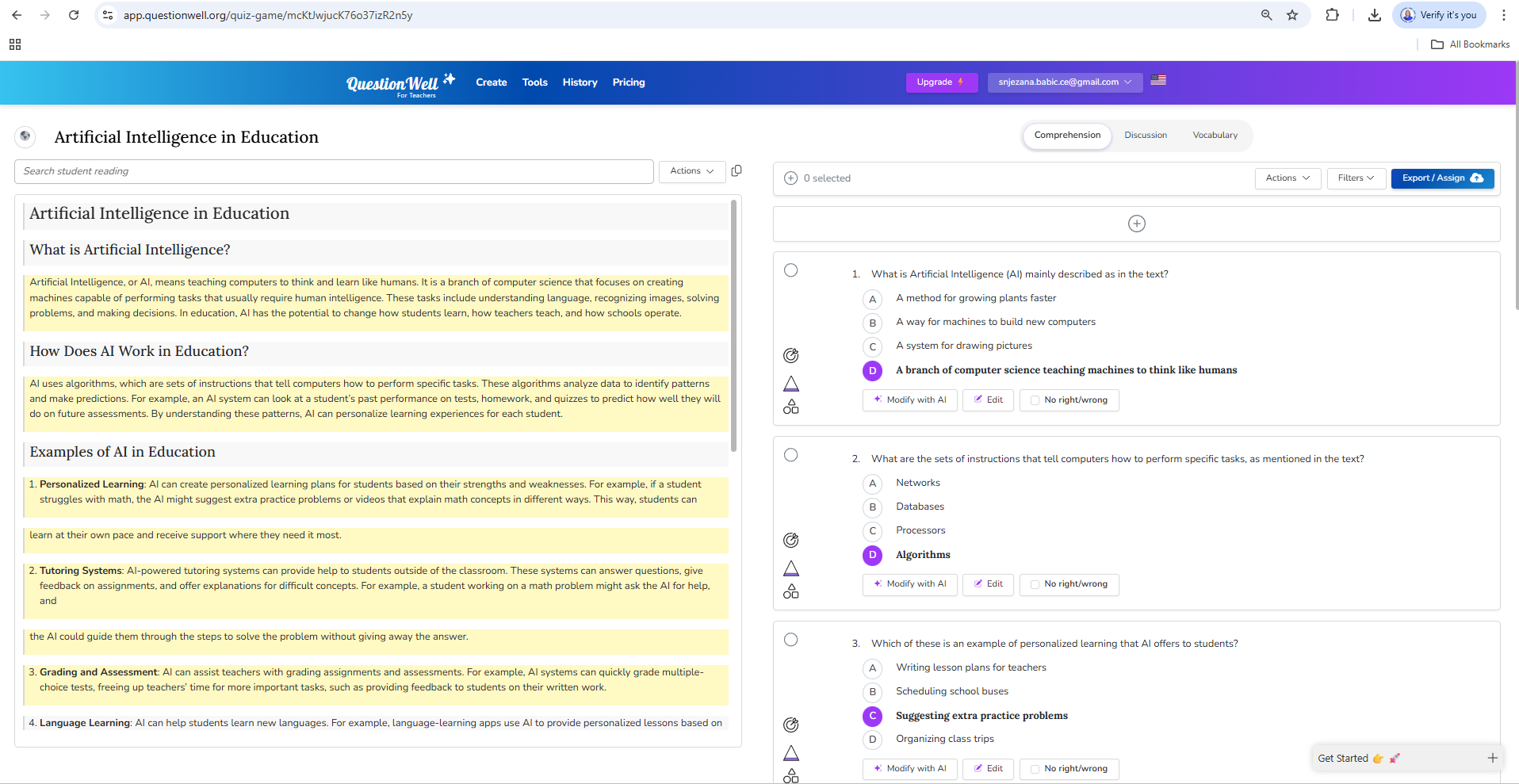
Figure 2. View of generated questions in QuestionWell with optional text about artificial intelligence
on the left and a set of higher-order questions with suggested answers on the right (Source: screenshot by the author, 2025)
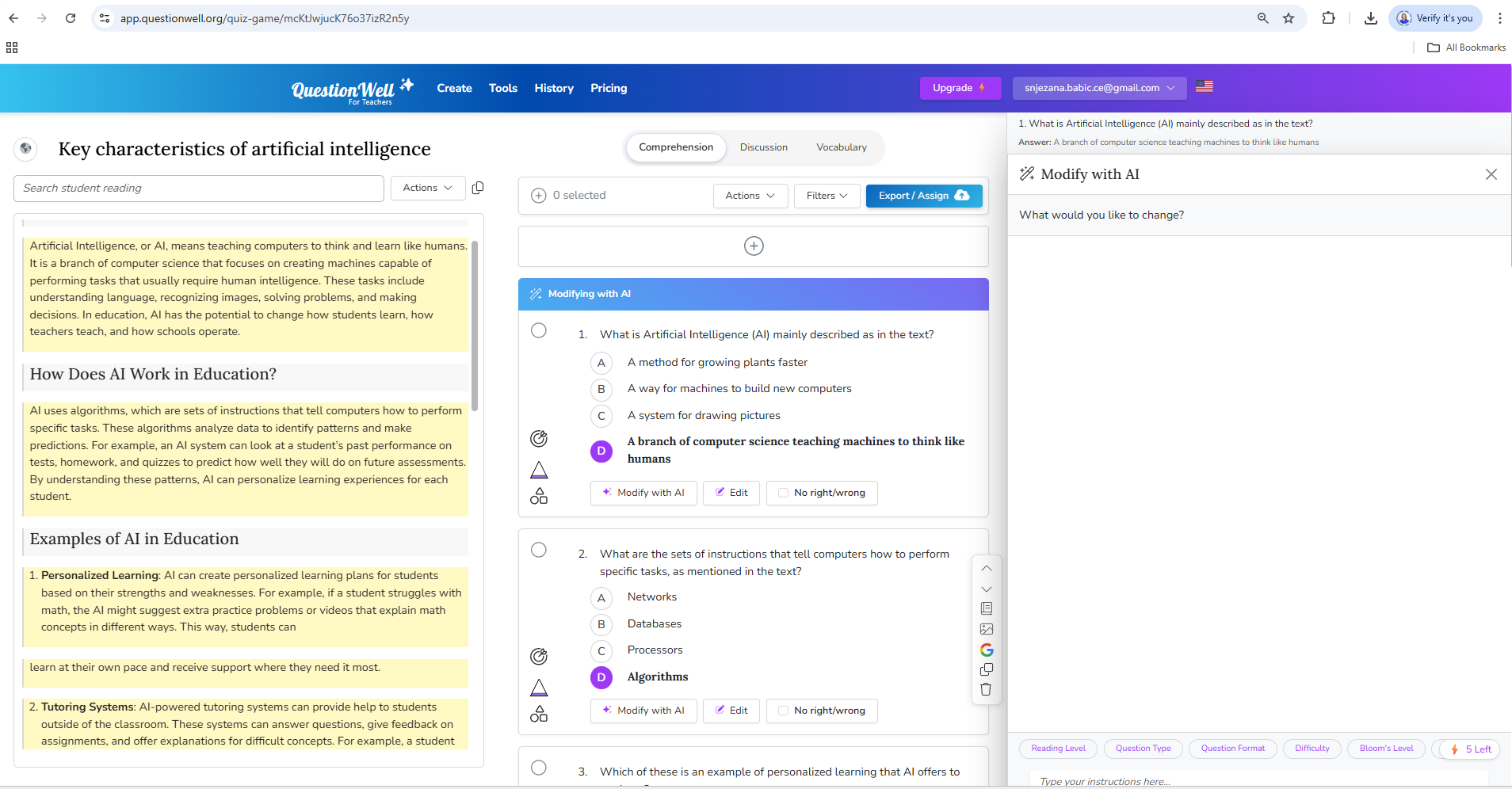
Figure 3. Editing generated questions in QuestionWell using the Modify with AI option
for further customisation of the content (Source: screenshot by the author, 2025)

Figure 4. Overview of the options for exporting questions from QuestionWell to various e-learning tools and systems (e.g., Moodle, Microsoft Forms, Google Forms) (Source: screenshot by the author, 2025)

Figure 5. Generating assignment code and QR code for sharing quizzes with students in QuestionWell
(Source: screenshot by the author, 2025)
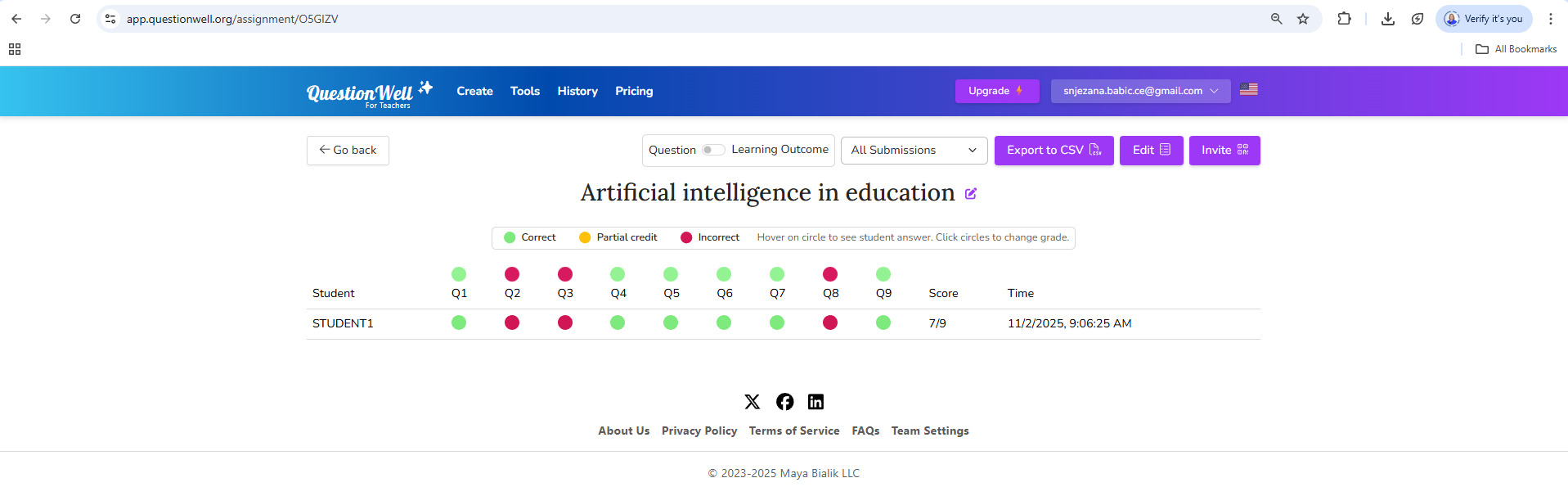
Figure 6. Overview of quiz results in the QuestionWell tool showing correct, partially correct, and incorrect answers for individual questions (Source: screenshot by the author, 2025)
12. Example of integrating artificial intelligence tools and systems for formative and summative assessment
In modern higher education, artificial intelligence is increasingly used to support various forms of knowledge assessment. Artificial intelligence tools and systems allow teachers to automate technical tasks, generate questions at higher cognitive levels, conduct more objective assessments, and analyse results in greater depth.
Below are four examples of digital tools based on artificial intelligence used in formative and summative assessment, with emphasis on pedagogical purpose, application method, and student privacy protection.
QuestionWell and the Moodle e-learning system – summative (and formative) knowledge assessment
A course instructor uses QuestionWell to create a final exam that assesses the achievement of learning outcomes. After logging into the QuestionWell platform, the instructor enters a summary of the course unit (Figure 1), and the tool automatically generates a set of questions of various types and levels of complexity according to Bloom's Taxonomy (Figure 2). The questions are edited in the QuestionWell tool, then the test is exported in the Moodle-compatible GIFT format and imported into the institutional Moodle system, where points are assigned to individual questions, and the exam design is finalised (Figure 3–5).
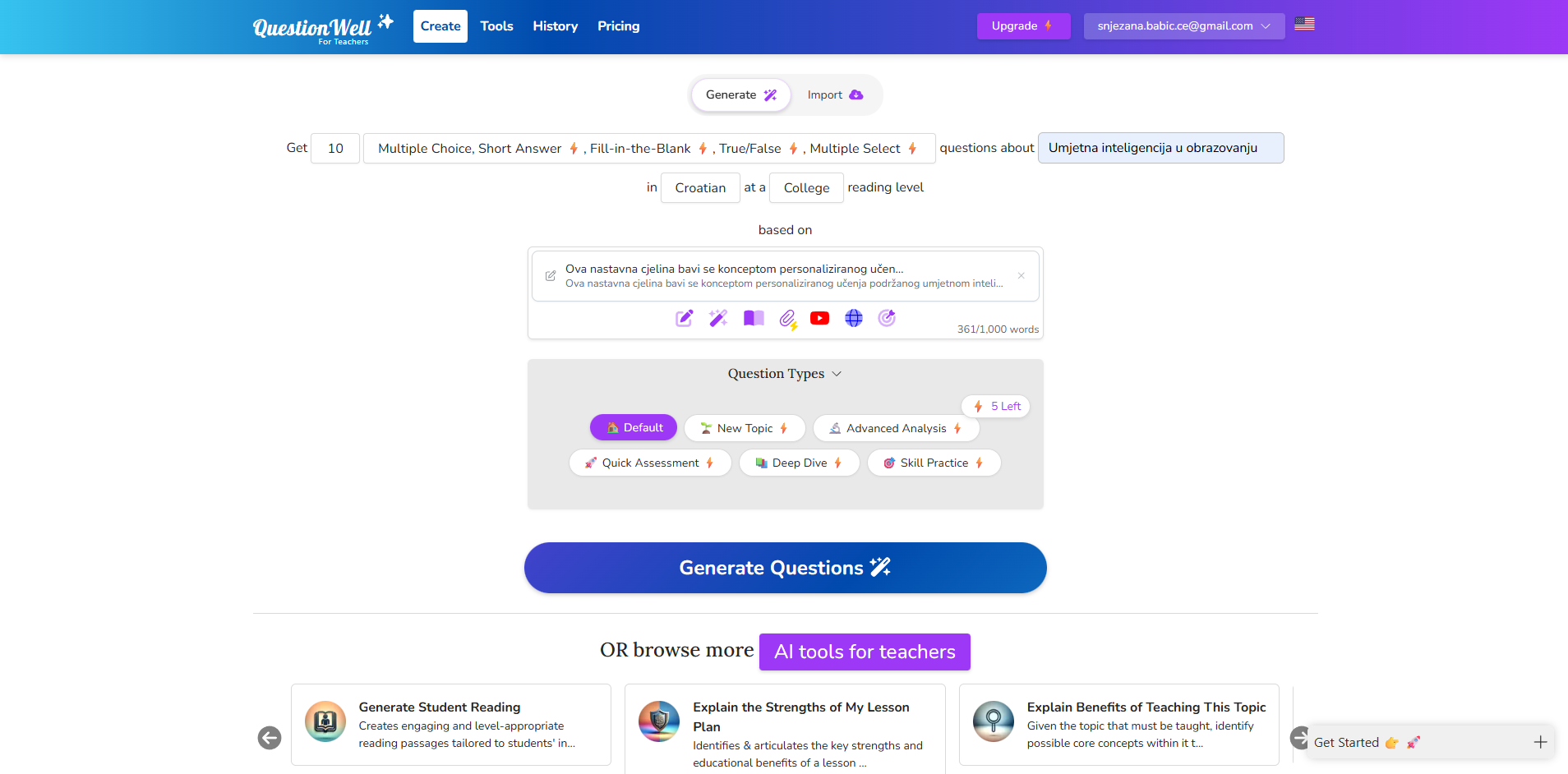
Figure 1. QuestionWell tool interface when entering a course summary (Source: author, screenshot of the QuestionWell tool, 2025)
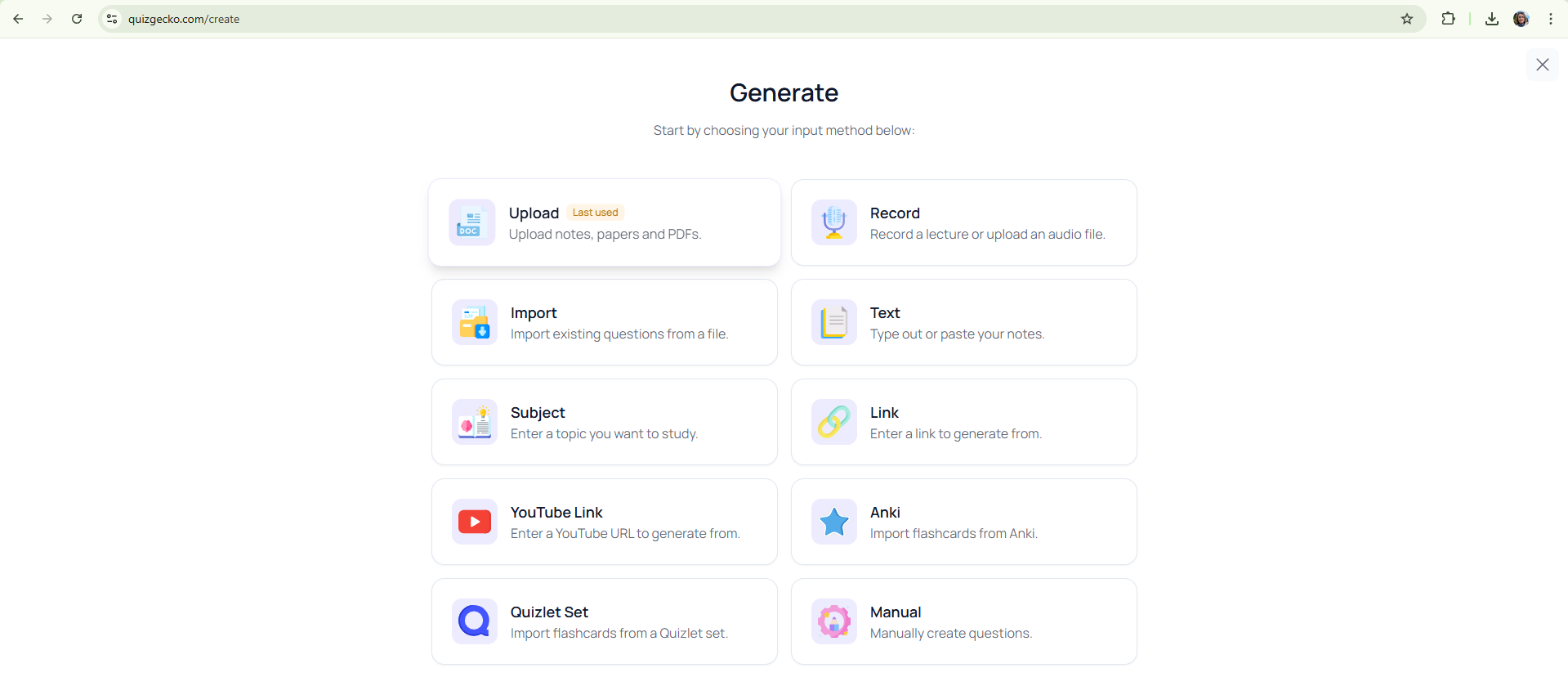
Figure 2. QuestionWell tool interface with automatically generated questions based on the course unit summary (Source: author, screenshot of the QuestionWell tool, 2025)
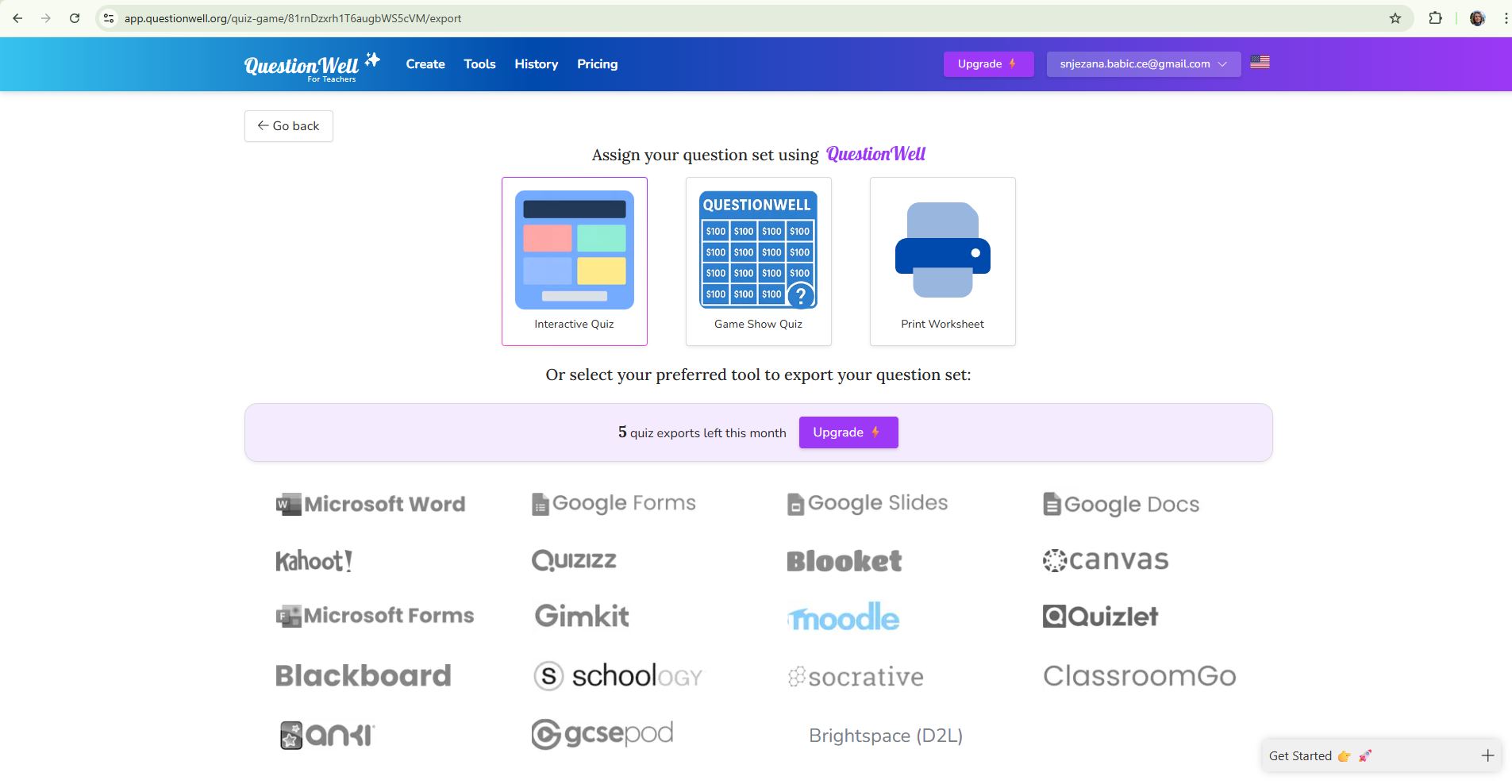
Figure 3. QuestionWell tool interface when editing and selecting generated questions (Source: author, screenshot of the QuestionWell tool, 2025)
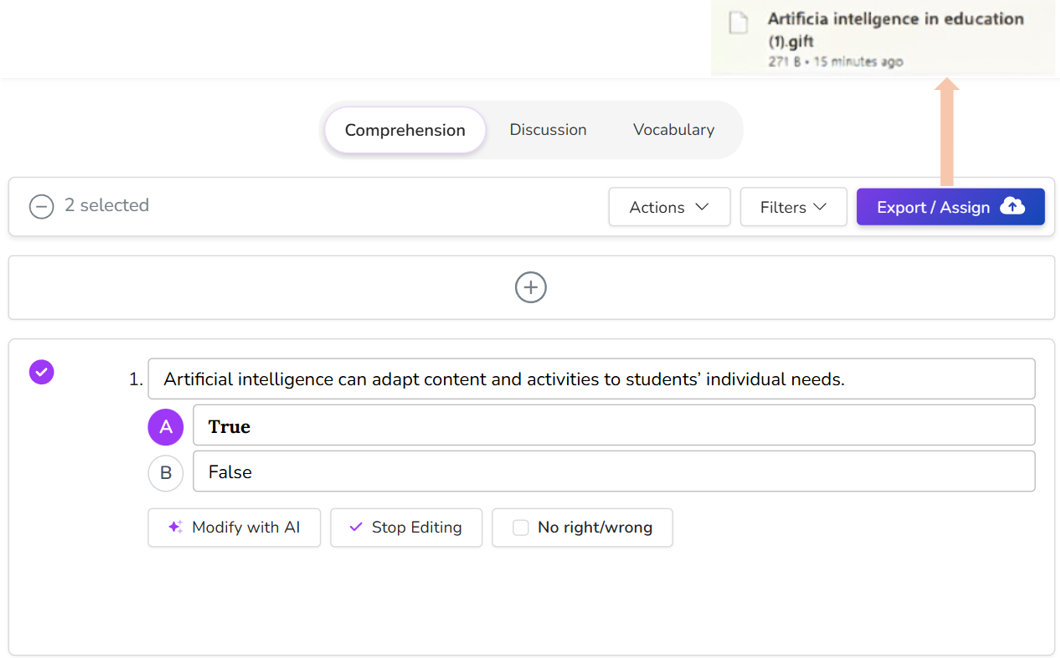
Figure 4. QuestionWell tool interface when exporting a test in Moodle-compatible GIFT format (Source: author, screenshot of the QuestionWell tool, 2025)
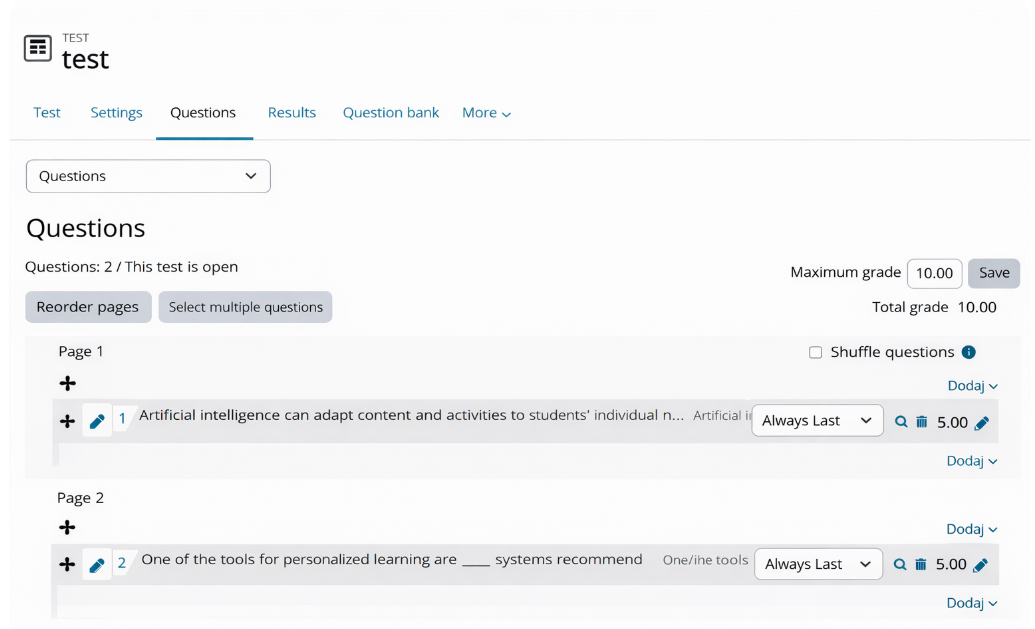
Figure 5. Moodle interface when importing a GIFT file into the question database (Source: author, screenshot of Moodle/Merlin (Srce), ChatGPT, 2025)
Moodle is the primary e-learning system at a higher education institution, integrated with the ISVU system, which enables monitoring of student activities and achievements within the official framework. This integration ensures transparency, security, and protection of student privacy, as all results are stored within institutional infrastructure compliant with data protection regulations (GDPR). Upon completion of the exam, Moodle automatically generates a performance analysis by question and by student, allowing the teacher to reflect on teaching quality and plan improvements.
Advantages: standardised evaluation, automated grading, data security, and integration with institutional systems.
2. QuestionWell and Google Forms – formative or summative evaluation
Another approach involves combining QuestionWell and Google Forms, which enables quick preparation of quizzes and flexible implementation of online knowledge assessments. The instructor enters educational content into QuestionWell (Figure 1–2), and the tool generates questions that are exported to Google Forms with one click (Figure 6). In Google Forms, the teacher edits the test layout, adds scoring, and activates automatic feedback.
Students access the test via a link or QR code and receive feedback immediately after submission. Results are collected in Google Sheets, where they are available in real time and can be visually analysed. If institutional regulations permit, Google Forms can also be used for summative assessment while adhering to data protection and student identity regulations.
Advantages: easy creation and sharing of tests, automatic analysis of results, possibility of formative and summative use, accessibility without LMS integration.
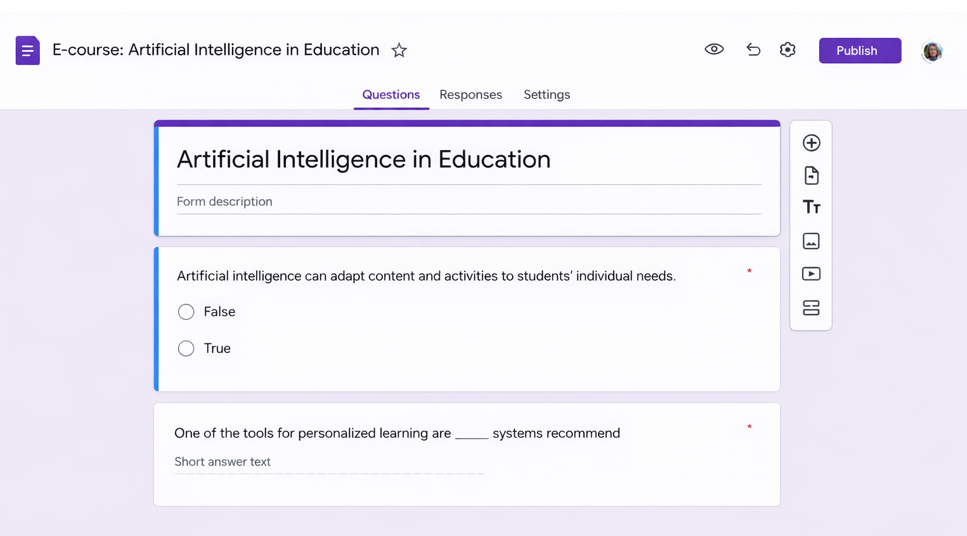
Figure 6. View of the downloaded GIFT file of a test generated in the QuestionWell tool uploaded to a Google Form (Source: author, screenshot of Google Forms, 2025)
3. Integration of Gradescope and Moodle – advanced summative and formative evaluation and analytics
Gradescope (Figure 7) is a tool for digital grading of written, scanned, and programmatic assignments that enables advanced summative assessment at the higher education level. When integrated with the institutional Moodle system, it provides teachers with a comprehensive and secure framework for administering exams, grading, and analysing results, with full automation of the process.
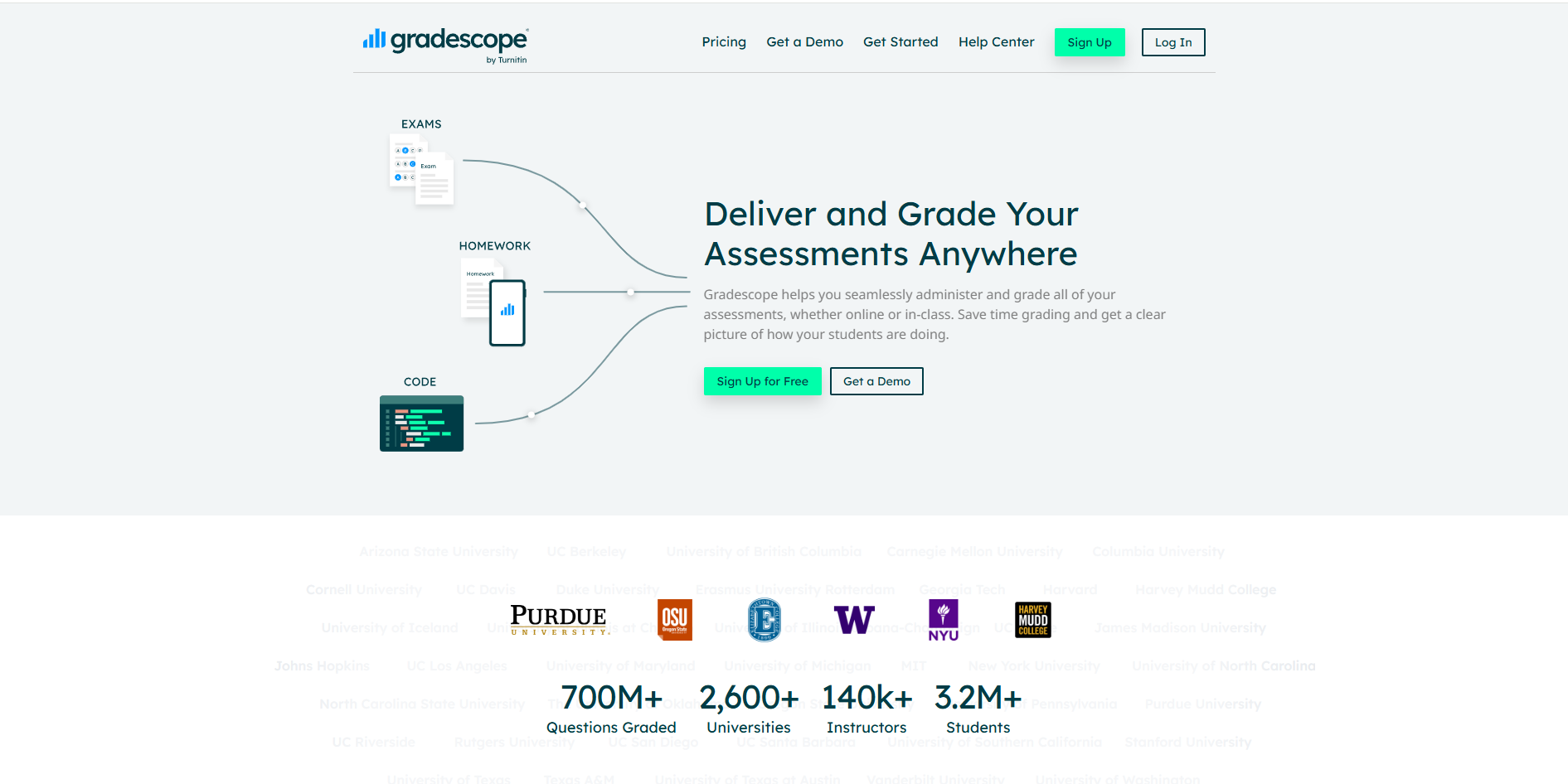
Figure 6. Gradescope tool interface (Source: author, screenshot 2025)
Usage process from a teacher's perspective
The instructor activates Gradescope in Moodle via LTI integration (Learning Tools Interoperability), which automatically connects the course to the corresponding space in Gradescope. This transfers basic course information and a list of students without manual entry.
The teacher then creates a new assignment or exam in Gradescope and uploads the prepared materials, such as a PDF exam, essay, lab report, or program code. A rubric with grading criteria is created within the tool, ensuring a standardised approach and increasing the objectivity of the assessment.
Students access the assignment directly through Moodle without additional login and can submit their work in various formats (text document, image, PDF, code). Gradescope records each submission and the time of submission, allowing for accurate tracking of student activity.
During grading, artificial intelligence automatically recognises similar answers and groups them, enabling the teacher to grade faster and more consistently. The system supports adding comments and qualitative feedback, contributing to transparency and understanding of the grade.
Once all assignments have been graded, the instructor posts the results and comments to students with a single click. Students can review scores and explanations and, if necessary, request a regrading. This approach increases fairness, communication, and trust in the grading process.
Data collection and privacy
Gradescope automatically generates analytical reports on student performance, including scores by criteria and questions, and common errors. Data can be downloaded in CSV or Excel format, and the results are simultaneously synchronised with Moodle Gradebook (the standard grading system for all Moodle courses), ensuring an up-to-date and centralised record of achievement.
All data is stored within the institutional system in accordance with privacy regulations and GDPR, with secure authentication via Single Sign-On access.
Official instructions for using Gradescope within Moodle are available to students, ensuring a clear understanding of the procedure and transparency of the entire grading process.
The advantages of using Gradescope integrated with Moodle include:
-
Automated and objective grading of written and programming assignments
-
Integrated collection and analysis of student performance data
-
Transparent feedback and the possibility of regrading
-
Secure data storage and protection in accordance with GDPR
-
Insight into teaching quality and opportunities for pedagogical reflection.
4. Quizgecko – personalised learning and formative assessment
Quizgecko uses artificial intelligence to generate personalised quizzes and review cards based on existing teaching materials. The instructor first selects the method of content entry: uploading a file (script or presentation), entering or pasting text, adding a link to a website or YouTube video, or manually creating questions (Figure 1).
Next, they adjust the quiz settings: selecting the language (e.g., Croatian), task types (multiple choice, true/false, short answers, completion), difficulty level, and additional requirements related to question style or exam preparation (Figure 2). Based on these parameters, Quizgecko automatically generates questions and corresponding study cards, using the principles of spaced repetition and algorithms for adjusting task difficulty.
Students can access the quizzes via a link without creating an account or logging in with a Google or Microsoft account to track their progress. After completing the quiz, they see their percentage of success, the number of correct and incorrect answers, and options to review results, analyse errors, and retake the quiz (Figure 3). This encourages reflection on their own learning and continuous improvement.
The system uses encryption and security protocols (HTTPS), and data is processed in accordance with GDPR, with the option for anonymous participation. Quizgecko is particularly useful for formative assessment, exam preparation, and the development of self-regulated learning, but it can also serve as a supplementary resource in online courses. Advantages include personalised learning, automatic quiz generation, progress monitoring, secure access and privacy, and the encouragement of metacognitive skills.
Figure 1. Quizgecko tool home menu for selecting the method of inputting teaching materials (file upload, text, link, YouTube, etc.) (Source: screenshot by the author, 2025)
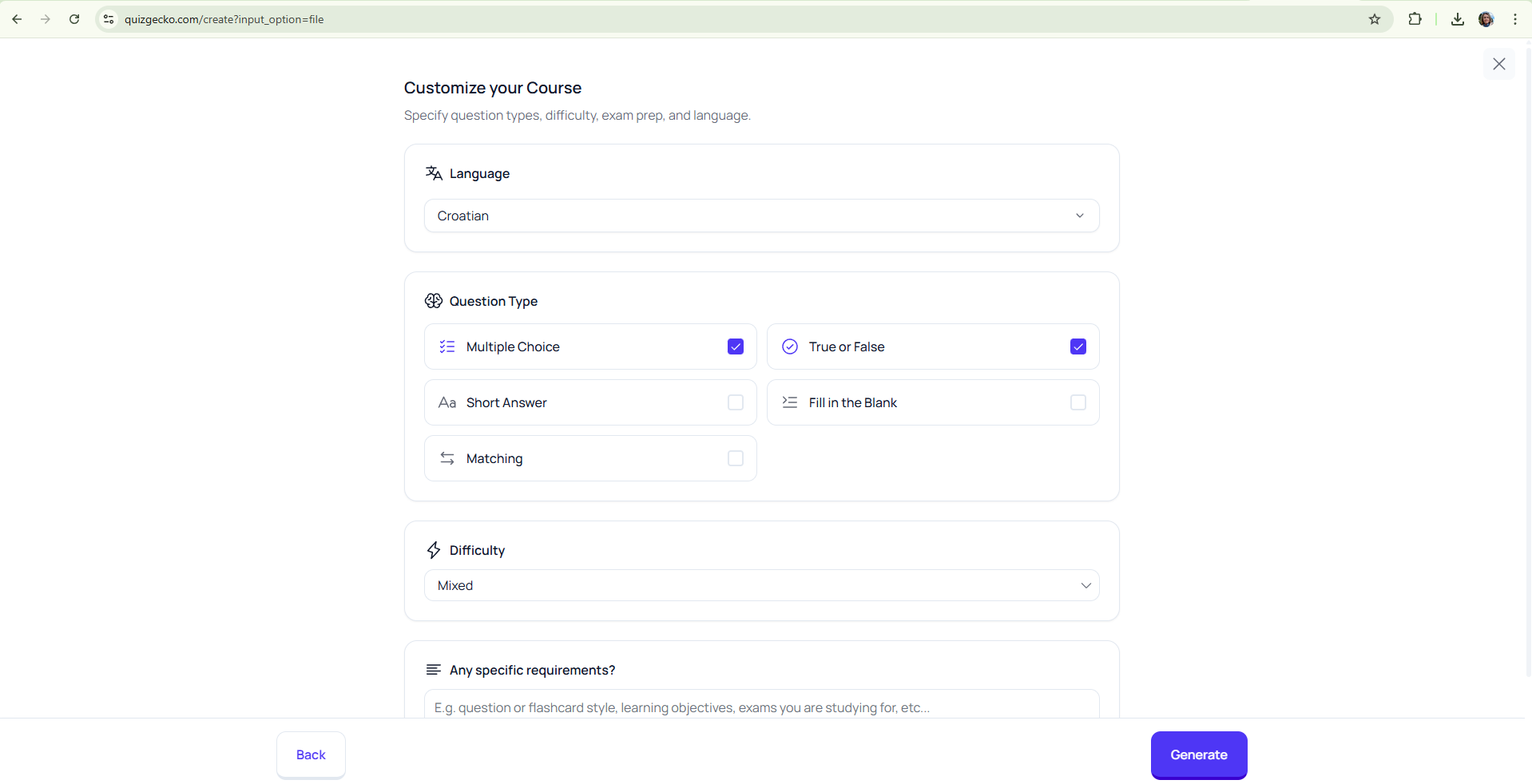
Figure 2. Quiz customisation settings in Quizgecko – selecting language, question types, and difficulty level before generating tasks (Source: screenshot by the author, 2025)
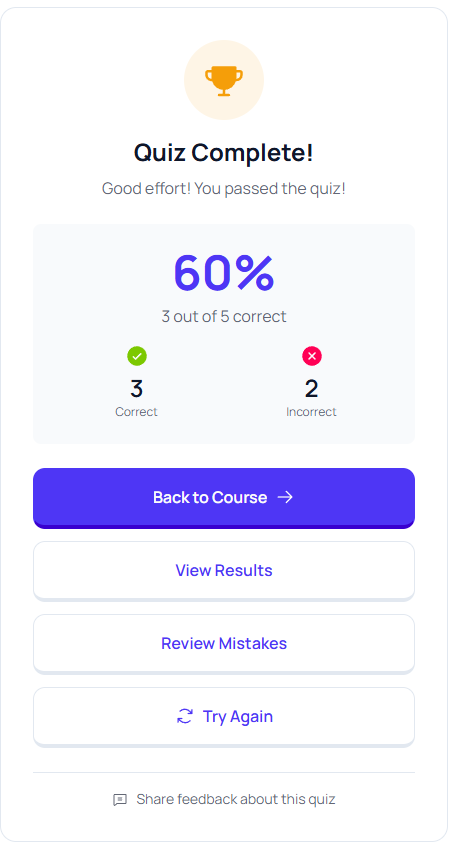
Figure 3. Display of quiz results in the Quizgecko tool with success percentage and options
for reviewing results, analysing errors, and retaking (Source: screenshot by the author, 2025)
13. Conclusion
The use of AI-based tools and systems in formative and summative assessment creates new opportunities to improve the quality, efficiency, and transparency of the educational process. Automated generation of questions, rubrics, and analytical reports gives teachers real-time insight into student progress and supports data-driven pedagogical decision-making. This reduces administrative burden and allows for a more individualised approach to students and the development of reflective teaching practices.
However, despite these recognised advantages, it is necessary to remain critically aware of the limitations and ethical aspects of using AI in assessment. Automated systems may exhibit bias in text analysis or fail to fully understand the context of a student's response, so human judgment and pedagogical responsibility remain essential elements of any evaluation process.
In the future, we can expect even stronger integration of AI tools with institutional systems such as Moodle, which will further enhance achievement tracking, data security, and personalisation of learning. The key to success, however, will be maintaining a balance between technological innovation and human expertise. Artificial intelligence can significantly improve the evaluation process, but only if it is used as a support – an instrument that empowers, rather than replaces, the teacher in their professional role.
14. Literature
-
Kaddouri, M., Mhamdi, K., Jabri, A., Boukare, M., & Jmad, S. (2025). Generative Artificial Intelligence and Assessment of Learning: Challenges and Perspectives. Effective Instructional Design Informed by AI, 277-326.
Description: Explores the challenges and perspectives of using generative artificial intelligence in learning assessment, highlighting how AI can improve the design of effective instruction.
-
Boud, D. & Molloy, E. (2013). Feedback in higher and professional education: Understanding it and doing it well. Routledge.
Description: A classic and still crucial work on the importance of feedback in higher education, focusing on practical guidelines for effective formative assessment. -
Heffernan, N. T. & Heffernan, C. L. (2014). The ASSISTments ecosystem: Building a platform that brings scientists and teachers together for minimally invasive research on human learning and teaching. International Journal of Artificial Intelligence in Education, 24(4), 470–497.
Description: Presents the ASSISTments platform, a AI-supported formative assessment system that enables teachers and researchers to collaborate in real time and improve the learning process. -
Holmes, W., Bialik, M., & Fadel, C. (2019). Artificial intelligence in education: Promises and implications for teaching and learning. Center for Curriculum Redesign.
Description: Provides a comprehensive overview of the applications of artificial intelligence in education, including its opportunities and challenges in summative and formative evaluation. -
Prompiengchai, S., Narreddy, C., & Joordens, S. (2025). A Practical Guide for Supporting Formative Assessment and Feedback Using Generative AI. arXiv preprint arXiv:2505.23405. Description: The authors explore how generative artificial intelligence, especially large-scale language models like ChatGPT, can support key components of formative assessment: understanding learning goals, students' current state, and directions for progress.
-
Zawacki-Richter, O., Marín, V. I., Bond, M., & Gouverneur, F. (2019). Systematic review of research on artificial intelligence applications in higher education – where are the educators? International Journal of Educational Technology in Higher Education, 16(1), 39.
Description: A systematic review of research on the application of AI in higher education, with a special focus on the role of teachers and their challenges in implementing AI for evaluation.
Background Colour
Font Face
Font Size
Text Colour
Font Kerning
Image Visibility
Letter Spacing
Line Height
Link Highlight
Paragraph Width
Text Alignment