Types of Cybersecurity Risks and Threats to Personal Data
| Site: | Loomen za stručna usavršavanja |
| Course: | Security and Privacy in the Digital Environment |
| Book: | Types of Cybersecurity Risks and Threats to Personal Data |
| Printed by: | Gost (anonimni korisnik) |
| Date: | Monday, 2 November 2026, 4:38 PM |
1. Cyberattacks
Cyberattacks are attacks carried out via the internet or digital systems with the aim of stealing data, compromising functionality, or disrupting system operations, extortion, or espionage.
A characteristic example of such an attack occurs when an attacker manages to insert malicious software that locks (encrypts) all files on an educational institution’s server and demands money for their decryption. This type of attack is known as a ransomware attack and has been considered the most serious form of attack over the past decade.
Figure 2: Types of cyber risks and threats to personal data
Some of the following links and documents are available in Croatian only. Participants may use free AI-powered translation tools to access the provided materials.
Further explore additional sources:
-
The website CARNET - CERT – National Authority for Prevention and Protection from Cyber Threats to the Security of Public Information Systems in the Republic of Croatia
-
web hero – strengthening the capacity of the police to combat cybercrime
- Europol's explanation of cyber threats (for those who want to know more).
2. Passwords
A password (or passphrase) is a secret string of characters (text, numbers, symbols) that confirms the identity of a user and allows access to devices, networks, or applications, and is known only to the owner of the password.
The purpose of a password is to protect personal or sensitive data so that only authorised persons can access protected information or functions. A password is the basic form of authentication in information systems.
A password such as "123456" or the name of a person, pet, etc., is very insecure because it is extremely easy to crack. It is recommended to use long and complex passwords, made with upper and lower case letters, numbers, and special characters, e.g., "MyDog!Like_2024".
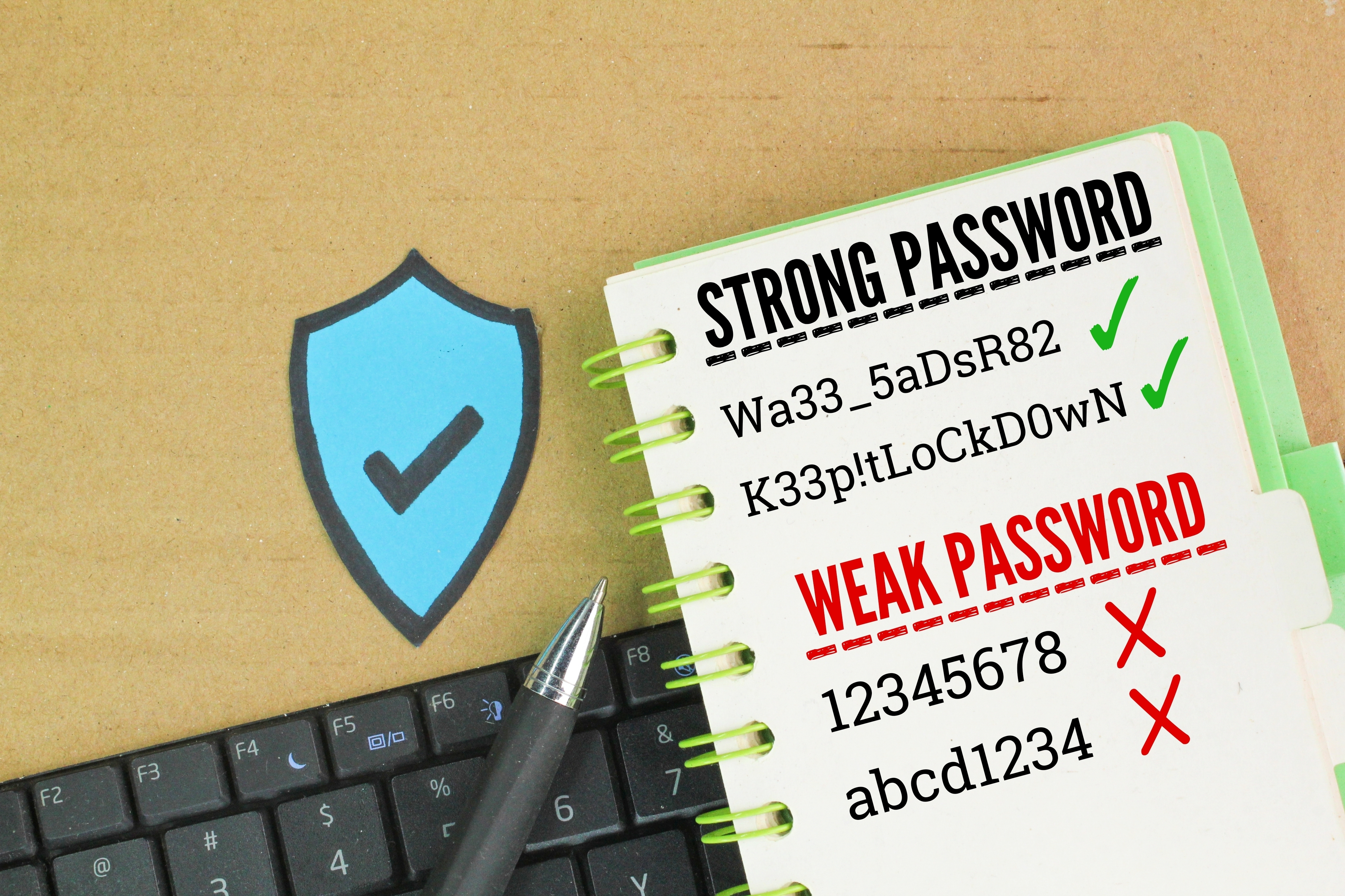
Image source: Shutterstock
3. Password manager
Multi-factor authentication (MFA) is increasingly becoming an integral part of all authentication systems, and passwords, as one of the authentication factors, continue to represent one of the key components of protecting user accounts. Given that the average user manages almost 100 passwords,1 the need to use a password manager arises.
A password manager is a tool that securely stores and automatically enters strong and unique passwords for different accounts, making them easier to use and reducing the risk of forgetting or repeating passwords.
Instead of remembering 10 or 100 different passwords, with a password manager, we remember one master key. Applications like Bitwarden or Keepass are examples of password managers. Bitwarden and Keepass are free to use.
Source:
1. How many passwords does the average person have in 2024?
4. Unpatched systems
Why is updating important?
Computer systems, servers, and applications that are not regularly updated with security patches represent a major security risk to any organisation or individual. Every system contains potential known and unknown vulnerabilities, and manufacturers regularly release security updates (called patches) that correct these known vulnerabilities. Unknown vulnerabilities or "Zero-day" vulnerabilities are security weaknesses in software or some other part of the system that an attacker has discovered, but for which there is no patch yet or is not known to the manufacturer, so attackers can exploit them before the manufacturer can fix them.
The lack of regular updates leaves the system exposed to known security vulnerabilities, making it easier for attackers to exploit them, as they use publicly available information about vulnerabilities and tools to exploit them. One of the most famous examples is the WannaCry ransomware attack, which exploited a vulnerability in the Windows operating system for which a patch had been available more than two months before the attack – but many systems simply had not been updated.
For example, a computer with a Windows operating system that is not regularly updated, especially with security patches that correct discovered vulnerabilities, can be compromised within minutes of connecting to the internet. The same applies to mobile devices, network equipment, CMS platforms (e.g., WordPress), and other components of information systems.
Security alerts about vulnerabilities in various systems can be found at the following sources:
- National CERT
- NIST – national (US) vulnerability database (for those who want to know more).
5. Security policies
Security policies are rules and guidelines that organisations set to manage information security, including data access, use of digital devices, and responsible user behaviour within organisations.
More information on creating security policies can be found at:
- CARNET security policy template for higher education institutions.
The previous link is available in Croatian only. Participants may use free AI-powered translation tools to access the provided materials.
6. Data backups
Data backups are one of the fundamental pillars of information security and business continuity management. Their primary purpose is to enable the recovery of lost, damaged, or compromised data in the event of a technical failure, accidental or intentional human error, cyberattacks (such as ransomware), or natural disasters (fires, floods, earthquakes).
Backups not only ensure the preservation of critical data and documents but also allow an organisation to quickly and reliably resume operations after an incident, thereby reducing operational and financial losses.
Due to the growing complexity and sophistication of cyber threats, the 3-2-1 rule for backup is increasingly recommended:
- have at least three copies of data (original data + two backup copies)
- store them on at least two different media (e.g., disk and cloud)
- one copy should be stored outside the organisation's location (off-site), preferably in a physically separate environment or in the cloud with a high level of security.
Additionally, when protecting against ransomware attacks, it is recommended to use immutable backups, which cannot be subsequently modified or deleted, or to implement systems that are physically or logically separated from the computer network (air gap backup). It is also important to perform regular data recovery tests (restore tests) to verify that backups can indeed be restored correctly and quickly when needed.
Backups are a key element of a disaster recovery strategy and represent a business necessity for preserving trust, legality, and stability of work in a digital environment.
Data backups can also be stored on an external drive or Google Drive as a safety measure.
Backup tools:
-
backup software: Macrium Reflect, EaseUS Todo Backup.
Macrium Reflect Free Edition allows users to create complete backup copies (images) of their disks or partitions, including the operating system, applications, and data. The free version is ideal for home users who want basic data protection, but it does not include advanced options such as incremental copies, encryption, scheduled backups, and support for network locations.
EaseUS Todo Backup is a free backup software that allows you to create copies of files, partitions, disks, and the entire operating system. The free version is suitable for home users, but advanced features such as system cloning, universal recovery, and Windows Server support are only available in commercial versions.
7. Phishing and social engineering
8. Malware
Malicious software (malware) is software designed to harm users, computer systems, or networks. It can steal sensitive data, spy on user activity, destroy or modify files, and deny access to a system (e.g., by locking files and demanding ransom). The consequences can include data loss, financial damage, business disruption, and security breaches.
The most common forms of malware include:
-
viruses – self-replicating programs that attach themselves to other files and spread without the user’s knowledge;
-
worms – spread independently over a network, often without the need for user action;
-
trojan horses – disguise themselves as legitimate programs but allow unauthorised access to a system;
-
ransomware – locks down data or entire systems and demands a ransom to regain access. The most serious threat to information systems in recent years;
-
spyware – secretly collects information about the user without their knowledge, often for the purpose of identity theft or activity monitoring.
Effective defense against malware includes regular data backups, up-to-date antivirus software, regular system updates, safe user behaviour, and network segmentation.
Free antivirus tools:
9. Insecure Wi-Fi
Insecure Wi-Fi is most often wireless networks without a password, with weak encryption, or inadequate protection in cafes, shopping centers, or other public spaces, and are a serious security risk. Such networks allow attackers to easily connect and access other devices on the same network, without the need for authentication and authorisation.
On unprotected Wi-Fi networks, it is possible to:
-
intercept (sniff) network traffic and "eavesdrop" on user activities;
-
collect sensitive information such as usernames, passwords, email content, payment information, or VPN network parameters that the user has written in the computer configuration;
-
perform man-in-the-middle attacks, manipulating the communication between the user and the server.
Example:
If a user connects to an open network in a mall and visits websites that do not use HTTPS, an attacker can intercept and analyse the traffic and potentially reveal user information, including passwords.
VPN (Virtual Private Network) is a technology that creates a secure, encrypted tunnel between the user's device and the internet, thereby protecting data from eavesdropping and enabling secure connections, especially when using public networks.
Free VPN to protect:
-
ProtonVPN (basic version)
Advice:
Do not enter passwords on public networks or use banking services without a VPN.
10. Unprotected data in the cloud
Files and information stored in the cloud without adequate protection - such as encryption, strong passwords, or properly set access rights - are a serious security risk because they can be exposed to unauthorised access, theft, or data leakage. For example, documents on services such as Google Drive or Dropbox that are shared with "anyone with a link" and without additional protection can become easily accessible and misused.
Data in the cloud can be unintentionally shared in several ways, most often due to incorrect settings or user carelessness:
-
unrestricted links – when the file or folder is shared via a public link ("anyone with a link can access"), the content may reach unauthorised persons;
-
incorrect access rights – granting editing rights instead of just viewing can allow others to change or download data;
-
sharing with the wrong people – by entering the wrong email addresses or sharing with a large group without checking who the recipients are;
-
inconsistent device sync – automatically syncing files with personal or public devices can lead to other users unintentionally accessing that data;
-
lack of password or two-factor authentication – leaving accounts unprotected allows attackers to access user data if they get their hands on it.
The examples provided show that it is important to regularly review sharing settings, use strong passwords, and control who has access to which data.
11. Data access abuse
Data access abuse refers to any situation in which a person uses their authority to access information in a manner that is inconsistent with the organisation’s policies, laws, or ethical standards. This includes:
-
unauthorised data viewing - when an employee accesses sensitive information (e.g., customer personal information, medical records, financial statements) without a legitimate business reason;
-
sharing data with third parties – when information is taken outside the organisation without permission, such as by sending data to competitors or acquaintances;
-
using data for personal gain – such as identity theft, personal gain, manipulating information, or exploiting confidential information for other purposes;
-
abuse of administrative privileges – when IT staff or other users with higher levels of access bypass security controls or modify data without supervision.
Such incidents can cause serious harm to an organisation, including loss of customer trust, legal consequences, financial losses, and reputational damage. This is why it is crucial to have clear access management policies, regular audits, and employee education on the proper and responsible use of access rights.
Example:
A faculty employee using students' personal data for private purposes, without permission – this is a misuse of access.
Related to GDPR (more on GDPR in Lesson 7) – misuse of data can also be legally punishable under the General Data Protection Regulation (GDPR).
More information on personal data protection: Croatian Personal Data Protection Agency.
Background Colour
Font Face
Font Size
Text Colour
Font Kerning
Image Visibility
Letter Spacing
Line Height
Link Highlight
Paragraph Width
Text Alignment