11. Example for the QuestionWell artificial intelligence tool
Tool description:
QuestionWell is a digital tool that enables teachers to systematically and effectively design questions for exams, quizzes, and other forms of knowledge assessment. It was developed to support a pedagogically thoughtful approach to assessment and to facilitate the creation of tasks aligned with learning outcomes and levels of cognitive complexity according to Bloom's Taxonomy.
The teacher enters textual content into the tool, such as a passage from a textbook, an expert article, or their own teaching notes. Based on this input, QuestionWell automatically generates question and answer suggestions. Teachers can select the level of cognitive demand – from recognition and understanding to analysis, evaluation, and creation of new ideas – which enables differentiated knowledge assessment. The teacher can review, edit, and supplement the generated questions according to the specific objectives of the course (Figures 1 and 2).
The tool allows questions to be exported in multiple formats (CSV, Google Forms, Quizizz, Canvas, Moodle), making it suitable for integration into institutional e-learning systems. In this way, QuestionWell connects modern technologies with the didactic principles of higher education teaching and supports the development of quality and objective assessment methods.
Example of application:
An instructor of the course Artificial Intelligence in Education plans a final knowledge test to assess understanding of the ethical and pedagogical aspects of applying artificial intelligence in teaching. Instead of creating questions manually, the instructor uses the QuestionWell tool to speed up the process and ensure that the tasks are aligned with the learning outcomes of the course.
In the quiz creation interface, the teacher selects the number of questions, the type of task (e.g., higher-order tasks), the language, and the level of difficulty, and enters a summary of the teaching unit on which the questions will be generated (Figure 1). Then selects Bloom's levels of "Analyse" and "Evaluate" so that the questions encourage students to engage in deeper reflection and reasoned assessment. QuestionWell automatically generates a set of higher-order questions that promote analytical and critical thinking, with the original text displayed on the left and the question and answer suggestions on the right (Figure 2).
Such questions require students to connect theoretical knowledge with practical situations, analyse the relationships between technology, ethics, and pedagogical practice, and draw their own reasoned conclusions. The teacher then reviews the generated questions, changes the wording and difficulty of the tasks if necessary, and uses the "Modify with AI" option to further adapt the content to the students' level (Figure 3).
When satisfied with the selected set of questions, he/she selects the Export / Assign option and chooses the target platform, such as Moodle or another e-learning system, or exports to Word, Google Forms, or other tools (Figure 4). QuestionWell can also generate a task code and a QR code that the teacher shares with students for direct access to the quiz without additional import (Figure 5).
After students complete the quiz, the results are automatically displayed in QuestionWell: for each question, it is visible whether the answer is correct, partially correct, or incorrect, as well as the total number of points and the time taken to solve (Figure 6). In this way, the teacher gains insight into student performance on individual questions and topics and can identify parts of the material that require additional clarification or repetition in class.
What this means for the instructor:
- Time savings and increased efficiency in creating questions and tasks
- Linking questions to learning outcomes and Bloom's levels
- Direct integration with institutional e-learning systems
- Greater objectivity, transparency, and consistency in assessing knowledge
- Support for the development of higher-order and critical thinking skills in students.

Figure 1. QuestionWell tool interface for selecting the number of questions, task type, language, and difficulty level, and entering a course summary (Source: screenshot by the author, 2025)
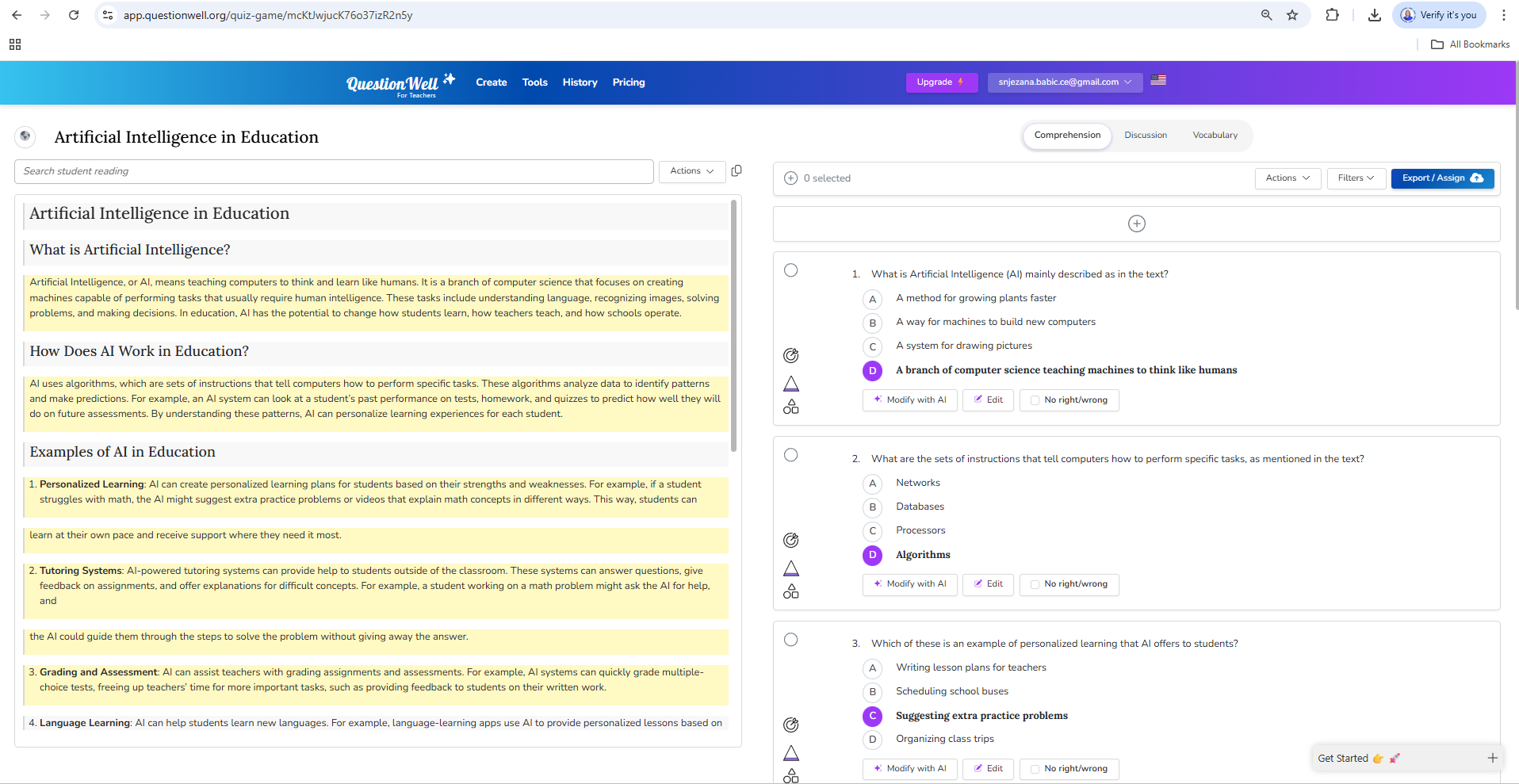
Figure 2. View of generated questions in QuestionWell with optional text about artificial intelligence
on the left and a set of higher-order questions with suggested answers on the right (Source: screenshot by the author, 2025)
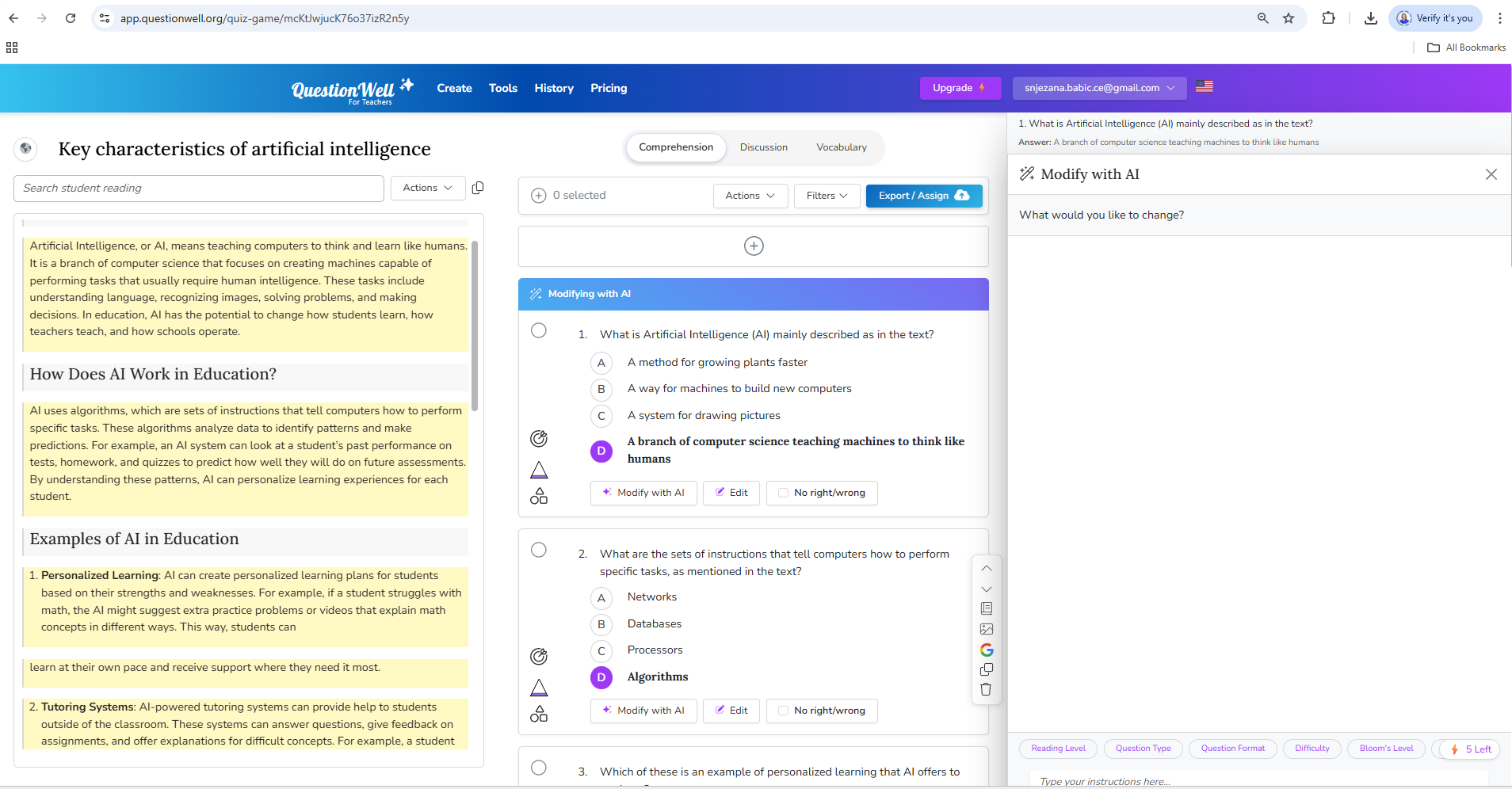
Figure 3. Editing generated questions in QuestionWell using the Modify with AI option
for further customisation of the content (Source: screenshot by the author, 2025)

Figure 4. Overview of the options for exporting questions from QuestionWell to various e-learning tools and systems (e.g., Moodle, Microsoft Forms, Google Forms) (Source: screenshot by the author, 2025)

Figure 5. Generating assignment code and QR code for sharing quizzes with students in QuestionWell
(Source: screenshot by the author, 2025)
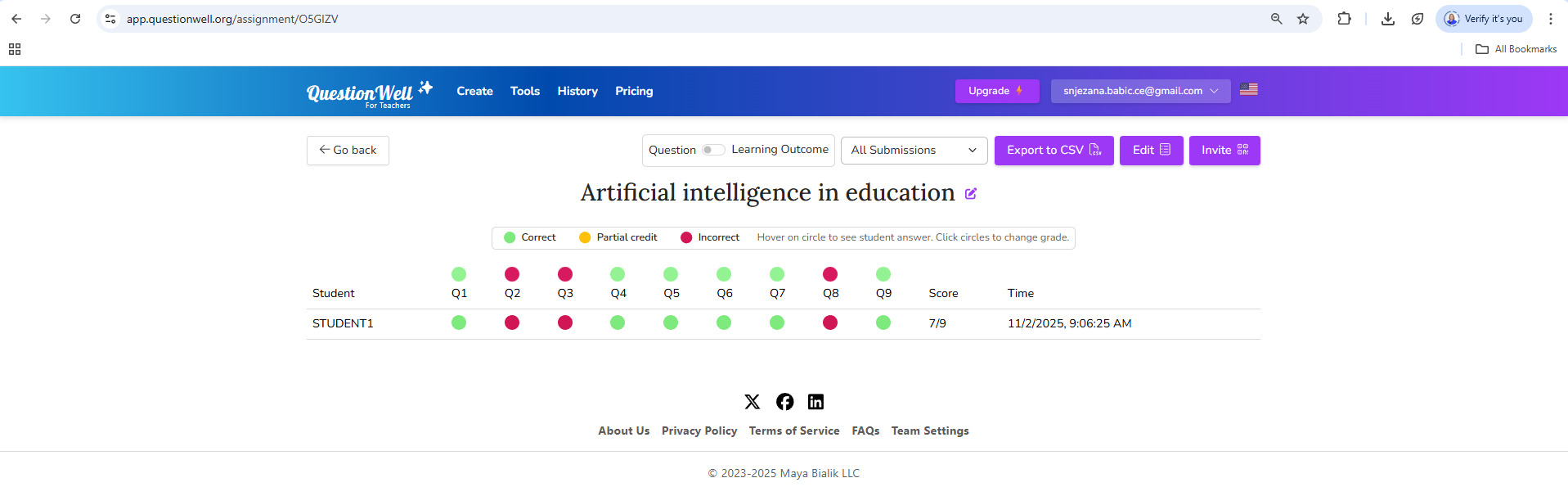
Figure 6. Overview of quiz results in the QuestionWell tool showing correct, partially correct, and incorrect answers for individual questions (Source: screenshot by the author, 2025)
Background Colour
Font Face
Font Size
Text Colour
Font Kerning
Image Visibility
Letter Spacing
Line Height
Link Highlight
Paragraph Width
Text Alignment